What Is Shop Pay? Guide to Shopify’s Accelerated Checkout
You've probably seen the Shop Pay button at checkout and wondered what it actually does. Here's the short version: it's Shopify's accelerated checkout, and it lets shoppers skip the form entirely on every return visit. For merchants, it's one of the simpler conversion levers available — no pricing changes, no redesign needed.
What Is Shop Pay and How Does It Work?
The first time someone uses Shop Pay, they check out normally — email, shipping address, billing information, card number. Shopify saves all of it. Next time, at any Shopify store running Shop Pay, they get a six-digit SMS code instead of a form. Type it in and the order goes through.
That's the core of it. The friction disappears.
Shop Pay handles a decent amount under the hood: one-tap checkout across all Shopify stores using Shopify Payments, up to 10 saved payment methods and 20 shipping addresses, buy now, pay later via Shop Pay Installments, Shop Cash rewards, and coverage across 23 countries. It works on web, mobile, and the Shop app.
How Shop Pay Stores Your Information
Addresses, billing information, card details — all of it sits on Shopify's PCI DSS Level 1 compliant servers, encrypted end-to-end. Shopify doesn't hand any of that data to a merchant until the exact moment an order is placed. Shoppers who change their mind can delete the account and everything tied to it from the Shop app.
One-Tap Checkout: The Speed Advantage
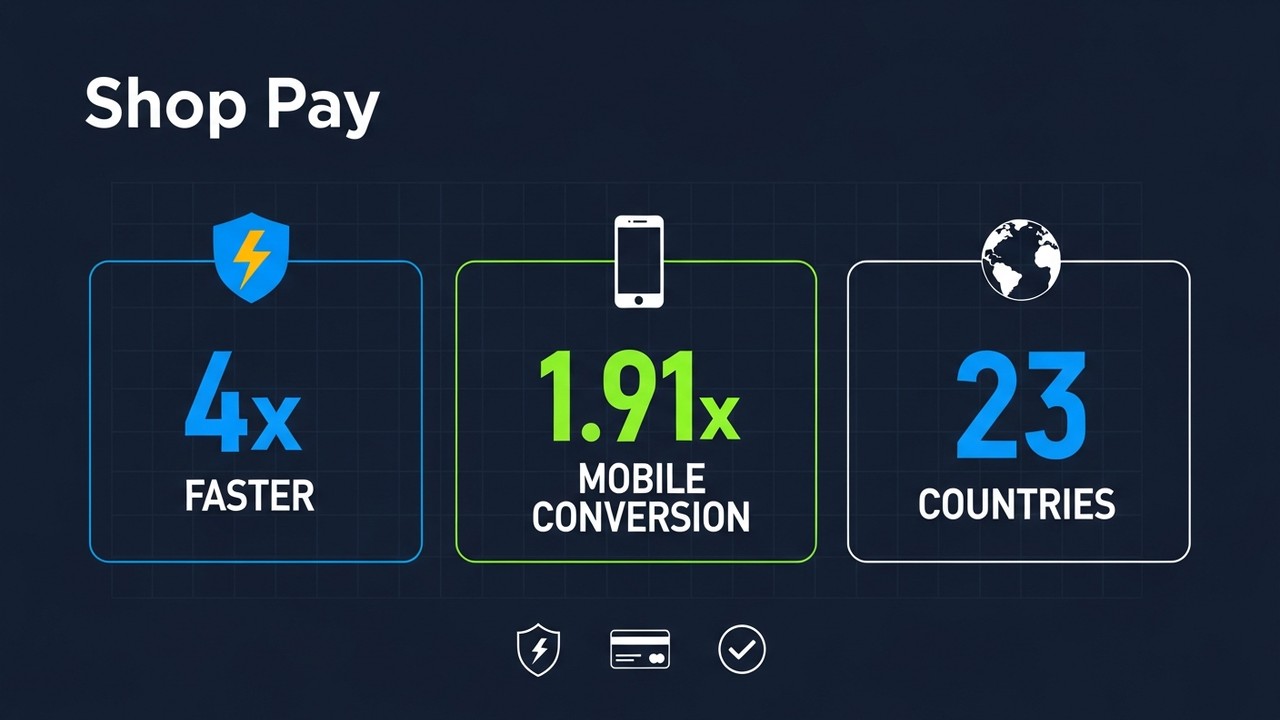
The speed gap shows in actual data. Checkouts using Shop Pay run 4× faster than standard guest checkout. Stores see 1.91× higher conversion rates on mobile against other checkout options — and cart abandonment falls 18% when Shop Pay is live. For anyone running paid traffic to mobile pages, that conversion number is not cosmetic.
Shop Pay vs Shopify Payments: Key Differences
People mix these up constantly. Both have "Shopify" in the name, both touch the payment flow. But they're doing completely different things.
| Feature | Shop Pay | Shopify Payments |
|---|---|---|
| What it is | Accelerated checkout UI layer | Payment processor (handles money movement) |
| What it does | Saves customer info for faster checkout | Processes credit card and debit card transactions |
| Requires the other? | Yes — needs Shopify Payments active | No — works without Shop Pay |
| Customer-facing? | Yes — visible button at checkout | No — runs in the background |
| Extra fee? | No extra fee (uses Shopify Payments rates) | 2.4%–2.9% + $0.30 depending on plan |
| Available to non-Shopify stores? | No | No |
Shopify Payments moves the money. Shop Pay handles the checkout process fast enough that the customer doesn't bail before it moves. You can run Shopify Payments without Shop Pay — plenty of merchants do. But the reverse isn't an option. Shopify Payments has to be active first, full stop.
Worth noting on cost: Shop Pay doesn't add fees on top of your normal Shopify Payments rate. The accelerated checkout is included. You're not paying extra for the speed improvement.
Shop Pay Installments Explained: Buy Now, Pay Later
Shop Pay Installments lets shoppers split purchases at checkout without leaving Shopify. Affirm runs the credit side behind the scenes. Two options: split into four biweekly chunks, or stretch it across several months. From the merchant's perspective, it doesn't matter which one the shopper picks — the full amount lands in your account immediately, minus Affirm's fee, and then Affirm deals with collecting from the customer.
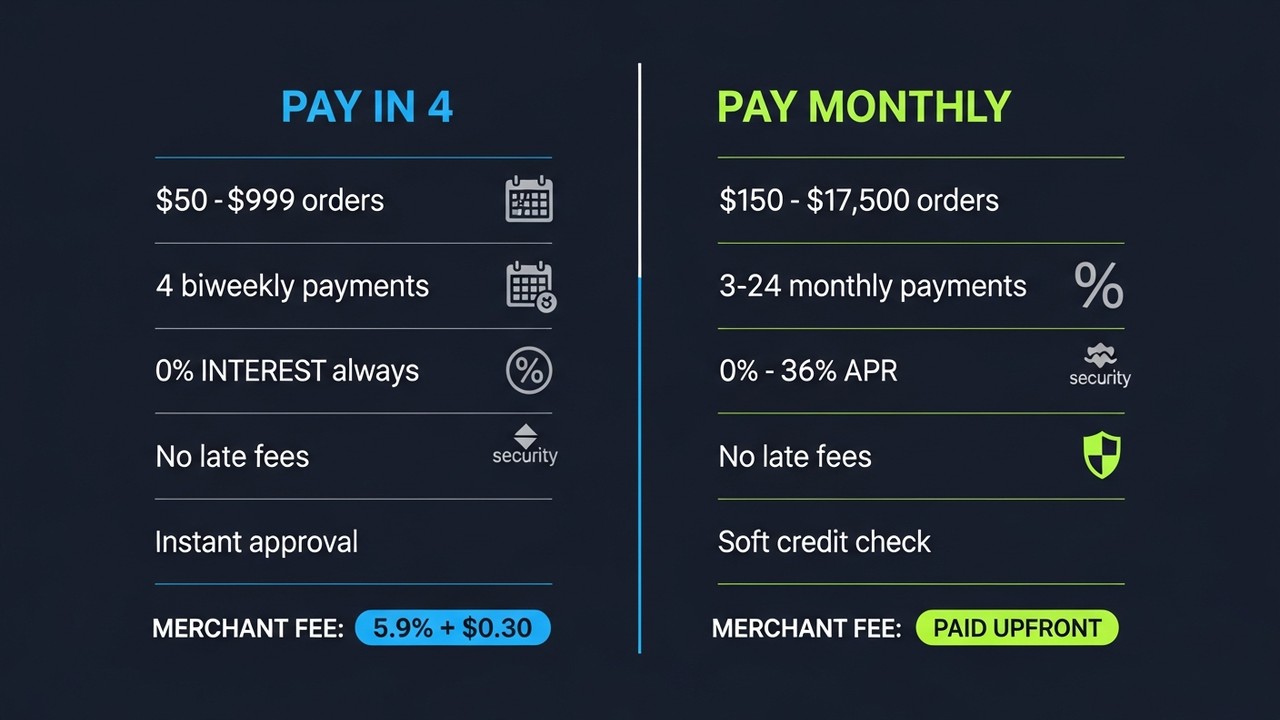
| Pay in 4 | Pay Monthly | |
|---|---|---|
| Purchase range | $50–$999 | $150–$17,500 |
| Payment schedule | 4 biweekly installments | 3, 6, 12, or 24 monthly payments |
| Interest | 0% (always) | 0%–36% APR |
| Late fees | None | None |
| Credit check | Soft check only | Soft check only |
| Merchant fee | 5.9% + $0.30 | 5.9% + $0.30 |
| Merchant payout | Full amount upfront | Full amount upfront |
Pay in 4: Interest-Free Biweekly Payments
Pay in 4 is where most shoppers start for smaller purchases. How it breaks down:
- Available on orders between $50 and $999
- Split into 4 equal payments, every two weeks
- First payment at checkout; remaining 3 over six weeks
- 0% interest, no hidden charges
- No late fees on missed payments (though Affirm may restrict future use)
- Near-instant approval via soft credit inquiry
Pay Monthly with Affirm
Bigger purchases — furniture, electronics, high-end apparel — work better on monthly terms. Three to 24 months, APR from 0% to 36% depending on creditworthiness and the chosen term. Merchants get paid the full amount upfront, minus 5.9% + $0.30, and Affirm handles collections.
One thing to factor into your refund policy: that 5.9% merchant fee doesn't come back on returns. Standard for BNPL processors, but it catches people off guard.
Benefits of Shop Pay for Merchants and Shoppers
Merchants get the conversion side. Shoppers get the convenience side.
What merchants see:
- 1.91× higher mobile conversion vs standard checkout
- 18% fewer abandoned carts
- Higher average order values when installments are available
- Zero collections exposure — Shopify and Affirm own the repayment process
- Shop Pay analytics in the Shopify dashboard
- No setup cost — it's included with Shopify Payments
What shoppers get:
- Checkout under 20 seconds on return visits
- Pay in full or split at checkout — picked at the moment of purchase
- Interest-free payments on orders under $1,000 through Pay in 4
- Shop Cash rewards on qualifying orders
- PCI DSS Level 1 encryption and SMS authentication
- One Shop account that works across every participating store
How to Enable Shop Pay on Your Shopify Store
Shopify Payments has to be active first — Shop Pay is tied to it at the account level. If it's not set up, start there. Once it is:
- Log in to your Shopify admin panel.
- Go to Settings → Payments.
- Under the Shopify Payments section, click Manage.
- Scroll to the Accelerated checkouts section.
- Check the box next to Shop Pay.
- Click Save.
Shop Pay now shows up at checkout for customers who have a Shop account. To enable Shop Pay Installments, find the separate toggle on the same page. Installments are US merchants only for now — international stores can leave that off.
Shopify Payments is available in the US, Canada, UK, Australia, and a few other markets. Outside those regions, neither Shop Pay nor Shopify Payments are accessible.
Shop Pay vs Other Payment Options: Quick Comparison
Inside Shopify, Shop Pay is the obvious choice for accelerated checkout. Step outside and you're looking at very different options with very different trade-offs.
| Payment Option | Works on non-Shopify stores? | BNPL? | Crypto support? | Global reach |
|---|---|---|---|---|
| Shop Pay | No | Yes (via Affirm) | No | 23 countries |
| PayPal | Yes | Yes (Pay Later) | No | 200+ countries |
| Apple Pay | Yes (where supported) | No | No | 70+ countries |
| Google Pay | Yes | No | No | 40+ countries |
| Crypto gateway | Yes | No | Yes | Global, borderless |
That table is pretty clear. Shop Pay wins on BNPL within Shopify. Outside that ecosystem it loses on almost every dimension — no cross-platform support, no crypto, a hard ceiling at 23 countries. Stores that live entirely inside Shopify and serve customers in supported markets won't feel any of those limits. Stores that don't will.
Markets with low card penetration — Southeast Asia, Latin America, parts of Eastern Europe — are a real gap. A cryptocurrency payment gateway like Plisio approaches that differently: accepts Bitcoin, Ethereum, and 20+ coins, no transaction limits, no chargebacks.
Conclusion
What is shop pay when you strip it back? Shopify's fix for checkout friction. It's a fast, secure payment method that turns a return visit into a 20-second transaction. For Shopify merchants, enabling Shop Pay is one of the lower-effort conversion improvements available — no added cost, measurable mobile lift, less cart abandonment. Shop Pay Installments layers in buy now, pay later with solid average order value upside, though the 5.9% merchant fee has to live somewhere in your margins.
The real ceiling is lock-in. Merchants who need to reach crypto users, sell into markets with weak card infrastructure, or use Shop Pay alternatives on other platforms need more than what Shopify's native tools offer. Exploring Web3 payment solutions alongside Shop Pay covers more ground, and the benefits of accepting crypto address gaps Shopify's ecosystem wasn't designed for.
For merchants ready to move past those limits: Plisio runs a crypto payment gateway on any platform, supports 23+ blockchains, and has no chargebacks — a practical complement to what Shopify already provides natively.