Reverse Image Search: How It Works, Best Tools, and 2026 Guide

Picture this. A friend forwards you a screenshot. Is it real? You drag the picture into Google. Ten seconds later, you have the original. That is reverse image search, and most people still don't know they can do it.
The technique is simple. Instead of typing a query, you supply a picture. The engine fingerprints the visual content, compares the fingerprint against billions of indexed images, and ships back every page that hosts the same image or a near-duplicate. I have used it for years, in journalism, in fact-checking, and in answering the dozen "is this real?" texts I get a month. It is one of the cheapest tools in the consumer internet, and almost nobody trains for it.
This guide pulls together what works in 2026. The mechanics. The eight tools worth knowing, with index sizes and pricing. The way AI rewrote the field after GPT-5 shipped vision in August 2025. Real use cases. Mobile flows. Privacy. Skip to whichever section you need.
What is reverse image search and how does it work?
Strip away the jargon. Reverse image search means: I give you a picture, you give me everywhere on the web that picture appears. The technical name is content-based image retrieval, or CBIR. The engine never reads words about the image. It reads the image itself.
Here is what happens under the hood. The algorithm extracts mathematical features from your picture. Color histograms. Shape descriptors. Gradient patterns. Edge maps. Those features become a fingerprint, a short vector of numbers that uniquely identifies the visual content. The fingerprint is matched against an index of billions of pre-fingerprinted pictures. Closest matches come back as results, ranked by similarity.
The feature extractors have intimidating names with old academic pedigree. SIFT (Scale-Invariant Feature Transform) survives rotation, scaling, and brightness shifts. Maximally Stable Extremal Regions tracks blobs across distortion. Vocabulary trees compress a picture into a few thousand visual words. Facebook open-sourced FAISS in 2017, and FAISS now underpins most of the industry's heavy lifting.
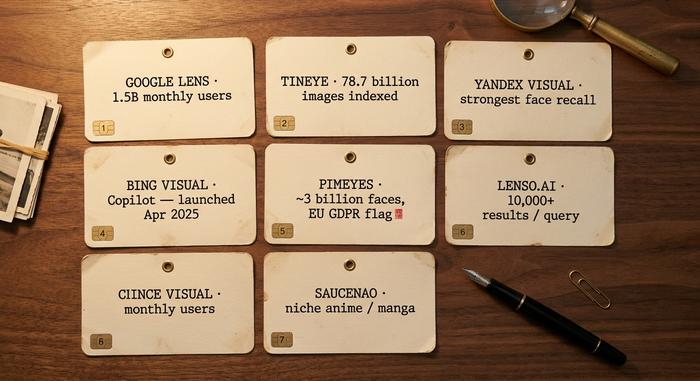
Scale is what separates the players. TinEye crossed 78.7 billion images indexed by October 2025. Google publishes no formal index size, yet Google Lens reports something close to 1.5 billion monthly active users and handles 12 to 20 billion visual searches each month. PimEyes claims a 3 billion-face index. Pinterest bought VisualGraph in 2014. Alibaba launched Pailitao the same year. The field is older than most users think, and the modern user experience really took off after Google retired the classic "Search by Image" interface and switched its default to Google Lens in 2022.
How to do a reverse image search on Google
Most people start with Google. Three concrete paths exist, depending on where you are.
Desktop first. Open `images.google.com`. Click the small camera icon inside the search bar. A panel opens. Upload a file. Or paste the URL of an image that already lives online. Or just drag the picture from your desktop straight into the search box. Supported formats: `.jpg`, `.png`, `.webp`, `.bmp`. Hit search. The results page groups exact matches at the top, then visually similar images, then pages where the picture appears.
Chrome makes it faster. Right-click any image on a webpage. Pick "Search image with Google Lens." A side panel opens with object detection, related products, and matches. The focus rectangle is the underrated trick. Drag its corners to crop to the part you care about. The face. The logo. The license plate. Re-running the search on the cropped region almost always returns better matches than the full image.
Phones use the Google app. Tap the multicolored Lens camera icon inside the search bar. Snap a new photo, or upload one from your camera roll. Mobile Lens layers in retail object recognition, so it tends to beat desktop on landmarks, products, and plants.
Nothing returns? That happens. The reasons are predictable. Your picture lives behind a login wall, so the public web crawler never saw it. The image is too new and the index has not refreshed. Or the source got watermarked and copy-edited beyond recognition. The recovery move is always the same. Crop tight to the most distinctive region. Re-upload. Try Bing or TinEye for a different ranking on the same query.
Best reverse image search engines and tools in 2026
| Engine | Standout | Index size / scale | Best for |
|---|---|---|---|
| Google Lens | Default everywhere | ~1.5B MAU, 12–20B searches/mo | General use |
| TinEye | Original-source detection | 78.7B images (Oct 2025) | Copyright, journalism |
| Yandex Visual | Strongest face/landmark recall | n/a | Faces, geography |
| Bing Visual / Copilot | Microsoft Image Match | Launched Apr 4, 2025 | Windows users |
| PimEyes | Face-only search | ~3B faces | Catfishing, identity |
| Lenso.ai | 10,000+ results per query | API up to 5,000 calls/mo | Researchers |
| SauceNAO / IQDB | Anime / manga niche | n/a | Fandom, source art |
Google Lens is the right starting point for almost any case. It combines the largest web index with on-device object recognition, and the results blend visually similar images, identical matches, and shopping links into one page.
TinEye is the tool of choice for copyright holders and journalists. Its strength is precise matching across cropped, resized, color-shifted, or watermarked versions of the same image, which is exactly what you need to track the original publication date and source. The free web tool sits next to TinEye MatchEngine, a commercial API priced from $200 to $1,500 per month plus an enterprise tier.
Yandex Visual Search has been quietly known for years as the strongest engine for faces and landmark recall. It will surface matches Google misses and is the favorite of open-source intelligence researchers. Note that the service's geopolitical availability has been complicated since 2022, and some U.S. corporate networks block it.
Bing Visual Search is Microsoft's offering, now integrated into Copilot Search since the April 4, 2025 redesign. It is competitive for general use and benefits from tight Windows integration.
PimEyes is the most controversial entrant. It is a face-only search engine indexing roughly 3 billion faces and is the practical tool for finding your own face on the public web, but it sits inside an unresolved European regulatory dispute. Treat it as a legitimate tool with consent and as a potential privacy concern when used on others.
Lenso.ai is the AI-first newcomer worth knowing. It returns up to 10,000 results per query with category filters (faces, places, duplicates, similar) and offers an API with up to 5,000 calls per month for researchers. The advance over older engines is the explicit category routing.
SauceNAO and IQDB are niche but excellent for tracking down the original artist of an anime, manga, or illustration. If general engines fail on art, these usually succeed.
How AI changed reverse image search in 2025-2026
The biggest shift in the last two years is that you no longer need a dedicated reverse image search engine for many use cases. GPT-5 launched on August 7, 2025 as a natively multimodal model — you paste an image, ask "what is this?" or "where might this be from?" and get a written answer with context, often with citations. Google Gemini and Anthropic's Claude do the same. For identifying a plant, a chip on a circuit board, a building, or a piece of art, an AI vision model is now competitive with a traditional reverse image search, and sometimes faster.
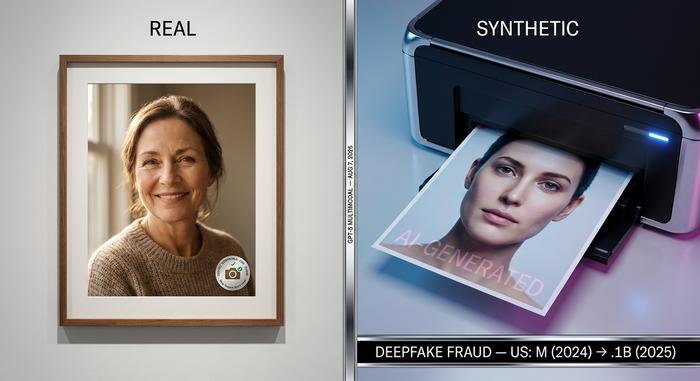
The flip side is provenance. As generative image models flooded the web with synthetic photos, the field had to invent ways to tell real from fake. Google DeepMind's SynthID watermark crossed 10 billion items by late 2025 and shipped a unified detector in November 2025. The C2PA standard for content credentials is now active inside OpenAI's DALL·E 3 outputs, Sony's Camera Verify (launched June 2025), and was briefly enabled on the Nikon Z6 III before a signing flaw forced Nikon to suspend the feature. Adobe pushes the same standard inside Photoshop.
AI-detection tools fill the gap for unwatermarked content. Hive Moderation reports 98–99.9% accuracy on clean test sets and a more realistic 75–85% on real-world images; AI or Not, Optic, and Reality Defender compete on similar benchmarks. None is perfect, and any single classifier can be fooled by post-processing. The practical advice is to run the image through two detectors and a reverse image search before drawing a conclusion.
The stakes rose sharply in 2025. Deepfake-driven fraud losses in the United States grew from about $360 million in 2024 to roughly $1.1 billion in 2025, according to industry trackers, and Deloitte forecasts $40 billion in cumulative deepfake losses by 2027. Reverse image search has shifted from a copyright tool to a fraud-prevention tool, and the line between the two is now thin.
Use reverse image search for OSINT, catfishing, and copyright
The cases that justify learning the tool well are mostly serious. Six matter.
OSINT. Open-source intelligence is the most refined practice. Bellingcat, the investigations outlet, built its reputation on geolocation by image. Their public guides walk readers through Yandex, Google Lens, and Mapillary, identifying the building, the road sign, the shadow angle from a single still frame. Reuters runs an identical desk. AFP Fact Check does too. Investigating war footage, election misinformation, or staged crime scenes? Reverse image search is step one, every time.
Catfishing. The everyday case. Drop a dating-app profile photo into Google Lens or PimEyes. If the same face shows up across a dozen unrelated profiles, a model agency roster, or stock photography archives, the profile is fake. It catches romance scams before money changes hands. I have done this for friends maybe twenty times, and the hit rate is uncomfortable.
Copyright. Photographers, illustrators, small businesses. Pixsy and Imatag crawl the web for unauthorized reuse of a client's images and ship takedown reports. The TinEye MatchEngine API powers similar workflows at scale. Independent creators run a quarterly manual TinEye search on their best-selling portfolio pieces. Cheap insurance.
Verification. The inverse case. You suspect a photo on a social media corporate or activist account is borrowed. A quick reverse search either confirms the picture is original or surfaces the original publication date and the actual source, which is exactly what you needed to identify.
Fact-checking. Reverse image search proves a viral picture matches the event reported, rather than an older photo recycled to mislead. The same workflow tracks plagiarized infographics, stolen NFT artwork, and lost pets across regional rescue networks.
Product hunting. The consumer-grade case. Spot a chair in a hotel lobby, photograph it, run Lens, and the engine returns manufacturer, model, and shopping links inside ten seconds. The visual web is a parallel catalog, and most shoppers never use it.
Reverse image search on mobile: iPhone and Android
Phones are now the dominant entry point. Workflows are short.
iPhone has two free options. Visual Look Up is Apple's quiet identification feature for plants, animals, landmarks, and food. Open Photos. Pick the picture. Tap the (i) info icon. If Apple recognizes the subject, a small icon appears overlaid on the photo with a tap-through to Wikipedia and shopping. For a real web-wide search, the Google app's Lens icon does the job. Or open Safari, long-press any image, and pick "Search Image With Google." Third-party apps like Reversee and Veracity offer an upload-and-search interface for users who would rather not route through Google at all.
Android is simpler because Lens is everywhere. Long-press any image in Chrome, hit "Search image with Google Lens." Inside the Google app the same Lens icon sits in the search bar. Samsung phones add Samsung Vision (similar to Apple Visual Look Up, deeper Bixby integration). The Search by Image app on the Play Store lets you fire a single picture into Google, Yandex, TinEye, and Bing simultaneously, which is the trick I use for hard cases.
Video matters too. Both platforms support screenshotting a frame from a TikTok, Reel, or YouTube short and reverse-searching the still. That is the usual workaround for verifying short-form video that blocks direct image extraction. Pick the clearest frame, screenshot, then Lens.
Reverse image search privacy and limitations
Anything you upload becomes a query in someone else's database. Policies differ. PimEyes deletes uploaded photos after 48 hours. Google and Bing keep queries longer and use them to train future models. Read the upload page before you drop in anything sensitive.
The face-recognition tier is the part regulators have noticed. Clearview AI sits on more than €95 million in unpaid European Union fines. The UK Upper Tribunal ruled in October 2025 that UK GDPR applies to Clearview's activity. The EU AI Act labels most biometric matching as a high-risk system, with provisions enforcing from August 2, 2026, and the most sensitive categories deferred to December 2, 2027. In the US, Illinois BIPA capped damages in August 2024 but stayed in force, and 23 states now have biometric-scraping laws.
The practical advice is short. Treat face-only search engines the way you would treat a public records search. The privacy stakes for the person whose photo you are uploading can be real, especially when the picture is one they did not knowingly publish.