What Is Gstatic.com? Web Scraping Best Practices Guide

Open the network tab in your web browser on almost any website and you will see requests fire off to a domain you never typed: gstatic.com. They are quiet, they are fast, and most people never notice them. But if you write scrapers or run browser automation, that quiet background traffic matters more than you might think. Gstatic.com is the domain Google uses to serve static content, and the pattern of requests it generates has become one of the small signals that bot-detection systems read to tell a real visitor from a script.
This guide explains what gstatic.com actually is, which of its subdomains matter, whether it is safe, and how its requests can expose an automated browser. Then it covers the practical side: how to scrape around it without lighting up every defense on the page.
What Gstatic.com Is and the Files It Serves
Gstatic.com is Google's content delivery network (CDN), and its job is narrow on purpose. It hands out static resources: the javascript files, css files, web fonts, images, and small interface bits that Google products reuse from one page to the next. These files barely change, so your browser can cache them on the first visit and pull them straight from disk after that. One trick, real savings. The heavy assets never cross the network twice, and load times drop.
The whole thing is deliberately boring. No cookies tied to your account, no application logic, nothing personal stored anywhere. It is plumbing. Google parked static files on a separate, cookie-free domain so browsers could grab them in parallel and cache them hard, while the main domains dealt with the dynamic, logged-in side of a service. For a user, that means speed. For anyone watching web traffic, gstatic is interesting for the opposite reason: it turns up everywhere and behaves the same way every single time.

The Gstatic Subdomains That Matter
Here is the thing most people miss. "Gstatic.com" is not one server. The subdomain sitting in front of it tells you what kind of request you are looking at, and a few are worth knowing by name if you automate browsers.
Fonts and the asset subdomains
Start with the one you will see most: fonts.gstatic.com. It serves the actual font files behind Google Fonts, and Google Fonts is everywhere. According to the HTTP Archive's 2025 Web Almanac, it shows up on about 54% of desktop pages and 47% of mobile ones. Do the math. Nearly every second site your scraper opens reaches for a font from gstatic. The rest of the family does the page-asset heavy lifting. static.gstatic.com and ssl.gstatic.com carry shared scripts and styles, apis.gstatic.com serves javascript libraries, and numbered hosts like img1.gstatic.com through img3.gstatic.com split image loading across parallel connections to shave milliseconds off the render.
Connectivity checks and generate_204
This one surprises people. connectivitycheck.gstatic.com serves no page content at all. Ask it for generate_204 and it answers with nothing on purpose: HTTP 204 No Content, empty body. Why would anyone want an empty reply? Captive-portal detection. Your phone fires that request the moment it joins a Wi-Fi network. Get the empty 204 back, and the connection is open. Get a hotel login page instead, and the phone knows it is trapped behind a portal and pops the sign-in screen. The behavior is spelled out in Chromium's own network-portal-detection design notes, and every real device makes the call on a fresh connection. Your scraper almost certainly does not.
Telemetry, thumbnails, and login
The rest do quiet background work. csi.gstatic.com swallows performance telemetry, the timing numbers Google uses to see how fast a page actually rendered for you. encrypted-tbn0.gstatic.com and its siblings push out the little thumbnails next to Google Search results, the "gstatic images" people keep asking about. accounts.gstatic.com and maps.gstatic.com hold the static furniture of login screens and map tiles. None of it is exciting. All of it is predictable, and predictable is exactly the part that matters later.
| Subdomain | What it serves | Why it matters for automation |
|---|---|---|
| fonts.gstatic.com | Google Fonts files | Loaded by about half of all sites; absence is conspicuous |
| static.gstatic.com / ssl.gstatic.com | Shared JS, CSS, UI assets | Core page rendering; missing assets break selectors |
| connectivitycheck.gstatic.com | generate_204 captive-portal check | Real devices always probe it; scripts rarely do |
| csi.gstatic.com | Performance telemetry | Real Chrome sends timing beacons here |
| encrypted-tbn0.gstatic.com | Search result thumbnails | These are the "gstatic images" people ask about |
Is Gstatic.com Safe, or a Virus?
This is the question most people actually show up with, so here is the plain answer. Gstatic.com is safe. It runs no code on your machine, it does not track you on its own, and it cannot be a virus, because all it does is hand out files for Google. Finding it in your history or your site's network log means nothing is wrong.
So where does the fear come from? A real but separate problem. Adware and browser hijackers sometimes bounce users through pages dressed up as a Google service, and a few malicious lookalike domains typosquat the gstatic name to borrow its good reputation. When someone says they caught a "gstatic virus," they almost always mean one of those: a junk extension spawning pop-ups, or a sneaky redirect. The cure is to pull the rogue extension or app, not to block Google's CDN. The genuine gstatic.com domain is not the attacker. It is the costume the attacker put on.
Why Gstatic Matters When You Scrape
You will almost never scrape gstatic.com for its own data; there is nothing to read there but static files. It matters for two indirect reasons, and both bite the unprepared.
The first is rendering. The page you actually want loads its fonts, icons, and sometimes its scripts from gstatic.com. If your scraper does not fetch those assets, a layout can shift, a font-dependent element can fail to appear, or a css selector you rely on can point at nothing — and any latency you saved by skipping those requests disappears when your parser hits a broken selector. Headless browsers that skip "non-essential" resources to save bandwidth are the usual victims here. A scraper that blocks images and fonts to run faster is making a reasonable speed choice and a quiet detection mistake at the same time, because the page it sees no longer matches the page a person would.
The second reason is detection, and it is the bigger one in 2026. Automated traffic is no longer a fringe of the web. Cloudflare reported in June 2026 that bots generated about 57.5% of all HTML requests, more than humans. Imperva's 2025 Bad Bot Report put bad bots alone at 37% of internet traffic, with all automated traffic crossing 51% for the first time in a decade. Against that backdrop, defenders look at every signal they can, and the shape of your requests, including the ones to gstatic, is part of the picture. The web-scraping tools market reflects the same pressure: according to Mordor Intelligence, it reached roughly $1.03 billion in 2025 and is projected near $1.17 billion in 2026.
How Gstatic Requests Expose a Bot
Here is the part most guides skip. The requests a browser makes to gstatic are part of its fingerprint, and a scraper can give itself away both by ignoring them and by faking them badly.
The silence tell
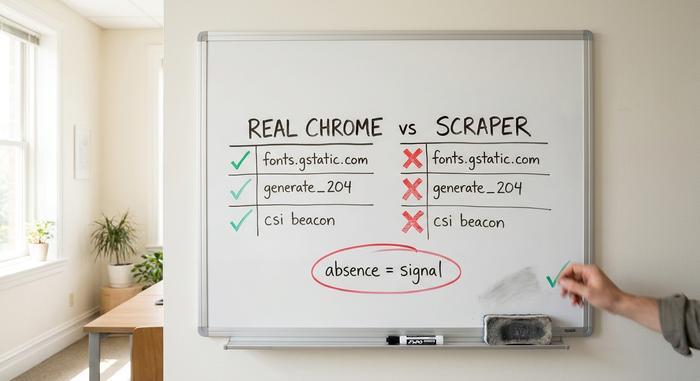
A real Chrome session on a fresh connection is chatty in a predictable way. It probes connectivitycheck.gstatic.com for that empty 204, it pulls fonts from fonts.gstatic.com, it fires timing beacons at csi.gstatic.com. A bare HTTP scraper that only requests the target HTML makes none of those calls. To a detection system watching the full request sequence, that silence is loud. A "browser" that loads a page but never touches a single gstatic asset does not look like any real browser, because real browsers cannot help themselves.
The loud tell
The obvious fix is to drive a full headless browser so the gstatic requests happen naturally. That helps, but it opens a different hole. Headless Chrome still leaks evidence of automation through the DevTools Protocol that controls it, and detection vendors actively probe for those artifacts. Researchers tracking headless detection noted that two patches to the V8 javascript engine merged in May 2025 specifically changed how automated Chrome serialized certain objects, a difference defenders could measure. So loading gstatic assets makes your traffic shape correct, but it does not erase the automation tells underneath. You have to get both right, which is harder than it sounds.
| Request | Real Chrome | Naive HTTP scraper | Detection reads it as |
|---|---|---|---|
| Target HTML | Yes | Yes | Neutral |
| fonts.gstatic.com | Yes | No | Missing assets, suspicious |
| generate_204 probe | Yes | No | No portal check, not a browser |
| csi telemetry beacon | Yes | No | No timing data, likely headless |
| CDP automation traces | None | n/a | Present in headless, a bot |
Best Practices for Scraping Gstatic.com
The goal is easy to say and harder to do. Make your automated traffic look like a real browser's whole footprint, not just its opening request. A handful of habits carry most of the weight.
Proxies and pacing
Route requests through rotating residential proxies, not one datacenter IP that lights up the moment it hits the same site twice. Residential addresses scattered across regions read as ordinary people, and that proxy rotation keeps you under the per-IP rate limits. Then slow down. Drop randomized delays between requests, roughly one to five seconds, and push the heavy jobs to off-peak hours when your volume disappears into everyone else's. Machine-perfect timing is its own giveaway. A little jitter buys a lot of cover.
Headers, robots.txt, and the legal line
Send what a browser sends. Randomize User-Agent, Referer, and Accept-Language so they line up into one believable profile instead of a default library fingerprint that screams "script." Let a real browser engine pull the gstatic.com assets, so the request sequence comes out complete. And stay on the right side of the line. Read the site's robots.txt before you start, respect the limits it implies, and take only data that is already public. Google's Terms of Service and rules like GDPR and CCPA do not pause for your project; ignore them and a scraping job becomes a legal one. When a page throws captchas at you, read it as a request to back off, not a wall to ram through.
Using Gstatic.com to Speed Up Your Own Site
There is a friendlier side to all this. If you run a website, gstatic works for you, not against you. Linking Google Fonts pulls the font files from fonts.gstatic.com, already minified and compressed, and served from a node near your visitor. Shared javascript libraries hosted on Google's static domain are cached the same way. The browser stores those files after the first visit, so repeat page views skip the download entirely and your load times drop — a measurable website performance gain that also improves the user experience on every subsequent visit. You get a slice of Google's global cache and edge network without running any of it yourself, which is exactly why so many sites quietly depend on it.
What Gstatic Means for Your Automation
Gstatic.com is invisible plumbing for ordinary users and a quiet tell for anyone running automation. The same predictability that makes it fast, the same files fetched the same way on every real visit, is what turns its absence or its clumsy imitation into a signal. If you build scrapers, stop treating gstatic as background noise and start treating its sub-requests as part of the fingerprint you have to match. If you just run a site, link those fonts and move on. Either way, the lesson is the same: the boring traffic is the traffic worth watching. The cheapest mistakes in scraping are not the clever ones; they are the assets you forgot to load. So next time you open the network tab, ask what your own requests would look like to the other side.