What Is Cache? How Cached Data Speeds Things Up

A modern CPU can pull a value out of its closest cache in well under a nanosecond. Reaching all the way to main memory for that same value takes roughly a hundred times longer. So the chip does the obvious thing: it keeps a copy of the data it is likely to need right next to itself. That copy is a cache, and the trick gets repeated at every layer of computing, from the silicon in your processor out to the server that delivered this page. This guide explains what a cache is, how caching works, every place it quietly lives, and whether you should bother clearing it.
Cache definition: what a cache really is
A cache is temporary storage. Small, fast, and parked as close as possible to whatever needs it. It holds copies of data the system expects to want again, so when the moment comes it can retrieve the copy instead of redoing slow or expensive work. Open this page a second time and a good chunk of it loads from a copy already sitting on your machine, not from the server.
Temporary is the word doing the heavy lifting here. Cached data is never the original. It is a duplicate, kept around purely for speed, and you can bin it whenever you like. Wipe it and nothing of value disappears. The system just walks back to the real source and rebuilds the copy. Your bank balance does not live in a cache; a copy of the webpage showing that balance might. That gap between the source of truth and a throwaway copy is the whole reason caching is safe to bolt onto everything. Worst case, the copy is missing or wrong, the system shrugs, fetches from the source, and carries on.
How caches work: cache hit, miss, and eviction
Every cache, everywhere, runs on a single question: do I already have a copy of this? Yes means a fast answer. Serve the copy, skip the slow path, done. No means you do the slow work once: fetch from the source, hand back the result, and keep a copy on the way out so future requests are quick. That is the whole mechanism. The rest is bookkeeping around two messy problems, namely what to throw out when room runs low, and how to avoid handing back a copy that has gone stale.
Cache hit vs cache miss
Found it? That is a cache hit. Not there? A cache miss, which forces a trip to the slower backing store. The share of requests that end in a hit is called the hit ratio, and it is the one number engineers actually watch. A content delivery network serving static files like images and stylesheets aims for 95 to 99 percent. Hit that, and almost every visitor gets a nearby copy while the origin server sits there barely touched. A low hit ratio means the cache is mostly decoration.
When the cache fills up: eviction policies
A cache is small on purpose. Fast storage costs money, so there is never room for everything, and once the cache fills, something has to go. The rule that picks the loser is the eviction policy. The usual default is Least Recently Used, or LRU: drop whatever has sat untouched the longest, betting that what you have ignored lately you will keep ignoring. Other schemes count differently. Least Frequently Used (LFU) tracks how often each item gets accessed. First In First Out (FIFO) just dumps the oldest entry. Same gamble, different clothes. Every policy is really a guess at which copy you will miss the least.
Keeping copies fresh: TTL and write policies
A copy is only good while it still matches the source. So most caches stamp each entry with a time-to-live, or TTL: a countdown, after which the copy counts as expired and has to be rechecked or refetched. On the web, the Cache-Control header sets that clock. The rule book is RFC 9111, and its max-age directive lets a response stay cached for up to a year, or 31,536,000 seconds if you want the exact figure. Writes are the other half of the problem. Write-through saves to the cache and the source at the same time, which is safe but slower. Write-back saves to the cache now and the source later, which is fast but leaves a brief window where the two disagree. Pick your trade-off.
Types of cache: from CPU to content delivery network
Here is the part most explanations miss. A browser cache and an L1 CPU cache sound like different worlds — but they are the same idea at different distances. Each layer keeps copies of slow-to-reach data close to whatever needs it. Walk the ladder from the inside out and the pattern repeats the whole way.
Memory caching: CPU cache levels L1, L2, L3
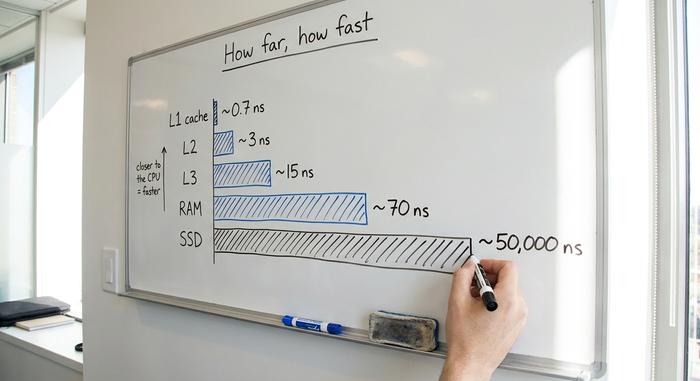
The fastest caching happens on the processor itself. Modern CPUs carry three levels of cache built from SRAM, a memory type that is far quicker than the DRAM used for main memory and far more expensive per byte. L1 is tiny and almost instant, a few dozen kilobytes per core answering in roughly a nanosecond. L2 is larger and slightly slower. L3 is bigger still and shared across cores; Intel's Core i9-14900K ships with 36 MB of it, and AMD's Ryzen 9 7950X3D pushes L3 to 128 MB. All of this exists to paper over one gap: pulling data from L1 takes under a nanosecond, while DDR5 main memory takes around 70, about a hundredfold difference. Caches work because programs reuse the same data and the data sitting near it, a habit called locality of reference.
| Layer | Typical size | Typical access time | What it holds |
|---|---|---|---|
| L1 CPU cache | 32-80 KB per core | ~0.7-1 ns | The next instructions and values |
| L2 CPU cache | 0.5-2 MB per core | ~3-4 ns | Recently used data near the core |
| L3 CPU cache | 16-128 MB shared | ~10-20 ns | Data shared between cores |
| Main memory (RAM) | 8-64 GB | ~70-100 ns | Running programs and active data |
| SSD storage | 256 GB-4 TB | ~50-100 µs | Files and the operating system |
| CDN edge node | varies | ~20 ms over the network | Web copies near the visitor |
| Origin server | varies | ~100-200 ms cross-region | The source of truth |
Disk, OS, and application caches
Above the hardware, software keeps its own caches. Your operating system holds frequently accessed data, such as recently read files, in spare RAM so reopening them is instant. Databases cache the results of common queries. Applications add a dedicated in-memory layer, often Redis or Memcached, that sits between the app and its database and answers repeat requests in microseconds. The job is identical to the CPU's: keep what is hot in faster storage so you do not pay the slow cost twice.
Server-side caching and the CDN
The outermost layer reaches across the internet. When a web server caches finished pages, it avoids rebuilding them for every visitor. A content delivery network goes further, copying those assets onto edge servers spread across the globe so each request is answered from a machine physically near the user. A CDN edge hit can return in about 20 milliseconds, against 100 to 200 milliseconds when the request has to cross continents to the origin. The model now dominates the web: by 2024, roughly 75 percent of third-party content was served through a CDN.
Browser cache: what your web browser stores
The browser cache is the one most people actually meet. Load a site and your web browser quietly tucks pieces of it onto your device: the HTML, the stylesheets, the scripts, the images, the fonts. Come back later and it reads those files straight off your disk instead of fetching them again, which is why the second visit to a webpage snaps open faster than the first. The site logo? Downloaded once, reused on every page that shows it.
Here is what gets me: most of that speed goes unclaimed. As of 2021, around 90.4 percent of desktop web responses were cacheable, yet 52 percent of sites still landed below the 25th percentile on the standard browser caching audit. The win is just sitting there, free, and most of the web walks straight past it. Set caching up properly and the payoff is immediate. Repeat visits get quicker, mobile data use drops, and the origin server stops fielding the same redundant requests.

Benefits of caching: why it makes things faster
Caching is a trade. You spend a little memory and accept a small risk of serving something slightly out of date, and in return you get speed, lower load, and lower cost. Those three payoffs are why caching shows up at every layer instead of just one.
Speed is the obvious win: serving a copy from nearby storage beats recomputing a result or hauling it across a network. The second benefit is reduced load on the source. Every request answered by a cache is a request the database or origin server never has to handle, which keeps systems standing during traffic spikes. The third is plain money: serving cached bytes from an edge node is cheaper than generating them fresh and shipping them from a central server, and when you need to access data repeatedly, that saving compounds fast.
The user-facing payoff on application performance is real and measurable. Google's 2018 research on mobile sites found that cutting load time by a single second lifted conversions by as much as 27 percent, while a widely cited 2012 Aberdeen Group study put the cost of a one-second delay at a 7 percent drop in conversions. Faster pages keep people around. Caching is one of the cheapest ways to get there.
| Cache type | Where it lives | What it stores | Who manages it | Typical lifetime |
|---|---|---|---|---|
| CPU cache (L1/L2/L3) | On the processor | Hot instructions and data | Hardware, automatically | Microseconds |
| Browser cache | Your device | HTML, CSS, JS, images, fonts | Your web browser | Hours to a year |
| Application cache | App server memory | Query results, sessions | Developers (Redis, Memcached) | Seconds to hours |
| Server / CDN cache | Edge servers worldwide | Pages, media, API replies | Site owner and CDN | Per Cache-Control TTL |
| DNS cache | OS, router, resolver | Domain to IP lookups | The DNS resolver | 5 minutes to 24 hours |
Should you clear cached data, and when?
People treat clearing the cache like a chore on a maintenance checklist. Skip the checklist. It is really a troubleshooting tool, nothing more. Most days, leave cached data where it is, because it is quietly making every site you revisit load faster.
So when is clearing it worth the bother? Honestly, just three situations. A site breaks or keeps showing a stale cached version after an update, and that old copy in the browser cache is almost always the culprit; clearing the cache forces a clean download. You have been on a shared or public computer and want the local trace of what you viewed wiped. Or your phone is down to its last gigabyte and you need the room back, since a browser cache can quietly balloon to a couple of gigabytes on its own. Outside those, clearing buys you nothing. It slows your very next visit to every site while the browser rebuilds its copies, and a few browsers log you out in the process. The thing people get wrong most: clearing the cache does not delete your cookies or saved passwords. Those sit in a separate store and survive a cache wipe, unless you go out of your way to tick their boxes too.
| Browser | Where to clear the cache |
|---|---|
| Chrome | Settings, Privacy and security, Delete browsing data, Cached images and files |
| Firefox | Settings, Privacy and Security, Cookies and Site Data, Clear Data |
| Safari | Settings, Safari, Clear History and Website Data |
| Edge | Settings, Privacy, Choose what to clear |
Cache vs cookies vs buffer: clearing the confusion
Three words, constantly confused, all about storing data. Each does a different job. A cache holds copies of content so you can reach it faster next time. A cookie is a tiny note a site leaves to remember you: a login session, a language setting, a saved preference. It carries identity, not content. A buffer is different again. It holds data in transit, like the few seconds of video a stream loads ahead of where you are watching. The shortest way to keep them straight: cached data sticks around for reuse, a cookie remembers who you are, and a buffer empties the instant it is used.
What to remember about cache and caching
Once you see a cache as nothing more than "keep a copy of the slow thing close to where it is needed," it stops looking like a hardware feature and starts looking like a habit that runs through all of computing, from a 0.7-nanosecond fetch on a CPU to a copy of this page sitting on an edge server near your city. The practical lesson is the one the web has not learned: most of that speed is free and most sites still skip it. Next time a page snaps open before you can blink, you will know exactly which copy saved you the trip.