What Is a Browser Fingerprint? How It Works and Risks

Most people picture online tracking as a cookie: a small file a website drops in your browser and reads again on your next visit. Browser fingerprinting skips the file entirely. It identifies you by reading the settings your browser already hands out for free, such as your screen size, your installed fonts, your graphics card, and your time zone. Bundle a few dozen of those dull details together and the result is close to unique. Recent research puts roughly 60% of browsers in the one-of-a-kind bucket, with no cookie, no login, and no IP address required. So what is a browser fingerprint, why is it so hard to shake off, and what does it mean for anyone moving money in crypto? That is what this guide unpacks.
Browser Fingerprinting Definition and How It Works
A browser fingerprint, sometimes called a digital fingerprint, is a profile built from the technical traits your device exposes every time it loads a page — a form of device fingerprinting that works entirely without stored files. It draws on ordinary browser information and your system configuration, and no single trait gives you away. Your screen resolution is shared by millions of people, and so is your operating system. The power comes from the combination; stack enough common values together and the odds that another person matches all of them at once collapse toward zero.
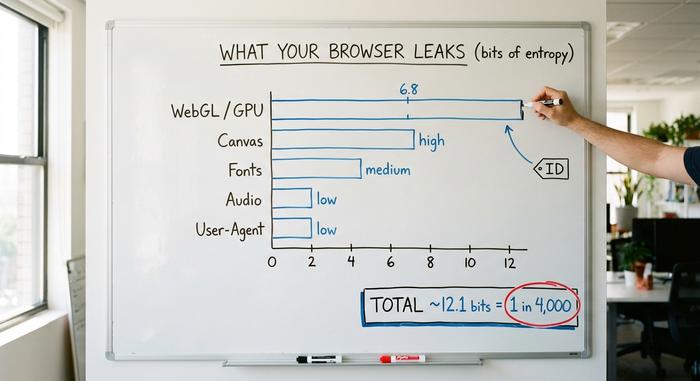
Researchers measure this in bits of entropy, which is just a way of counting how much a value narrows down the crowd. A modern desktop browser leaks about 12.1 bits in total, according to a 2025 study published at the Privacy Enhancing Technologies Symposium. That sounds small until you realize each bit roughly doubles the number of people you can tell apart. The graphics card string alone, read through WebGL, contributes close to 6.8 of those bits. This is not a new problem, either. When the EFF first measured it, 83.6% of the browsers it tested were unique across a sample of 470,161 visitors, and a 2016 replication (a different team, same method) found the figure had climbed to 89.4%.
Passive versus active signal collection
Fingerprinting splits into two styles. Passive collection reads what your browser sends automatically: the User-Agent header, the languages you accept, the order of your HTTP headers. This user agent fingerprinting is cheap but weak on its own. Nothing runs on your machine. Active collection goes further. It runs JavaScript that quietly asks your browser to draw an image, play a silent audio sample, or list its fonts, then measures exactly how your hardware responds. Active methods leak far more, which is why the most powerful techniques all rely on scripts.
Why uniqueness is really just math
Here is the part that trips people up. A fingerprint does not need to be secret to work. Every value in it is public, and you broadcast all of them willingly. What makes you trackable is that the specific bundle is rare enough to uniquely identify your device. This is why the only real defense is to look like everyone else, a point we come back to later. You cannot hide a fingerprint the way you hide a password, because it is not a thing you hold. It is a pattern you emit. Put numbers on it: at 12 bits of entropy a tracker can separate roughly one device in 4,000, and a script-heavy fingerprint that reaches 20-plus bits leaves you effectively alone in a city of a million.
Types of Browser Fingerprinting Techniques
Each technique leaks a different sliver of identity. Some are cheap and weak, others slow and revealing. A tracker usually grabs a handful of these fingerprinting vectors and hashes them into one short string, a single unique identifier that doubles as a device identifier. The table below shows the main vectors and roughly how much each one narrows the crowd.
| Vector | What it reveals | Roughly how identifying |
|---|---|---|
| User-Agent and Client Hints | Browser, version, OS | Low on its own |
| Screen and hardware | Resolution, color depth, CPU cores, memory | Low to medium |
| Canvas | GPU, drivers, font rendering quirks | High |
| WebGL | Graphics card and renderer string | High (~6.8 bits) |
| AudioContext | Audio stack processing differences | Medium |
| Installed fonts | Which typefaces your system has | Medium to high |
| Time zone and language | Region and locale settings | Low |
Canvas fingerprinting
Canvas is the workhorse. A script tells your browser to draw a line of text and a few shapes onto a hidden canvas element, then reads the pixels back. You never see it. The catch is that no two graphics stacks render that drawing identically, because GPU, driver version, anti-aliasing, and font smoothing all leave tiny marks. Those differences are stable and measurable. Canvas fingerprinting now runs on 12.7% of the top 20,000 websites and 9.9% of sites ranked between 20,000 and a million, based on a 2025 crawl presented at the ACM Internet Measurement Conference.
WebGL fingerprinting
WebGL exposes your graphics hardware more directly. A script can read the renderer string, which often names the exact GPU, and probe how it handles 3D rendering. That single channel carries some of the heaviest entropy in the whole fingerprint, which is why privacy browsers spend so much effort blunting it.
Audio and font fingerprinting
AudioContext fingerprinting generates a silent sound wave and measures how your audio stack processes it, since small hardware and software differences change the output. Font enumeration checks which typefaces your system can render, and the exact set you have installed is surprisingly personal. One honest caveat: the entropy of audio fingerprinting is poorly measured in recent peer-reviewed work, so treat vendor claims about it with some caution.
Browser Fingerprinting vs. Cookies: Key Differences
Cookies and fingerprints both track you, but they behave like opposites. A cookie is a file the site stores on your device, so you can see it, block it, and delete it. A fingerprint is collected on the fly from values you cannot remove. There is nothing to clear. That asymmetry, no consent prompt and no off-switch, is the entire reason trackers reached for it once browsers started killing third-party cookies. Unlike tracking cookies, which sit in a list you can wipe, a fingerprint leaves nothing behind to find.
| Dimension | Cookies | Browser fingerprint |
|---|---|---|
| Where it lives | Stored on your device | Computed on each visit |
| Consent prompt | Usually required | Often none |
| Can you delete it | Yes | No |
| Survives incognito | No | Mostly yes |
| Survives a fresh install | No | Often yes |
How Advertisers Use Browser Fingerprinting
Two very different camps lean on the same tool. Ad-tech companies, the advertising companies behind most online ads, use fingerprinting to follow you across sites and rebuild the cross-site profile they lost when third-party cookies fell out of favor. It lets them stitch your user behavior together without asking, a quiet form of behavioral tracking that needs no login. These tracking technologies can also fold in your browser history to sharpen the profile. The uses are not always harmless, either. The same cross-site profile can feed price discrimination, where two shoppers are quoted different prices for the same flight or gadget based on what the device and browsing history behind their fingerprint suggest they will pay. The second camp is fraud prevention, and here the logic flips: banks, marketplaces, and exchanges use the same device signals to identify users behind a stolen account or a bot farm, and to detect users quietly running many accounts at once.
This is now a real industry, not a side feature. One specialist vendor reported 65% year-over-year revenue growth and said it processes more than a billion device identifications a month as of early 2026. So when you ask who uses browser fingerprinting, the honest answer is both the trackers you want to avoid and the security teams trying to protect your account. Same technique, opposite intent.
Privacy Implications for Crypto and Fintech Users
If you trade or hold crypto, browser fingerprinting is the silent referee at every exchange you touch. It works in your favor and against you at the same time, which is exactly why it deserves more attention than the generic privacy advice usually gives it. For anyone holding funds, the privacy risk here is concrete, not abstract.
Exchanges, anti-fraud, and Sybil resistance
Exchanges fingerprint devices to enforce one very practical rule — one real person, one account. The same signals catch account takeover, block bonus and airdrop farmers running hundreds of fake identities, and flag bots. The goal is reliable user identification when a username and password are no longer enough. Vendors like FingerprintJS, SEON, and Sift sell exactly this. Device tampering, the telltale sign that someone is faking these signals, doubled in a year. It showed up in 4.4% of desktop identification events in 2025 versus 2.6% in 2024, according to one vendor's 2026 device intelligence report drawn from 23.4 billion events. Roughly one in five desktop events also rode through a VPN.
Wallet deanonymization
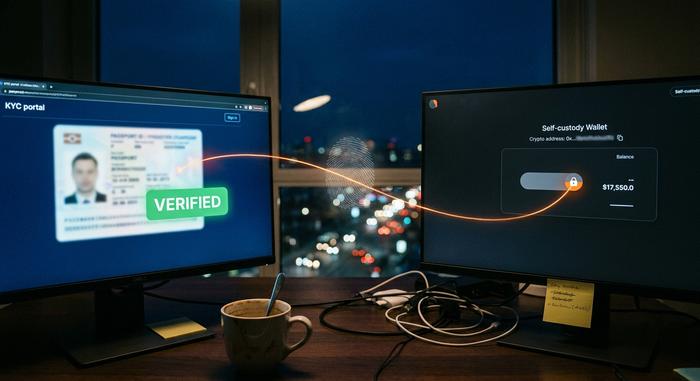
Most guides skip this risk entirely. Suppose you complete KYC on a regulated exchange in one tab, then open your supposedly anonymous self-custody wallet in another tab of the same browser. Both tabs emit the same fingerprint. Anyone correlating that data can link the verified identity to the wallet you thought was private. The fingerprint becomes the thread that ties your real name to your on-chain activity. It does not stop there. If you later open a second account to get around a regional block, the matching fingerprint can flag it as the same person and freeze it mid-verification.
The anti-detect arms race
In response, a whole market of anti-detect browsers has grown up, with names like Multilogin, GoLogin, and AdsPower. They spoof a fresh fingerprint per profile so one operator can run many accounts that look like many people. Exchanges escalate detection; the tools escalate evasion, and the gap keeps moving. I am not convinced either side ever wins outright. The doubling of tampering signals suggests the evasion tools are winning rounds, not the war.
The Legal Status of Browser Fingerprinting
Fingerprinting sits in a tightening legal box rather than an open field. In the EU, the rules now treat it much like a cookie. The European Data Protection Board finalized guidance in October 2024 confirming that reading device characteristics triggers the same consent requirement under the ePrivacy Directive that cookies do, echoing an earlier 2014 opinion. Regulators are also willing to say so loudly. After Google moved to re-allow fingerprinting for advertisers, the UK's data regulator publicly called the change irresponsible and said fingerprinting is not a fair means of tracking people. In the US, California's privacy law already counts these identifiers as personal data, putting fingerprinting squarely inside mainstream privacy concerns. The direction of travel is clear — less gray area every year.
Methods to Protect Against Fingerprinting
You cannot become invisible. You can pick one of two opposite strategies, and most people get them backwards. You either blend into the crowd so your fingerprint matches everyone else's, or you become a moving target whose fingerprint changes every time it is read. A VPN and incognito mode, the two tools people reach for first, barely touch a fingerprint at all.
Browser settings to reduce fingerprinting
Tor Browser takes the blend-in route. It makes every user present a near-identical fingerprint and uses letterboxing to round your window to common sizes, so screen dimensions stop leaking. Brave takes the moving-target route with a technique it calls farbling, which adds tiny per-session randomization to canvas and audio readings. It is clever, though researchers showed in 2025 that averaging across enough samples can partly undo it. Firefox sits in between with its Resist Fingerprinting mode and Enhanced Tracking Protection.
VPNs, extensions, and disabling JavaScript
Be clear about what each tool does. A VPN hides your IP address, which matters for vpn privacy, but your fingerprint is unchanged, so it does little here. Private browsing or incognito mode resets cookies but offers almost no fingerprinting protection. Privacy extensions such as uBlock Origin, the kind of tracker blocker most people already know, block the scripts that collect signals, which genuinely helps. Disabling JavaScript stops canvas, WebGL, and audio fingerprinting cold, since those need scripts to run, but it also breaks a large share of the modern web, so few people live that way for long.
Tools to check your browser fingerprint
You can test yourself in two minutes. The EFF's Cover Your Tracks tool shows how unique your browser looks and whether trackers can be blocked. AmIUnique and BrowserLeaks (both free) do similar work and break the result down vector by vector; you can see exactly which setting is making you stand out.
Recommendations: Living With Your Fingerprint
Match the defense to the threat. A casual reader who just wants better online privacy is well served by Brave or Firefox with a tracker blocker, and that is genuinely enough. A crypto user needs a stricter habit, which is identity hygiene. The single most useful rule is to never share one browser profile between your KYC'd exchange and your private wallet. A dedicated browser or profile per identity does more than any single extension, because it stops the browser fingerprint from becoming the link between your two selves. So the real question is not how to erase your browser fingerprint, which you cannot do. Full anonymity is rarely the real goal; anonymous browsing for a crypto user is really about keeping identities unlinked. It is how many separate identities you need to keep apart, and whether your current setup actually keeps them that way.