Best Private Browser 2026 : Secure, Tracker-Free Web

The promise on the front of every "private browsing" mode was always partly a marketing fiction. The window keeps your spouse from seeing the last Wikipedia rabbit hole. It does not stop your ISP, the site you visit, or any third-party tracker embedded on that site from watching the session. What changed in 2025 is that the obvious fallback — vanilla Firefox plus a few extensions — lost a real chunk of credibility. Mozilla quietly dropped its "never sells your data" promise in February. Google formally retired the Privacy Sandbox in October, confirming third-party cookies stay on by default in Chrome. So the question in 2026 is no longer "Brave or Chrome." It is which threat you actually need a browser to push back against, and whether the one you have is even trying.
What a private browser actually does
A private browser is a web browser whose defaults assume the network and the publishers are hostile. That means tracker and ad blocking turned on by default, fingerprint mitigations baked into the rendering layer, telemetry stripped, DNS queries that encrypt over HTTPS for the resolver path, and a Global Privacy Control signal sent on every request. Most of the credible options are open-source, which is how independent auditors verify those privacy features against the actual binary. It is the opposite of a "private window," which only hides local browsing history from someone sharing your device. EFF's Cover Your Tracks test draws the line clearly: no browsing history is not the same thing as no tracking. The site you visit, the trackers it loads, and your ISP still see most of what they used to see in normal mode. The fix sits at the browser layer, not in a button labelled "private."
Best private browser by threat model
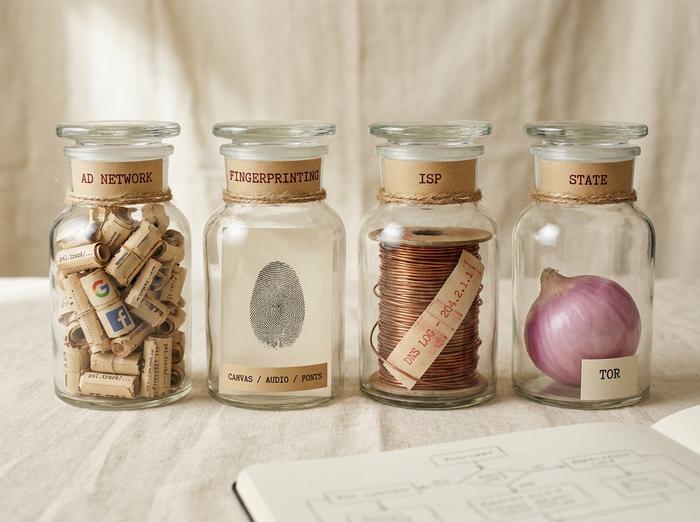
The honest answer to "best" depends on what you are hiding from. Four threats cover most readers:
| Threat | Best private browser pick | Why it fits |
|---|---|---|
| Ad networks, cross-site trackers | Brave | Shields blocks third-party cookies, scripts, and fingerprinting by default |
| Browser fingerprinting | Mullvad Browser | Tor-grade anti-fingerprint stack without the Tor network |
| ISP, employer, public Wi-Fi | Brave or LibreWolf + VPN | DNS over HTTPS plus a VPN handles the network layer |
| State-level surveillance | Tor Browser | Only browser that routes through the Tor network by design |
Ad and cross-site tracking is the everyday online privacy case. Ghostery's WhoTracks.me project, which analyses roughly 1.5 billion page loads a year, shows the top sites still carry ten to thirty third-party trackers per page. Brave Shields work as a built-in ad blocker and turn those off at the source by default, including third-party cookies and fingerprinting noise (a technique Brave calls "farbling," explained below). A 2025 academic paper, "Defeating Farbling," shows the randomization can be statistically defeated under certain conditions, so this is a caveat rather than a takedown.
Browser fingerprinting is the harder problem. It is the practice of reading enough small details about your browser (canvas rendering, audio context, installed fonts, screen resolution) to produce a near-unique ID that survives clearing cookies and switching IP address. Mainstream browsers do almost nothing about this; the privacy and security gap between Chrome and a fingerprint-resistant browser is widest here. The mitigation that works is to look the same as everyone else in the pool. Mullvad Browser, launched on 3 April 2023 in a joint project between Mullvad VPN and the Tor Project, ships Tor Browser's anti-fingerprint stack without the Tor network. It expects you to pair it with a VPN, and it ships uBlock Origin and NoScript pre-installed precisely so users do not break the shared fingerprint pool by tinkering.
ISP and corporate network visibility is a layer no browser alone fully solves. DNS over HTTPS, on by default in LibreWolf and Brave, hides which hostnames you resolve. TLS hides the path and the payload. The network operator can still see which IPs you connect to. A VPN, or a SOCKS proxy in stricter setups, is what closes that piece. Brave's native VPN service is one off-the-shelf option.
State-level adversaries are the case where every other entry on this page is the wrong answer. The Tor network is held up by roughly 8,000 volunteer relays, 2,500 of them exits, as of mid-2025 per Tor Metrics. About 1.95 million people use it daily. Tor Browser is the only browser whose threat model assumes a global passive adversary trying to identify you. Use it for that and only that. It is slow because of what it does, not despite it.
Best private browsers ranked for 2026
The serious list of private browsers is seven entries long. Anything else on a 15-item competitor list is filler.
| Browser | Engine | Default blocking | Standout feature | Tier |
|---|---|---|---|---|
| Brave | Chromium | Ads, 3rd-party trackers, fingerprinting | Brave Search, Tor windows, BAT rewards | Daily driver |
| Tor Browser | Firefox ESR | Trackers, fingerprinting, IP unlinkability | Routes through Tor network | Anonymity tool |
| Mullvad Browser | Firefox ESR | Trackers, fingerprinting | Tor stack without Tor network | Anti-fingerprint daily |
| LibreWolf | Firefox | Trackers, telemetry, DNS leaks | uBlock Origin + DoH on by default | Daily driver |
| DuckDuckGo Browser | WebKit / Chromium | Trackers, fingerprinting, HTTP→HTTPS | Smarter Encryption, Email Protection | Mobile-first |
| Hardened Firefox | Firefox | Configurable via Arkenfox user.js | Manifest V2 still supported | Power user |
| Ungoogled Chromium | Chromium | Removes Google services | Chrome compatibility, no Google | Power user |
Brave is the obvious daily driver for most readers. The company posted 100 million monthly active users at the end of September 2025, up from 82.7 million in February, and 42 million daily active users. Brave Search, its independent private search engine, now handles more than 50 million queries a day and produces around 15 million AI-generated answers in the same window. Shields are on by default. A "Private Window with Tor" option exists for the moments where you want IP unlinkability without leaving the browser, though Brave warns plainly that it is not a substitute for Tor Browser. The 2020 affiliate-link controversy, where Brave's address bar auto-completed affiliate codes for Binance and a handful of crypto sites, was resolved within days but is still worth knowing.
Tor Browser is in its 14.x series throughout 2025: 14.0.5 on 4 February, an emergency 14.0.8 Windows build on 27 March for CVE-2025-2857 (a sandbox escape inherited from Firefox), and the 14.5.x line from late April with 14.5.5 on 23 July. The October 2024 use-after-free, CVE-2024-9680 with a CVSS score of 9.8, was actively exploited against Tor users; Mozilla and the Tor Project patched it inside the same week. The pattern matters more than any single bug: this is a project that ships fixes fast and tells you what was wrong.
Mullvad Browser is the choice when you want Tor Browser's anti-fingerprint discipline without the latency of routing through Tor. PrivacyGuides lists it as the top desktop recommendation for anti-fingerprinting. Pair it with a Mullvad or other no-logs VPN. Do not install extensions; they break the blend-in pool the browser was designed to create.
LibreWolf is a privacy-focused browser, a Firefox fork rebuilt against each upstream stable usually within about three days. uBlock Origin is pre-installed, the default search engine is set to a private option, and the browser blocks third-party cookies by default. Firefox Studies and telemetry pings are stripped from the binary, and DoH and DNSSEC are on. The trade-off is that security patches can lag the Mozilla channel by a few days because LibreWolf builds independently. Acceptable for most threat models. Not for journalists in hostile environments.
DuckDuckGo Browser carries Smarter Encryption, an automatic HTTPS upgrade, and the Tracker Radar list. On Android, App Tracking Protection blocks between one and two thousand tracker attempts a day, from more than seventy companies, on a typical phone with around 35 installed apps. The May 2022 disclosure that DuckDuckGo allowed Microsoft trackers on third-party sites through its search-syndication contract is real history. The contract was amended in August 2022; the trackers are now blocked. Treat the episode as a credibility data point, not a permanent disqualification.
Hardened Firefox is regular Firefox with the Arkenfox user.js template applied. It is desktop-only and run by a small community on GitHub. The maintainers themselves say the template is not a Tor substitute; that line is on the project's wiki.
Ungoogled Chromium strips the Google services from Chromium's source. The maintenance baton has passed since founder Eloston stepped back in 2019; recent releases sit on the 147.x line in late 2025. The catch is real: the macOS binaries are notarized by a volunteer Apple Developer account through October 2026, and you are trusting whoever built the binary. Verify against the source if your threat model demands it.
And the villain. Google Chrome holds about 65.1% of all-device global browser market share in March 2026 per Statcounter. Google retired the Privacy Sandbox APIs (Topics, Protected Audience, Attribution Reporting) on 17 October 2025, and confirmed in April that third-party cookies stay enabled by default in Chrome with no separate consent prompt. The Topics taxonomy that some privacy articles still describe as the "future of Chrome tracking" only ever had 470 categories. None of that is going to make Chrome a privacy browser.
Why Firefox no longer ranks as a top secure browser
Vanilla Firefox used to be the obvious second-best pick. The February 2025 Terms of Use rewrite changed that. Between 26 and 27 February, Mozilla rolled out new ToU language with a broad data licence and dropped its long-standing "we never sell your data" promise. After backlash, Mozilla rewrote the rest of the ToU in March but did not restore the no-sale claim, citing California's CCPA definition of "sale" as "broad and evolving." Combined with sponsored New Tab content and the company's stated interest in advertising, the practical effect is that vanilla Firefox no longer belongs in the same trust tier as Tor Browser, Mullvad Browser, or LibreWolf.
The redeeming feature is real: Firefox still supports Manifest V2, which means uBlock Origin works in full. That is exactly why LibreWolf and Hardened Firefox remain on the list. The advice is to use one of them rather than vanilla Firefox, not to abandon the engine.
Private browsing mode vs a private browser
The private window is the most over-trusted feature in the modern browser. It does one thing: when you close it, the browser drops the local session, including history, cookies, and form data. That is useful on a shared device. It is not what most people think it is.
In a private window, your IP address is still visible to every site, and the websites you visit can still log your visit. Browser fingerprinting still works exactly the same way. The advertising trackers that load on the page still load. A private window does not act as an ad blocker. Public Wi-Fi can still see which hostnames you resolved unless DoH is on. After the UK Online Safety Act's age-verification rules took effect on 25 July 2025, monthly UK searches for "Tor browser" climbed to about 33,000 and "Incognito mode" to nearly 39,000, per BetaNews. Two very different tools, getting confused for the same job. A private browser closes most of that gap by changing defaults across every window, not just the one labelled private. A private window mostly closes the gap between you and the person who borrows your laptop.

How to choose a privacy-focused browser
Five questions, in order, resolve the choice for almost every reader.
First, do you need a state-level threat model? If yes, Tor Browser. Nothing else qualifies. Second, do you need anti-fingerprinting strong enough that ad networks cannot stitch a profile across sessions? If yes, Mullvad Browser paired with a VPN. Third, do you depend on Chrome extensions and Manifest V3 compatibility? If yes, Brave or Ungoogled Chromium. Fourth, do you want the Firefox feel with the data-collection layer removed? LibreWolf if you want a one-click install, Hardened Firefox if you are comfortable editing user.js. Fifth, is this mostly a mobile question? DuckDuckGo Browser on Android or iOS, or Firefox Focus when you want one-tap erase as the dominant flow. Most readers end up with two browsers (a daily driver and an escape hatch) rather than one privacy browser to rule them all.
What no private and secure browser fixes
The browser layer cannot fix every privacy problem. Logged-in accounts still link your browsing activity to your identity regardless of which default browser you used; Tor does not help if the first thing you do is sign into Gmail. OS-level telemetry, the kind Windows or Android collect outside the browser, sits below where modern browsers can intervene. Browser extensions you install yourself can punch holes through carefully chosen defaults. ISP-level visibility requires a VPN, not a different browser. App-level tracking on phones, the kind DuckDuckGo's App Tracking Protection blocks one to two thousand times a day per device, is happening outside any browser at all. The shortest honest sentence on this topic: the best private browser is a layer in a stack, not the whole stack.
The plural answer ends up being the right one. Pick a daily driver from the four-or-five-way fight between Brave, LibreWolf, Mullvad Browser, and DuckDuckGo. Keep Tor Browser installed for the cases where it is the only browser that does the job. And read the next Privacy Sandbox blog post, because the rules under all of this keep changing, and the question of who is allowed to sell your data may not have a stable answer for very long.