Solflare Wallet Review: The Solana Crypto Wallet vs Phantom

Two wallets own Solana. Phantom has the crowd, and Solflare has the depth. For most casual users that gap never matters, because both let you hold SOL, swap tokens, and click into a dApp without much thought. The moment you decide to actually stake your coins or plug in a hardware device, the ranking starts to flip.
This Solflare review looks at the wallet that Solana power users keep coming back to. We will walk through what it does well, where it falls short, how its security really holds up, and how it stacks against Phantom on the things that decide which wallet you keep. If you only ever touch one blockchain, the answer is less obvious than the download numbers suggest.
What Solflare Wallet Is, and Who Built It
Solflare is a non-custodial crypto wallet built specifically for Solana. It was created by Solrise Finance, which shipped the web version in 2020 and the mobile app in 2021. That makes the Solflare wallet older than Phantom, and the head start shows up in how deep its staking tools go.
Solana-only is a deliberate choice, not a limitation the team forgot to fix. Instead of spreading across many chains, Solflare optimizes for one. The payoff is that it often supports new Solana features before multi-chain rivals do, because the developers are not splitting attention across Ethereum, Bitcoin, and everything else. The company reports more than 4 million users and over $13 billion in assets held or staked through the wallet, though those figures come from Solflare itself and are not independently audited. Treat them as a direction, not a precise score.
Solflare Features: Staking, Swap and NFTs
Solflare's real edge is not how it looks. It is that almost everything a Solana holder does in a normal week lives inside the app, tuned for the chain rather than bolted on as an afterthought.
Native SOL staking and the APY you can expect
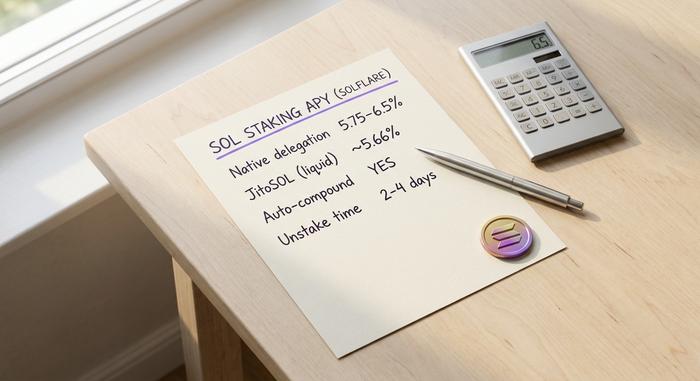
Staking is where Solflare earns its reputation. You can stake any amount of SOL, including fractions, by delegating to a validator directly from the wallet. Current native staking yields run around 5.75% to 6.5% before validator commission, and the in-app flow advertises figures in the 6% to 8% range, according to Solana staking data compiled by Datawallet. Rewards auto-compound, and when you unstake, the SOL takes roughly two to four days to unlock as the network rolls through its epochs.
You also get a choice of how to stake. Native delegation locks your SOL with a single validator you pick, which is the simplest path. Solflare also supports liquid staking tokens such as JitoSOL, where you receive a tradable token representing your staked position and can use it elsewhere in DeFi while still earning. Liquid staking yields sit slightly lower, near 5.66%, but the flexibility suits anyone who does not want their capital frozen during the unstake window. None of this is unique to Solflare, yet the interface makes it readable in a way that newcomers actually finish.
In-wallet swaps through Jupiter
Need to move from one token to another? Solflare routes swaps through Jupiter, the DEX aggregator that scans Solana liquidity for the best available rate. You pick the pair, set a slippage tolerance, and confirm. The catch is the fee: Solflare adds roughly a 0.8% charge on top of the aggregator's own pricing. That is fine for the occasional trade and expensive if you swap constantly, in which case a dedicated DeFi front end will cost you less.
NFTs, spam burning and burner wallets
Solflare handles NFTs with a proper gallery, not an afterthought tab. You can view collections, check rarity, and set a profile picture. More useful is the spam-NFT burner: junk airdrops are a daily annoyance on Solana, and Solflare lets you burn them to reclaim the small amount of SOL locked as account rent. For risky mints, temporary burner wallets let you connect to a sketchy dApp without exposing your main holdings.
Is Solflare Wallet Safe? Security and Self-Custody
Solflare is genuinely non-custodial, and it kept its record clean through the event that wrecked a competitor. There is still one honest gap worth naming before you trust it with real money.
Non-custodial means you hold the keys
When you create a Solflare wallet, the seed phrase is generated securely on your device and never sent to a server. Solrise cannot freeze your funds, cannot move them, and cannot recover them if you lose the phrase. The wallet encrypts local data, supports biometric unlock on mobile, and runs transaction simulation plus anti-phishing checks that warn you before a malicious contract drains an account. If you want to understand why that key control matters at all, it is worth reading how a self-custody crypto wallet differs from leaving coins on an exchange.
The audit gap
Here is the part most reviews skip. Solflare's core extension and mobile code have no published third-party security audit. The one public audit on record, by ConsenSys Diligence in August 2023, covered the MetaMask Snap integration, not the main wallet. The code is open-source, which lets independent developers inspect it, but open-source is not the same as a formal audit; plenty of bugs hide in code that anyone can read. For a wallet holding billions, that absence is a real, if quiet, mark against it, and it is the one detail I would not gloss over before parking a large balance here. It does not mean Solflare is unsafe, only that you are trusting reputation and time-tested code rather than a signed report. Pair it with a hardware wallet and the risk drops sharply, because your keys never touch the software in the first place.
The Slope hack of 2022 and Solflare's clean record
In August 2022 a wallet exploit drained 9,231 Solana accounts for around $4.1 million. The cause was traced to the Slope wallet, which had logged seed phrases to a server. Solflare was named in early panic but was confirmed unaffected, per the Solana Foundation's incident report. Surviving a market-wide scare without a single compromised Solflare key is the kind of track record that marketing cannot fake.
Platforms: The Solflare Wallet Extension and App
Solflare meets you on almost every surface. The Solflare wallet extension runs on Chrome, Firefox, Brave, Edge, Opera, and Arc, and the mobile apps cover both iOS and Android. There is also a standalone web wallet for quick access without an install.
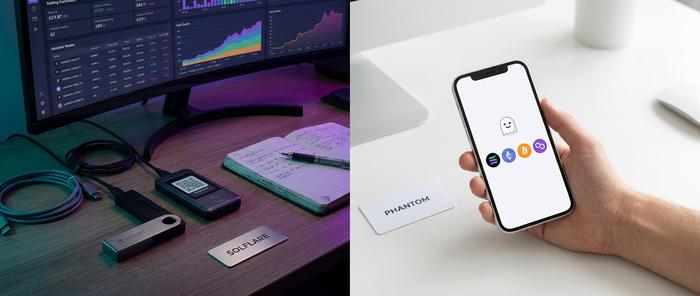
For cold storage, Solflare supports two hardware lines rather than one. Ledger devices work, and so does Keystone, the air-gapped QR-based signer that Phantom does not natively pair with. That extra hardware choice is a small but real reason serious holders pick Solflare.
Switching between the surfaces is smooth because they share the same seed phrase. Import once on the extension, and the same accounts appear on mobile after you restore from your recovery phrase. The wallet also supports multiple accounts under one seed, which is handy for separating a trading stash from long-term holdings.
One change is worth flagging. Solflare retired its MetaMask Snap on May 11, 2026, pushing those users to migrate to the full Solflare apps. The Snap was how many people first reached Solana from inside MetaMask, so its sunset signals a company consolidating around its own software rather than living inside someone else's wallet. If you were using that route, you will need to set up a native Solflare app to keep trading.
Solflare vs Phantom: Which Solana Wallet Wins
This is the comparison most readers actually came for, and the honest answer is that it depends on how you use crypto. Phantom wins on reach and multi-chain support. Solflare wins on staking depth and hardware choice. Popularity is the wrong tiebreaker here.
| Factor | Solflare | Phantom |
|---|---|---|
| Chains | Solana only | Solana, Ethereum, Polygon, Bitcoin |
| Users (approx.) | 4 million | 15 million |
| Hardware wallets | Ledger and Keystone | Ledger only |
| Staking | Deep, validator-level | Simple, fewer options |
| Swap fee | About 0.8% | Around 0.85% |
| Open-source | Yes | Partly |
| Best for | Solana stakers, power users | Multi-chain, beginners |
Phantom is the bigger company by far. It raised a $150 million Series C in January 2025 at a roughly $3 billion valuation, as reported by Coin Bureau, and its multi-chain reach makes it the default for anyone holding more than just SOL. Solflare counters with a tighter Solana focus, broader hardware support, and staking that rewards people who actually use it.
The design philosophies differ in a way you can feel within a minute. Phantom hides complexity behind an ultra-minimal interface, which is exactly what a first-timer wants. Solflare exposes more controls — clearly labeled tabs for staking, swaps, and validator selection — which is exactly what a power user wants, and what a beginner might find busy. Neither approach is wrong; they target different people. If your portfolio lives across Ethereum and Bitcoin too, Phantom is the practical pick. If you are all-in on Solana, Solflare gives you more rope, and the freedom to hang yourself with it if you ignore the security basics.
Fees and Around-the-Clock Human Support
Solflare itself is free to download and use. There is no subscription and no account fee. The costs that exist are the ones Solana charges everyone, plus the swap markup already mentioned.
| Action | Cost |
|---|---|
| Create wallet | Free |
| Network transaction | About $0.00025 |
| Token account rent | 0.002 SOL |
| In-wallet swap | About 0.8% plus slippage |
| Staking | No Solflare fee (validator commission applies) |
| Buy with card | On-ramp provider fee |
The numbers are tiny by design; Solana fees are fractions of a cent, which is one reason the chain attracts active traders. The one figure to watch is that 0.8% swap markup. On a $100 trade it is 80 cents, barely noticeable, but on a $10,000 rebalance it is $80 you would not pay on a pro trading interface. Light users will never feel it; heavy swappers should route large trades elsewhere and keep Solflare for convenience.
Solflare also runs around-the-clock human support through live chat, which is rarer than it sounds in self-custody software, where the usual answer to a lost seed phrase is silence. Support cannot recover your keys — no honest wallet ever can — but it can walk you through staking, swaps, and recovery steps that confuse newcomers. That alone separates it from wallets that hand you a seed phrase and wish you luck.
Who Should Use Solflare on Solana
The decision comes down to one question: do you live on Solana, or just visit? If you stake SOL, manage NFTs, and connect to Solana DeFi and web3 dapps every week, Solflare rewards that habit with deeper tooling and broader hardware support. Keystone users in particular have a reason to choose it.
If you hold a mix of chains, or you simply want the cleanest possible first wallet, Phantom is the easier landing. Solflare's depth is wasted on someone who just wants to buy and hold a little SOL. Match the tool to the behaviour, not to the download count.
There is also a middle path worth naming. Nothing stops you from running both: Phantom as the friendly daily driver across chains, Solflare as the dedicated staking and hardware hub for your Solana holdings. Wallets are free and non-custodial, so the cost of keeping two is only the few minutes it takes to back up a second seed phrase. For active Solana users, that split is often the most sensible setup of all.
The Bottom Line on the Solflare Wallet
Solflare is the specialist's Solana wallet. It offers deeper staking, two hardware options instead of one, an honest non-custodial design, and a clean record through the worst wallet scare Solana has seen. The drawbacks are equally clear: a single-chain scope and the missing audit of its core code, which you should weigh before parking a large balance.
So before you install anything, ask what you actually want. One chain done thoroughly, or many chains done simply? Answer that, and the choice between Solflare and Phantom stops being a popularity contest and becomes an easy call.