What Is an ISP? Internet Service Providers Explained

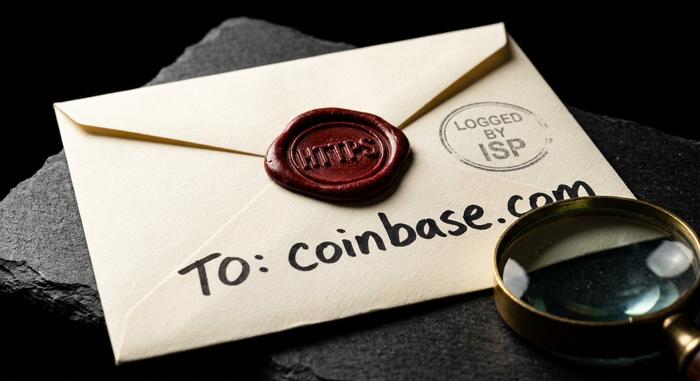
Your ISP is the first thing that sees everything you do online. Every website, every login, every crypto transaction starts the same way: as a packet handed to your internet service provider. It carries that packet, and it can read the envelope. An ISP, or internet service provider, is simply the company that connects you to the internet. But "simply" is doing a lot of work in that sentence. The same company that delivers your bandwidth is also a chokepoint — it can see where you go, slow you down, or block you outright. This guide explains what an ISP is, how it actually delivers internet access, and then the part almost no one covers: what your provider can see about your crypto, and how to blind it.
What Is an ISP and What It Actually Does
Strip away the marketing and an ISP is a middleman. A mandatory one. It owns or rents the physical path between your home and the rest of the internet — and nothing you send reaches a server without passing through its equipment first.
The connection itself is ordinary hardware. A modem translates the ISP's signal into something your devices understand. A router shares that one connection across your phones and laptops. Between your modem and the provider runs the "last mile," the final stretch of cable or fiber that reaches your building. Bandwidth is just the width of that pipe: how much data it moves per second.
Commercial internet service providers first appeared in 1989, in the United States and Australia, when the rules that kept the early internet non-commercial began to fall away. Today there are thousands of them. In the US alone, roughly 2,913 providers file with the FCC, though most people can reach only a handful. Choosing one, then, means choosing who carries and can inspect your entire path to the internet.
How ISPs Deliver Internet Services to You
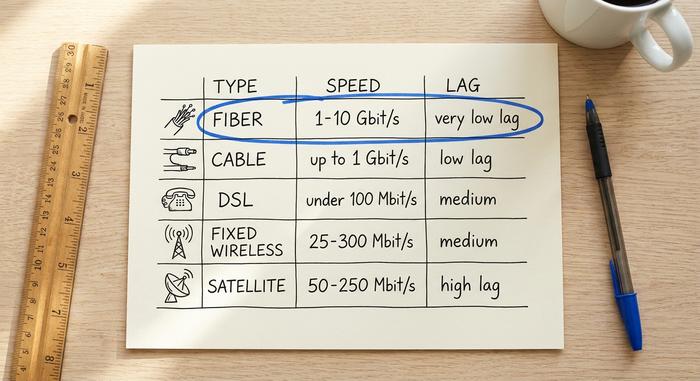
"Broadband" is a marketing word, not a technology. Underneath it sit several different ways an ISP can deliver internet services, and the physical medium, copper, glass, radio, or orbit, decides almost everything: your speed, your lag, and whether you can get a connection at all.
Cable and fiber optic
Most homes run on cable. It reuses the coaxial wiring that once carried television, which is why it was cheap to roll out, and why your speed sags around 8pm when the whole street is streaming. Fiber is the better technology, no contest. Light pulses through hair-thin glass, a gigabit or more, lag you can barely measure. So why doesn't everyone have it? Money. Trenching fiber to a single house can run into the thousands, so providers wire dense cities first and leave everyone else waiting, sometimes for years.
DSL and the dial-up legacy
DSL squeezes data through the copper phone lines already buried in the ground. It carried the 2000s. Cheap, available almost anywhere with a landline, and slow, usually capped well under 100 Mbit/s. Before it came dial-up, which seized the entire phone line and topped out around 56 kbit/s. If you remember a single photo loading one strip at a time, that was dial-up. Plenty of rural homes still run on DSL, because nothing better has reached them.
Satellite and fixed wireless
When the ground fails you, you go up. Satellite internet bounces your data off a dish on the roof. The old geostationary kind added half a second of lag to everything, since the signal flew about 35,000 km each way. Low-orbit constellations like Starlink killed most of that delay. Fixed wireless takes a humbler route: a radio link from a tower a few miles off to an antenna on your wall. Neither is glamorous. Both keep rural areas online where cable and fiber simply never showed up.
| Connection type | Medium | Typical speed | Latency | Best for |
|---|---|---|---|---|
| Fiber optic | Glass strands (light) | 1–10 Gbit/s | Very low | Cities, heavy users |
| Cable | Coaxial copper | 100–1,000 Mbit/s | Low | Most suburban homes |
| DSL | Copper phone line | 10–100 Mbit/s | Medium | Older or rural areas |
| Fixed wireless | Radio to tower | 25–300 Mbit/s | Medium | Rural, no wired option |
| Satellite | Dish to orbit | 50–250 Mbit/s | High (low for LEO) | Remote rural areas |
Tiers and Peering: How ISPs Connect Up
No single ISP owns the internet. It is a network of networks, and the ISPs inside it are ranked into tiers by how much of the global backbone they control.
The three tiers
Tier 1 internet service providers sit at the top. Companies like AT&T, Lumen, and Telia own intercontinental fiber and can reach the entire internet without paying anyone for access. Tier 2 providers own regional networks but still buy some reach from above. Tier 3 ISPs are the local companies that sell service to your home; they buy almost everything upstream.
Peering and transit
When two networks exchange traffic directly for free because it benefits both, that is peering. When a smaller ISP pays a larger one to carry its traffic to the rest of the internet, that is transit. The whole system is a market in reach, with Tier 1 networks renting access down the chain.
How your data is routed
Your request does not travel in one piece. It is split into packets, each stamped with source and destination IP addresses, then routed hop by hop across whichever networks get it there fastest. Your ISP handles the first hops and, importantly, sees both ends of every connection you open. It also assigns the public IP address your connection shows to the world, so every site you visit sees an address that traces straight back to your provider — and through it, to you.
The Biggest Internet Service Providers
In most markets, a few internet providers control access. In the US, four names dominate fixed broadband: Comcast, Charter, AT&T, and Verizon. Between them they account for about 132.6 million fixed broadband connections nationwide as of mid-2024, according to the FCC. Most American homes get one or two real choices. That is it.
That concentration matters well beyond your monthly bill. When a handful of companies carry the traffic for tens of millions of people, each one becomes a powerful place to watch, throttle, or filter. And it is not hypothetical. In January 2025, a US federal appeals court struck down the FCC's net neutrality rules, leaving ISPs legally free to slow down or favor whatever traffic they like. A provider that can throttle a service can also quietly bury it.
Zoom out and the numbers get larger. About 5.5 billion people, roughly 68 percent of humanity, were online in 2024, according to the ITU. Nearly every one of them reaches the internet through an ISP that can see their traffic.
What Your ISP Can See About Your Crypto
Here is the part the other guides skip. People assume HTTPS makes them invisible. It does not. Encryption hides the contents of your traffic, not the fact that the traffic happened, or who it went to. Your ISP still sees the shape of everything.
DNS and SNI leakage
Before your browser loads an exchange, it asks a DNS server for the site's address. Often in plain text. Then the TLS handshake itself carries the destination domain in a field called SNI, historically unencrypted. So even over HTTPS, your ISP watches you look up and reach coinbase.com or binance.com. The contents are sealed. The destination is not. The first time I watched my own DNS queries scroll past in a packet capture, every domain sat there in the clear, and the privacy problem stopped feeling abstract. Newer standards like Encrypted Client Hello try to close the SNI gap, but adoption is still patchy in 2026, so the leak is the default.
Connecting to exchanges and nodes
IP addresses give away the rest. Every machine you reach has one. Your ISP logs which ones you contact, when, and how much data moves each way. A connection to a known exchange IP, or to the port a Bitcoin node listens on, shows up as a pattern even with no domain name attached. Timing and volume tell their own story.
Logging, retention, and data-selling
What happens to those logs depends on where you live. In the United States, Congress repealed the FCC's broadband privacy rules in April 2017, on a 50-48 Senate vote, and ISPs were suddenly free to sell customers' browsing history without asking. Europe went the other way. In 2022 its Court of Justice ruled that blanket metadata retention violates fundamental rights. Same technology. Opposite rules about who gets to keep, and sell, the record.
| What your ISP can see | Your IP | Destination domain | Page contents |
|---|---|---|---|
| Plain HTTP | Yes | Yes | Yes |
| HTTPS (most sites today) | Yes | Yes (via DNS/SNI) | No |
| VPN | Yes (to VPN only) | No | No |
| Tor | Yes (entry node only) | No | No |
ISP Crypto Blocking and Deanonymization
An ISP does not only watch. It can also block, and the metadata it holds can peel the anonymity off "anonymous" crypto.
Blocking and censorship
China is the clearest case. Its Great Firewall blocked Coinbase, CoinMarketCap, and CoinGecko in September 2021, with DNS filtering and deep packet inspection run at the ISP level. Control the providers and you control the map. An exchange can simply vanish from the network for a whole country, overnight. Other governments have leaned on their ISPs to do the same.
Linking transactions to IP addresses
Blocking is loud. Deanonymization is quiet. Back in 2014, researchers Biryukov, Khovratovich, and Pustogarov showed that clients on the Bitcoin peer-to-peer network could be tied to their IP addresses by anyone watching enough connections. The first node to relay your transaction tends to give away where it started. A well-placed observer, and an ISP is about as well-placed as they come, sits right in that spot.
Why running a node can expose you
The threat did not freeze in 2014. A 2025 USENIX Security study deanonymized more than 15 percent of Ethereum validators within three days, using just four monitoring nodes. Running your own node is great for self-custody. But a naive setup broadcasts your IP to every peer it connects to, and your ISP watches all of it. The methods keep sharpening, too. A 2026 study fingerprinted Bitcoin users from raw network patterns alone, using machine learning, no on-chain data needed.
How to Hide Crypto Activity From Your ISP
You cannot remove the ISP from the path. You can blind it. The trick is to break the link between who you are and what your traffic gives away.
Start with the lookup. Encrypted DNS, whether DNS-over-HTTPS or DNS-over-TLS, stops your provider from reading which domains you resolve. That alone closes the easiest leak. Then deal with the traffic itself. A VPN wraps everything in one encrypted tunnel, so your ISP sees only that you reached the VPN, not where you went next. The catch: now you are trusting the VPN instead. They are mainstream these days, with roughly 1.5 billion people using one in 2024. Tor goes further. It bounces your traffic through three relays, so no single hop sees both your identity and your destination, and plenty of crypto privacy tools route through it by default. Even after years of churn, Tor still carried somewhere between two and seven million daily users through 2024. Running a node? Put it behind Tor, so its broadcasts cannot be traced back to your home IP. None of this is airtight. All of it makes watching you far more expensive.
Why Your ISP Is Both Pipe and Watchtower
An ISP is two things at once. It is the infrastructure that makes the internet usable, and it is a single chokepoint that, by default, sees the metadata of everything you do. For ordinary browsing that is mostly a billing relationship. For crypto it is a privacy problem, because the connection itself, the timing, and the destination are visible even when the contents are not. The practical takeaway is not paranoia. It is design. Assume your provider can see who you talk to, and decide what you want hidden. Turn on encrypted DNS this week, and reach for a VPN or Tor for anything you would rather your ISP not keep a record of.