How to Change or Reset UPI PIN in Google Pay
Your UPI PIN is what stands between your bank account and an unauthorized transaction. If you need to know how to change GPay PIN, the whole thing takes under two minutes — whether you've forgotten the PIN, suspect it leaked, or just want a regular security refresh. This guide walks through every method: Android, iPhone, with a debit card, and without one.
Google Pay handles billions of UPI transactions in India every month. But most GPay-related fraud doesn't come from hacked servers. It comes from PINs that got guessed, shared by accident, or used on a stranger's phone. Knowing how to change GPay PIN correctly, and when to do it, cuts that risk considerably.
What Is a UPI PIN and Why It Matters
Think of a UPI PIN as your bank's secret handshake inside Google Pay. It's a 4- or 6-digit number tied straight to your bank account — not to Google, not to your phone. Send money, split a bill, check your balance: every one of those actions asks you to enter this PIN before it goes through.
A lot of users confuse it with the Google Account PIN (the one Google asks for during device setup or app purchases). Totally different thing. Different system, different purpose. Mixing them up is probably the most common reason people end up stuck when trying to change their pin in Google Pay for the first time.
One bank account, one PIN. If you've linked three accounts to GPay, each has its own code — update one and the others don't budge. Worth knowing: even Google has no access to these PINs. They're validated entirely at the bank's end, which is why you can't just call Google support to recover one.
When Should You Change Your GPay UPI PIN
You don't need to know how to change GPay PIN and use that knowledge daily, but some situations call for immediate action:
- You shared your PIN with someone, even accidentally or with family
- You suspect someone has accessed your account without authorization
- A transaction alert showed up for something you didn't initiate
- You forgot the PIN and can't complete payments
- Your registered debit card was lost, stolen, or expired
- Your bank sent a security notification requesting a PIN reset
- You want a routine refresh — security experts suggest doing this every 3 to 6 months
For anyone thinking about sending money with maximum privacy, a strong and current PIN is the first line of defense.
How to Change UPI PIN in Google Pay: Android
This is the standard flow for how to change GPay PIN on Android. Update the app to the latest version first — older builds sometimes show a different menu layout.
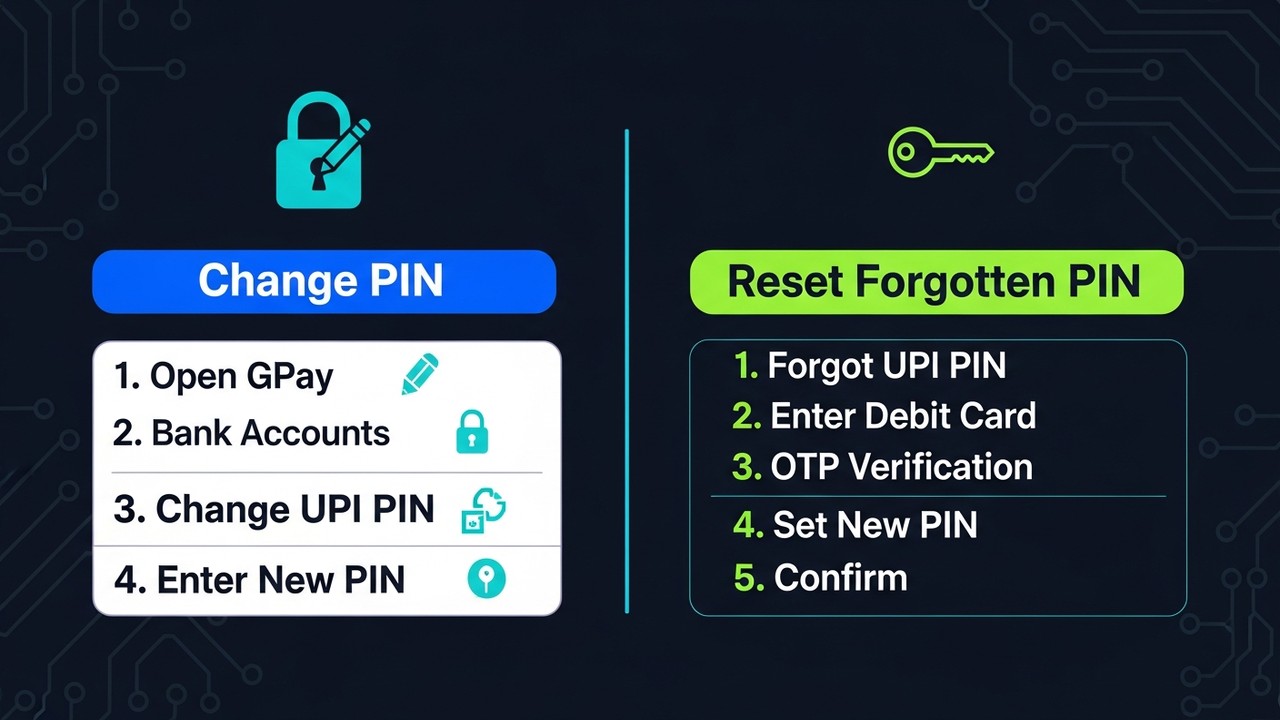
- Open the Google Pay app on your phone
- Tap your profile photo in the top-right corner
- Select "Bank accounts" from the menu
- Tap the bank account whose PIN you want to change
- Select "Change UPI PIN"
- Enter your current UPI PIN to verify your identity (or confirm via OTP if prompted)
- Type your new 4- or 6-digit PIN in the first field
- Re-enter the same PIN in the confirmation field
- Tap Submit — a success screen confirms the change
The new PIN works immediately. No waiting period, no approval from the bank. Run a quick balance check right after to confirm everything went through.
When you tap "Change UPI PIN," the app might ask for your current PIN or send an OTP instead. Which one appears depends on your bank's settings. Both are normal. If the screen just spins without showing either option, your internet connection probably dropped — close the app and try again.
How to Change UPI PIN in Google Pay on iPhone
Changing your UPI PIN in Google Pay on iOS follows the same path as Android. The interface stays consistent across platforms.
- Open Google Pay (download from the App Store if it's not installed yet)
- Tap your profile icon in the top-right
- Select "Bank accounts"
- Choose the account you want to update
- Tap "Change UPI PIN"
- Verify with your current PIN
- Set and confirm your new PIN
- Tap Submit
A couple of iPhone-specific things to watch: if the OTP doesn't arrive, check that Google Pay has SMS permissions in iOS notification settings. Also verify that your registered mobile number with the bank matches the SIM in your phone. On dual-SIM iPhones this often trips people up.
How to Reset UPI PIN in Google Pay If Forgotten
Forgot your PIN entirely? You can reset your UPI PIN without visiting a bank branch. Google Pay supports two methods. Which one works for you depends on what you have available.
Reset with Debit Card
This works with virtually every bank:
- Open Google Pay, tap your profile, go to "Bank accounts"
- Select the affected account
- Tap "Forgot UPI PIN"
- Enter the last 6 digits of your linked debit card number
- Enter the card expiry date (MM/YY)
- An OTP gets sent to your registered mobile number — the one on file with your bank
- Enter the OTP to verify
- Set your new UPI PIN, confirm, tap Submit
The OTP lands on the number registered with your bank, which may differ from your Google account number. If they're different, make sure you have the bank-registered SIM in hand.
Reset with Aadhaar (Without Debit Card)
SBI, Bank of Baroda, Bank of India, and a handful of other public sector banks support Aadhaar-based PIN reset. Useful when your debit card is lost or expired.
- Go to "Forgot UPI PIN" in the bank account screen
- Look for an Aadhaar option (only shows up if your bank supports it)
- Enter your Aadhaar number
- An OTP goes to the mobile number linked to your Aadhaar through UIDAI
- Enter the OTP
- Set and confirm your new UPI PIN
Your Aadhaar has to be linked to the bank account. If your bank doesn't offer this option and you've lost your debit card too, contact the bank directly — they can help you reset it through their own channels.
| Reset Method | What You Need | Works For |
|---|---|---|
| Debit card | Last 6 digits + expiry | All banks |
| Aadhaar | Aadhaar number + linked mobile | SBI, BoB, select PSU banks |
| Via bank app | Varies by bank | Most nationalized banks |
Troubleshooting Google Pay UPI PIN Problems
OTP not showing up
Nine times out of ten, the SIM isn't active or has no signal. But there's another culprit nobody checks: the mobile number your bank has on file. After a phone upgrade or SIM swap, that number often differs from the one you're currently using. Restart the device, and most SMS delays clear up on their own.
Getting "Incorrect PIN" twice in a row
Stop trying after two wrong entries. NPCI rules impose a 24-hour transaction lock the moment a second wrong UPI PIN lands. Your money's fine — you just can't send any until the lock expires. Faster fix: go straight to "Forgot UPI PIN." Running that flow clears the lock and lets you set a fresh one without waiting a day.
The "Change UPI PIN" button is grey
Update the app. Seriously, that's it most of the time — an old build of Google Pay. If updating doesn't help, clear the cache manually: Settings, then Apps, find Google Pay, go to Storage, tap Clear Cache. The option usually reappears after that.
Change failing halfway
Don't lock your screen or jump to another app while the PIN change is running. The process needs the connection open the whole time. Drop out mid-flow and you'll likely have to start over from the bank account screen.
Can't share one PIN across all linked accounts
That's how UPI works. Every bank account you link gets its own PIN, set up independently. You're free to use identical digits across all of them — the system doesn't stop you — but each account still needs to be configured one by one through GPay.
Money left the account but the transaction showed as failed
PIN has nothing to do with this one. It's a bank reconciliation gap, and the amount almost always reverses within 24 to 48 hours. If it doesn't come back, raise a dispute through GPay support (Profile, Help, Payment issues) or go straight to your bank. Don't run the same payment again in the meantime — it may deduct twice.
UPI PIN Safety Tips for Google Pay Users
Changing your PIN regularly only matters if the new one is actually hard to guess. A few habits that make a real difference:
- Never share your PIN — not with family, not with anyone who claims to be Google Pay support or your bank. Real support agents never ask for it.
- Skip the obvious patterns: 1234, 0000, 1111, or your birth year are the first guesses an attacker tries.
- Change your UPI PIN right away if you typed it in on someone else's phone or any device you don't control.
- Avoid changing PIN on public Wi-Fi — open networks are easy to sniff.
- Different accounts, different PINs. Reusing the same PIN everywhere turns one breach into several.
- Google Pay never calls to ask for your PIN. Any call claiming otherwise is a scam, full stop.
- After a phone reset or SIM swap, set a fresh PIN. Old credentials can linger in unexpected ways.
- Before traveling, update your UPI PIN so you're carrying fresh credentials into an unfamiliar environment.
Good PIN hygiene is part of managing digital payment credentials securely — the same principles that protect a crypto wallet apply to UPI as well.
For Merchants: Expanding Beyond UPI Payments
If you run an online store and currently accept UPI, adding cryptocurrency opens your checkout to international customers UPI won't reach. Plisio makes accepting crypto payments online straightforward — Bitcoin, Ethereum, and a range of altcoins, sitting alongside your existing payment options with minimal integration work.
Wrapping Up
Learning how to change GPay PIN once means you're covered for life — the flow doesn't change. Routine refresh takes sixty seconds: Bank accounts, tap the account, Change UPI PIN, done. Forgot it entirely? Debit card reset covers most people, Aadhaar reset covers the rest. New phone, new SIM, or just a gut feeling something's off? Same steps every time.
One thing that actually makes a difference: how to change GPay PIN is easy, but picking a decent PIN matters more. Skip the birth year, skip the repeating digits, don't reuse across accounts. That combination of regular changes and a non-obvious PIN handles the bulk of everyday UPI risk.