What Is Viggle AI? The Meme Maker and Animation Tool That Went Viral
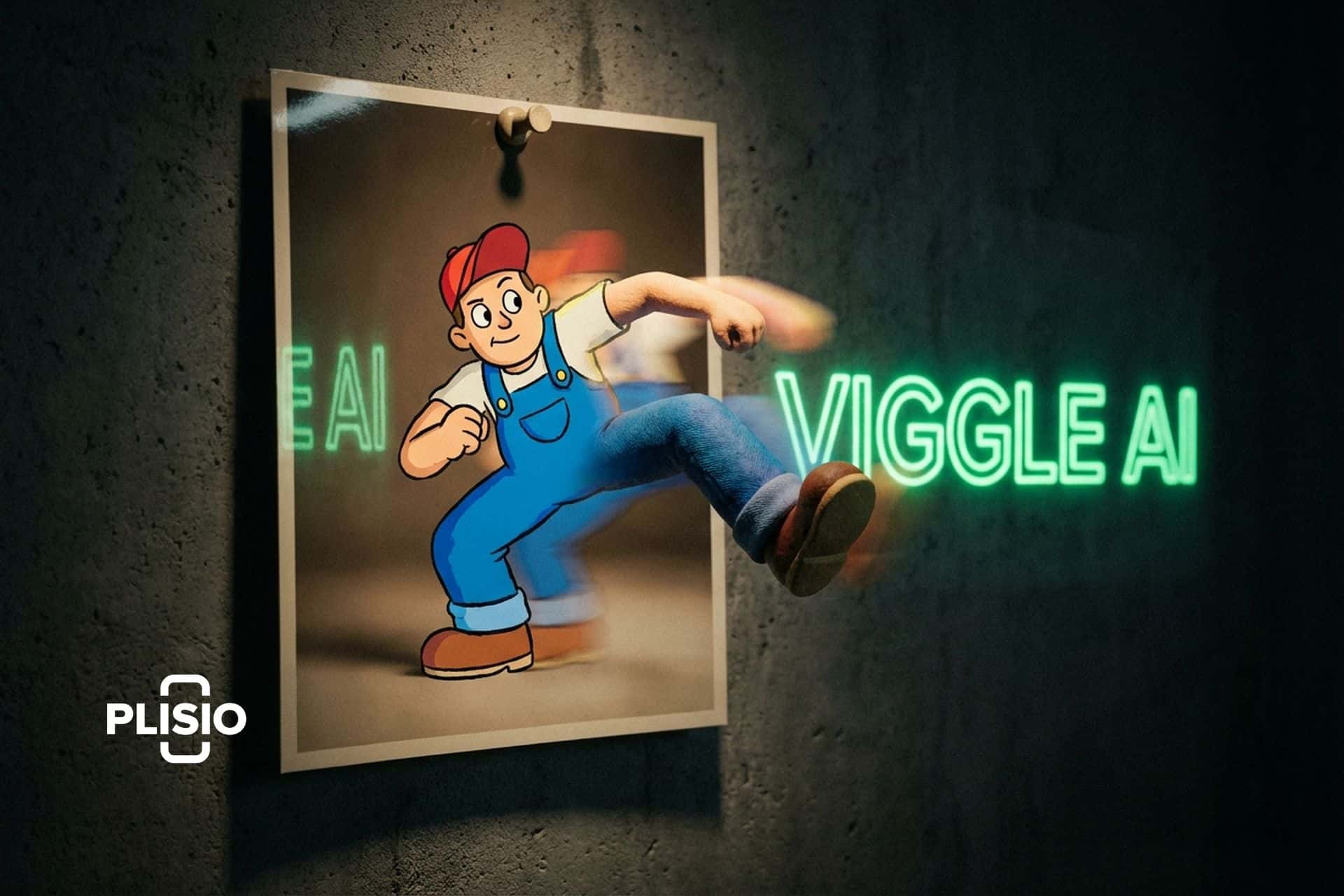
Somebody dropped a character from a stock photo into a Fortnite dance and it looked... good. Not "good for AI" good. Actually good. Smooth motion. Physics that made sense. The character's weight shifted naturally when they spun, their clothes moved like real fabric, and the whole thing took maybe two minutes to make. That video hit Twitter in early 2024 and within a week everyone was talking about Viggle AI.
I saw the clip, assumed it was cherry-picked marketing content, and went to try it myself. Uploaded a photo, picked a dance motion template, waited about ninety seconds. The result was imperfect but genuinely impressive. The character from my photo was dancing. In 3D. With physics. For free. On a Discord bot. That was the moment I realized this tool was different from the usual AI video hype.
Viggle went from zero to 1.6 million Discord members in under a year. It became the engine behind half the AI meme content on social media in 2024. And the technology behind it, a model called JST-1 that actually understands 3D physics rather than just pattern-matching 2D pixels, represents something genuinely new in the AI video space. This article covers what Viggle is, how JST-1 works, how to actually use the tool step by step, and how it compares to the bigger names in AI video generation.
What Viggle AI is and why it matters
Viggle AI is a character animation platform that takes a still image of a person or character and makes it move. Not in the janky "zoom and pan on a photo" way that most AI tools do. Viggle generates actual 3D motion. The character turns, walks, dances, jumps, and the movement respects physics: gravity, weight transfer, fabric draping, momentum.
The company was founded by a team with backgrounds in computer vision and 3D modeling. They built JST-1, which stands for Joint Space-Time, and they describe it as "the first video-3D foundation model that comes with actual physics understanding." That claim is worth unpacking because it's what separates Viggle from everything else in its category.
Most AI video tools (Runway Gen-3, Pika, Kling) generate video by predicting what the next frame should look like based on the previous one. They're working in 2D pixel space. The output looks good until a character needs to turn sideways, interact with an object, or move in a way the training data didn't cover. Then things get weird: limbs phase through bodies, proportions shift, gravity stops working.
JST-1 takes a different approach. It reconstructs a 3D representation of the character from the input image, understands the character's skeletal structure, and then animates that 3D model according to physics rules before rendering the final 2D video output. The character has volume, weight, and joints. When it dances, the feet push off the ground with the right force. When it turns, the perspective shifts correctly because the model knows the character has a back, not just a front.
Is the output perfect? No. Complex scenes still produce artifacts. Multi-character interactions are unreliable. And the model works best with cartoon and anime characters rather than photorealistic humans. But for single-character animation from a still image, Viggle produces results that I haven't seen matched by any consumer tool at this price point. Which is free.
How to use Viggle AI: step-by-step guide
Viggle runs in two places: a web app and a Discord bot. The Discord bot came first and is still the primary interface for the community. Here's how each core feature works.
Mix: the main event
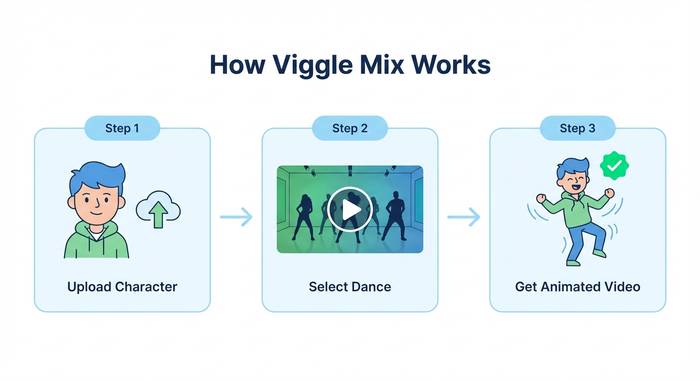
Mix is what made Viggle go viral. You give it two inputs: a character image and a motion video. Viggle extracts the character from your image, maps them onto the motion from the video, and renders the result.
Step by step: open the Viggle web app or Discord. Use the /mix command. Upload a clear image of a character (one person, visible body, good lighting). Upload a short video with the motion you want (a dance, a walk, a gesture). Pick your background: green screen, white, or original. Hit generate. Wait 60-120 seconds. You'll get a video of your character performing the motion from the reference clip.
The results depend heavily on your inputs. Clean character images with visible limbs work best. Messy backgrounds, obscured body parts, or extreme angles confuse the model. Motion videos work best when they show a single person doing clear, distinct movements. Subtle gestures are harder than big dances.
Move: animate with background preserved
Move is similar to Mix but keeps the character's original background. Upload a character image, upload a motion video, and the system animates the character while preserving whatever scene they're standing in. Useful when you want context: a person at their desk suddenly breaking into a dance, a character in a park doing a wave.
Ideate and Stylize
Ideate generates video concepts from text prompts. Describe what you want and the model produces a video. Stylize lets you change the visual style of an existing character or animation. Both are more experimental than Mix and Move, and the results are less predictable.
The /character command
This lets you create a persistent character that you can reuse across multiple animations. Upload an image once, save it as a character, and reference it in future mixes without re-uploading every time. For content creators building a recurring character (a mascot, an avatar, a brand figure), this saves significant time.
Viggle pricing: what's free and what costs money
Viggle uses a freemium model and the free tier is surprisingly generous compared to most AI video tools.
| Feature | Free | Premium |
|---|---|---|
| Generations per day | Limited (varies) | Higher limits |
| Queue priority | Standard (can be slow) | Priority processing |
| Video length | Up to 30 seconds | Up to 30 seconds |
| Resolution | Standard | Higher quality |
| Watermark | Yes | Removed |
| Commercial rights | Yes (royalty-free) | Yes (royalty-free) |
| Multiple characters | Templates only | More options |
The commercial rights piece is notable. Viggle states that generated content is "completely royalty-free" with "full commercial usage rights to every video you generate." That's unusual. Most AI video platforms either restrict commercial use on free tiers or charge enterprise licensing. Viggle lets you use the output for marketing, social media, or any commercial purpose without additional fees.
The premium pricing has shifted over time and varies by region. Check viggle.ai directly for current rates. When I last looked, the paid tier was under $20/month and primarily removed watermarks, boosted queue priority, and increased daily generation limits.
Viggle vs Runway vs Pika vs Kling: where it fits
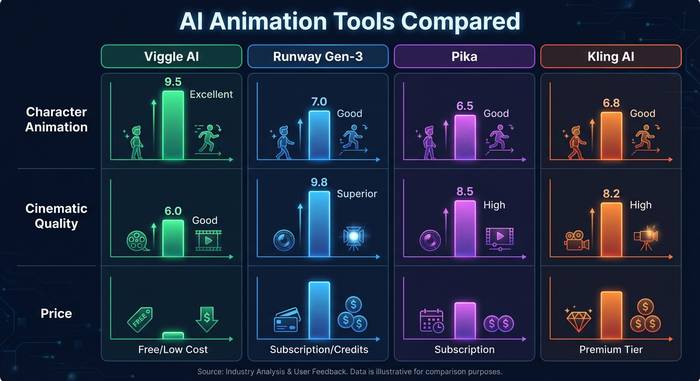
The AI video generation space has gotten crowded fast. Here's where Viggle sits relative to the tools most people compare it to.
| Tool | Best at | Physics/3D | Pricing | Character animation |
|---|---|---|---|---|
| Viggle AI | Single-character motion, memes | JST-1 (3D physics) | Free + paid | Excellent |
| Runway Gen-3 | Cinematic video generation | 2D pixel prediction | $12-76/mo | Moderate |
| Pika | Quick, stylized clips | 2D pixel prediction | Free + $8-58/mo | Basic |
| Kling AI | Longer video, lip sync | 2D with some 3D | Free + paid | Good |
| Animate Anyone (open source) | Research-grade pose transfer | 2D diffusion | Free (self-hosted) | Good but technical |
Viggle isn't trying to compete with Runway on cinematic quality. It's not trying to replace Pika for quick social media clips. Its lane is character animation specifically: taking a still image of a person or character and making it move convincingly. In that specific lane, JST-1's physics understanding gives it an edge that pixel-based tools can't match.
Where Viggle loses: it can't generate video from scratch the way Runway or Pika can. You need an input image and a motion reference. It's animation, not generation. The output length is capped at 30 seconds. And it currently works best with illustrated or cartoon characters. Photorealistic humans sometimes hit uncanny valley territory where the 3D reconstruction creates subtle wrongness in facial features and skin texture.
Where Viggle wins: the motion quality is unmatched at this price point. A free Viggle generation with a good input produces more physically convincing movement than a $76/month Runway subscription produces for character animation. That's because Viggle's model actually understands 3D space and the others are guessing at it from 2D patterns.
What to actually use Viggle for: real use cases
The meme use case is what brought Viggle to 1.6 million Discord members, but there are more practical applications.
Content creators use it to animate their avatar or persona for social media. A YouTuber with a cartoon character avatar can make that character dance, wave, or react in videos without hiring an animator. TikTok creators make characters from photos do trending dances. The turnaround time, under two minutes per clip, makes it feasible to produce animated content daily.
Small businesses and marketers use it for quick promotional animations. A restaurant can take a photo of its mascot and make it dance in a social media ad. An e-commerce brand can animate a product character for a story highlight. The zero cost and commercial licensing make it accessible for businesses that can't afford motion design studios.
Indie game developers and storyboard artists use it for prototyping. Before investing in full animation, they can test how a character looks in motion. Does the pose work? Does the movement sell the emotion? Viggle gives a rough but fast answer.
Education is a use case I didn't expect to see but it makes sense. Teachers and course creators take a character mascot and animate it for explainer videos. Way more engaging than a static image on a slide deck. A character that gestures while explaining photosynthesis keeps a 12 year old's attention longer than text and arrows. I've seen language tutors on TikTok use Viggle to make animated characters demonstrate greetings in different cultures. Creative, low effort, and it works.
Limitations and things to watch out for
Viggle is impressive but it has real boundaries.
Human images are supported but the model was clearly optimized for illustrated characters. Photorealistic results are hit or miss. Faces sometimes drift into uncanny valley territory. Hands are... improving, but still the weak point of every AI video tool in existence.
The 30-second cap means you can't generate long-form content. For anything beyond a quick clip, you'll need to edit multiple generations together.
Privacy is a legitimate concern. You're uploading images and videos to a cloud service. The privacy subreddit had a thread about Viggle's data practices, and while the company has implemented content moderation and C2PA metadata tagging for traceability, you should think before uploading sensitive personal photos. Especially photos of other people without their consent. The deepfake potential is obvious and the ethical responsibility sits with the user.
No API means no automated workflows. If you want to build Viggle into a product or generate hundreds of animations programmatically, you're out of luck for now. Everything goes through the web app or Discord manually.
There's also no mobile app that replicates the full feature set yet. The iOS app exists but it's a simplified version focused on meme templates rather than the full Mix/Move workflow. And the Discord dependency, while part of what built the community, creates friction for users who don't use Discord. Having to join a server, learn slash commands, and wait in a public queue is not a normal software experience. The web app helps, but it's still in development and missing some features.