LPB Piso WiFi 10.0.0.1: Admin Login and Pause Time Guide
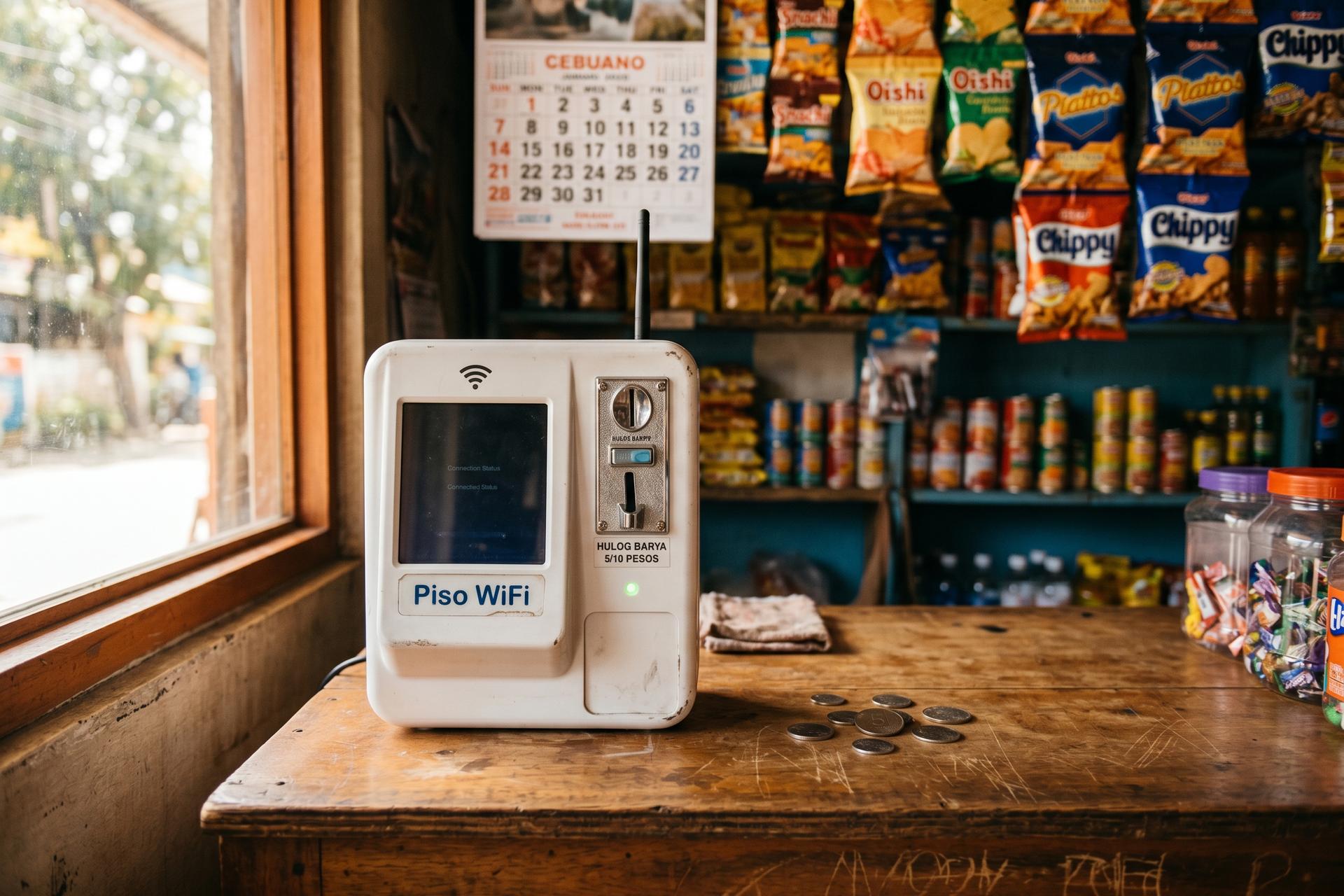
Lunchtime in a barangay sari-sari store. On the counter, a small white box with a coin slot. Drop a peso in and a few minutes of WiFi come back, paid by the minute. That box is a Piso WiFi vendo, and somewhere inside it is a router whose admin panel sits at 10.0.0.1. Most of the machines you will see in the country run LPB Piso WiFi software. The platform claims roughly 420,000 active units across 21 distributors. Almost all of them still ship from the box with admin password "123456789", which is not a joke and not a typo. This piece covers what 10.0.0.1 actually is, how the user portal differs from the admin portal, how the pause time button works, how to set rates and vouchers, and what to try when the login page refuses to load.
What LPB Piso WiFi actually is, and where 10.0.0.1 fits
LPB Piso WiFi is not the hardware. It is the software stack that operators in the Philippines install on a cheap router to turn a home or shop internet line into a paid, coin-vending hotspot. The IP 10.0.0.1 has nothing to do with LPB itself. It sits inside the 10.0.0.0/8 private IP address range (the same range covers small home routers and big enterprise gear), and it is used as a default gateway for many router brands. Comcast Xfinity gateways, some Cisco devices, certain TP-Link units, all reach their config page at 10.0.0.1. The same login screen is used by router brands well outside the Piso WiFi vending machines world. Other popular IP-addresses commonly used as the default gateway by popular router brands include 192.168.0.1 and 192.168.1.1. These are both very common, used as the default gateway for many routers, and you can find the IP address printed on a small label on the device. The choice between 10.0.0.1 and the 192.168.x.x options is purely a vendor decision, not a sign of brand quality.
The vendo machine itself has a backstory. It descends from "Pisonet" coin-operated internet kiosks that started showing up in Dagupan City in the early 2010s, originally giving you about four to seven minutes of access per peso. LPB just modernised the format. The operator buys an LPB licence, screws a coin acceptor onto a router, and pockets every coin that drops. Two tiers exist. Lite is PHP 400 a year, capped at 50 concurrent users. Premium is PHP 700 a year with no user cap. Both run the same admin panel.
| Vendor | License model | Default rate | Default admin password |
|---|---|---|---|
| LPB Piso WiFi | Lite PHP 400/yr; Premium PHP 700/yr | PHP 1 = 5 min | 123456789 |
| AdoPiSoft | Commercial captive portal | PHP 1 = 5 min | varies by build |
| JuanFi | Free, MikroTik-based | Operator-defined | operator-defined |
This article concentrates on LPB, because LPB is what the search query "LPB Piso WiFi 10.0.0.1" almost always refers to.
How to log in at 10.0.0.1 — user portal vs admin portal
10.0.0.1 actually hosts two pages, not one. Plain http://10.0.0.1 is the user portal — the Piso WiFi login page where a customer pays, sees remaining time, and pauses or resumes. http://10.0.0.1/admin is the owner side: the 10.0.0.1 router login page used to set rates, print vouchers, change the WiFi password, and read the day's takings. Same router. Same default IP address (10.0.0.1 is the default IP for the LPB Piso WiFi system). Different credentials. If you forget which IP your router uses, flip the box over — the label on the bottom prints it.
Logging in is short. Join the LPB Piso WiFi network. Ethernet beats wireless here, since a flaky WiFi link can boot you mid-config. Open a web browser. Click the address bar (not the search bar — this is where most people slip), type the address 10.0.0.1, hit Enter. The user portal usually shows up on its own when a device joins. To access the admin panel, type 10.0.0.1/admin and enter the default username and password: admin / 123456789. The IP address 10.0.0.1 is the same in both cases. These are public defaults. Change them in your first login admin session — LPB's setup notes say so, and so does every Piso WiFi security write-up since 2022.
What's on screen is just a webpage served by the router. Nothing here touches the public internet. 10.0.0.1 is a private IP, the default IP for many routers and Piso WiFi systems alike. So the 10.0.0.1 IP works only as a local IP address — reachable, in plain terms, only by a device on the same network. The routine to access 10.0.0.1 is identical for a Piso WiFi vendo and a regular home router: type 10.0.0.1, press Enter, log in.
Most 10.0.0.1 admin login failures come down to one of five mistakes. In rough order of frequency when using 10.0.0.1 on Piso WiFi:
1. The typo. People type 10.0.0.0.1 (four octets) instead of 10.0.0.1 (three dots, four numbers). An IPv4 address only ever has four octets, and the correct ip address is 10.0.0.1. There is no 10.0.0.0.1 login page.
2. Randomized MAC. Modern phones default to a randomised MAC for new networks. The LPB system tracks paid sessions by MAC, so a randomised one looks like a brand new device every reconnect. Set the WiFi profile to use the device's "phone MAC".
3. Stale cache. The user portal aggressively caches its session state. Clear the browser cache or open the address in an incognito window.
4. Wrong network. The device is connected to a neighbouring WiFi network, not the LPB SSID. Reconnect, then retry.
5. Forgotten admin password. If you have already changed the default and lost it, there is no online recovery flow. Hold the router's reset button for around ten seconds; the panel will return to admin / 123456789, but every saved setting goes with it.
Once you are inside the admin panel (sometimes labelled the admin dashboard or admin interface), the first three actions worth doing are changing the admin password, renaming the SSID, and setting a fresh wifi password under Network Settings.
The pause time feature, and why it matters
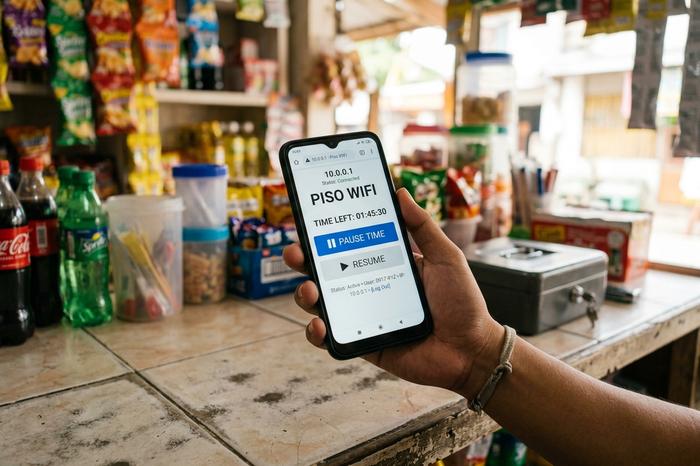
The Piso WiFi pause time feature is the single thing that turned the system from a curiosity into a daily habit, allowing users to stop their internet session without losing paid minutes. A user who has paid for an hour can tap "Pause Time" on the login page, walk away for lunch, and return to find the remain time still waiting on the meter. Without pause, every break burns paid minutes; with pause, the session time only counts when the user is actually online. That small change is why pause and resume drives more positive reviews than any other admin-facing toggle.
The mechanics are simple. On the user side, a buyer connects to the WiFi network, opens the login portal, and sees a "Pause Time" button that stops their internet session. Returning to 10.0.0.1 and tapping "Resume" continues the timer where it left off. On the admin side, the operator can configure or disable the feature entirely under Portal Settings, the panel where they can manage which buttons (Insert Money, Pause Time, Voucher Code) appear to the customer. Disabling pause is occasionally used to stop a small group of users from monopolising a slot for a whole afternoon.
Sensible defaults: leave pause on, but cap the maximum paused duration at 24 hours through the admin panel. That keeps the convenience without letting old, abandoned sessions clog the user list.
Setting rates, vouchers, and speed limits in the admin panel
The point of opening the admin portal at 10.0.0.1/admin is not just to log in; it is to change what the customer pays. LPB ships with a defensible default rate card but lets operators rewrite it freely.
| Coin | Default time | Default data cap |
|---|---|---|
| PHP 1 | 5 minutes | 50 MB |
| PHP 5 | 30 minutes | 300 MB |
| PHP 10 | 1 hour | 600 MB |
| PHP 20 | 2 hours | 1.2 GB |
In the admin dashboard, three levers do most of the work. The timer-rate editor lets you raise or drop the price per minute (operators near schools tend to keep rates low; operators near transit terminals raise them). The voucher generator prints fixed-minute codes that can be sold offline or handed to staff as compensation. The speed limiter sets both a global ceiling and a per-user cap, which is how you set time limits and bandwidth limits to manage internet use, preventing one heavy video stream from ruining the experience for ten neighbours on the same connection. Every change is saved instantly; nothing requires a reboot. None of this requires touching the underlying router admin interface. LPB sits on top of the router settings and lets you change their settings through its own portal. Customers in turn insert coins and get internet access, exactly as the vendo is designed to allow users to access the network in small paid chunks.
Security risks of leaving 10.0.0.1 unconfigured
Forget the Hollywood version. The real risk is dull: admin / 123456789 is a public default, copy-pasted into every tutorial and into at least one brute-force toolkit on GitHub (the `PisoWifi-BruteForce` repo, still public as of this writing). Anyone on the same WiFi can try those credentials in about three seconds. If it works, they can lock you out, drain pre-paid balances, rename the SSID, swap the WiFi password, or just stroll into the dashboard and read today's takings. There is also the open-WiFi side, which is what Norton flags as public-WiFi sniffing. Any HTTP page (no S) loaded on an unencrypted Piso WiFi can be lifted off the air along with the cookies and form data attached.
Fixing it doesn't take long. Change the admin password on day one. Change the WiFi password too. Move the SSID off "open" and onto WPA2 or WPA3. One legal hook: if vouchers store customer phone numbers, the Data Privacy Act of 2012 (RA 10173) applies and the operator should register as a Personal Information Controller with the National Privacy Commission. It's a paper form, but a real trigger.
When 10.0.0.1 won't open: five fixes in order
When the page refuses to load, most people start trying things at random. Don't. There's a sensible order — cheapest fix first, hardware reset only at the bottom.
| Step | Symptom | Cause | Fix |
|---|---|---|---|
| 1 | Browser shows search results, not the panel | Typed in search bar, or used 10.0.0.0.1 | Type http://10.0.0.1 into the address bar |
| 2 | "Site can't be reached" | Device not on the LPB SSID | Reconnect to the LPB WiFi network |
| 3 | Stuck on a loading screen | Stale browser cache | Open in an incognito window |
| 4 | Session resets every time | Phone using Randomized MAC | Switch the network's privacy setting to "Device MAC" |
| 5 | Admin login rejected | Forgotten password | Hardware reset: hold the router's reset button for ~10 seconds |
Step one catches more people than the other four combined. On mobile Chrome and Safari, the address bar is also the search bar. Type bare digits, get a Google search. Add http:// in front, problem disappears. Step four is the other heavy hitter, and it's a phone setting, not an LPB bug. Android 10+ and iOS 14+ assign every new WiFi a fresh randomised MAC by default. To LPB, the same phone joining tomorrow looks like a stranger, and yesterday's paid balance is gone with it.

Earnings, payback, and the LPB Piso WiFi business
A lot of people who Google "LPB Piso WiFi 10.0.0.1" aren't troubleshooting. They're sizing up the business. The numbers aren't glamorous, but they hold up. These machines live in public places: sari-sari stores, jeepney stops, condo lobbies, anywhere people pause and want a short burst of internet service. Daily takings, by operator reports, run PHP 200 in a slow corner to roughly PHP 1,000 in a busy one. School gates and jeepney terminals usually settle around PHP 400 to PHP 500. A starter kit (router, coin acceptor, LPB licence) runs PHP 6,000 to PHP 9,000. A strong location pays itself back in one to two months. After that, the bills are mostly a PLDT 15 Mbps line at around PHP 1,700 a month plus roughly PHP 200 in electricity. Legally, the NTC slots Piso WiFi under Value-Added Service. The operator needs a Certificate of Registration, not a congressional franchise. Through 2024-2026 no Piso-specific ruling has appeared.