PolygonScan: what it is, how to use the Polygon blockchain explorer, and what beginners need to know

I switched to Polygon after a $47 gas fee on a $10 Uniswap swap. That was it for me. Bridged over to Polygon, made my first QuickSwap trade, and then sat there wondering whether it actually went through. Someone said "check PolygonScan." That was my introduction.
PolygonScan does for Polygon what Etherscan does for Ethereum. Same team built it, same tech underneath, same layout. You paste a transaction hash, a wallet address, or a contract address into the search bar, and it shows you what happened. Simple as that.
The numbers behind the network are wild when you stop to think about them. Over 5.2 billion total transactions. 504 million unique wallet addresses. Daily peaks of 1.67 million active addresses in mid-2024. A record 204 million transactions in February 2026 alone. Gas under a penny. That is why 45,000+ dApps chose to build on Polygon instead of paying Ethereum prices. And every single one of those transactions is browsable on PolygonScan.
I am going to walk through what this tool does, how to actually use it, and the stuff most guides skip over.
What is PolygonScan and how does it relate to Etherscan?
PolygonScan launched on June 9, 2021, built by the Etherscan team as part of a partnership with Polygon Labs. The interface looks nearly identical, the features work the same way, and the team behind both platforms is the same. As of 2026, it handles about 4.5 million unique monthly visitors and 10 million page views. If you know how to use Etherscan, you already know how to use PolygonScan. The only difference is which blockchain's data you are looking at.
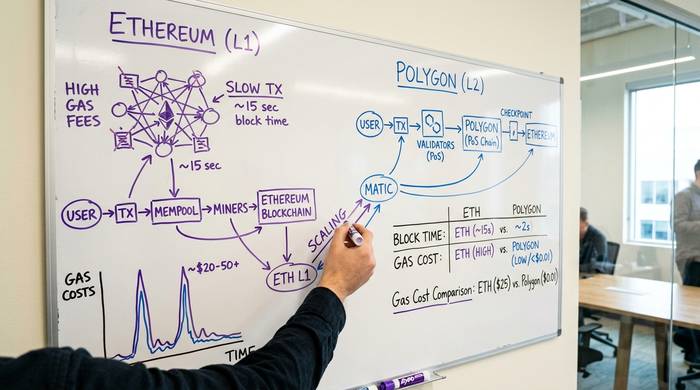
Etherscan reads Ethereum. PolygonScan reads Polygon. That matters because the two networks, while compatible (both are EVM-based), have different transaction histories, different tokens, different validators, and different gas mechanics. A transaction on Polygon does not show up on Etherscan and vice versa. If you bridged assets from Ethereum to Polygon, you need to check PolygonScan to see what happened after the bridge.
Polygon runs as a Proof-of-Stake sidechain that anchors its data back to Ethereum for security. Validators on the Polygon network confirm transactions and produce blocks. PolygonScan displays all of this: which validator confirmed which block, how much gas was used, what tokens were transferred, and whether the transaction succeeded or failed.
One thing that confuses people: the native token on Polygon was called MATIC for years and was rebranded to POL on September 4, 2024, as part of the Polygon 2.0 upgrade. The swap was 1:1, and roughly 99% of all MATIC has been converted to POL as of early 2026. POL trades around $0.09 with a market cap near $990 million. PolygonScan still shows both names depending on the context. If you see MATIC balances on PolygonScan, that is the same asset as POL.
How to use PolygonScan: the practical guide
You do not need an account. Open polygonscan.com in any browser. The homepage shows you the current POL/MATIC price, recent blocks, recent transactions, and a search bar at the top.
Looking up a transaction
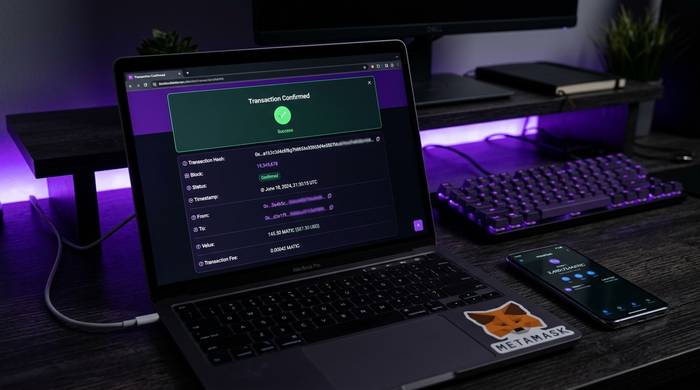
Grab the transaction hash from your wallet. It is the long 0x string your wallet shows after you send. Paste it into the PolygonScan search bar. Hit enter.
You get everything: status (Success, Failed, Pending), which block recorded it, the timestamp, sender and receiver, the amount, gas cost, and input data for smart contract calls. If it says Success, the money moved. If it says Failed, something broke, but you still paid gas. That is just how EVM chains work and there is nothing anyone can do about it.
Checking a wallet address
Paste a wallet address. You get the POL balance, every token in that wallet (ERC-20, ERC-721 NFTs, ERC-1155), and the full transaction history.
Here is the part that tripped me up early on. PolygonScan splits transactions into types: external (you signed it), internal (a smart contract triggered it), ERC-20 transfers, and NFT transfers. Why does that matter? Because sometimes you do a DeFi swap and the tokens you received show up under "Internal Transactions" instead of the main list. If you think a transaction is missing, check that tab before you panic. I spent 20 minutes convinced I lost $400 in USDC before I found it sitting under internal transactions on a Aave withdrawal.
Using the gas tracker
Gas on Polygon is cheap enough that most people never think about it. Under a penny per transaction. But the Gas Tracker still has its uses. It shows three speed tiers with estimated costs, plus two lists I actually find useful: "Gas Guzzlers" (the 25 contracts burning the most gas right now) and "Gas Spenders" (the 25 wallets paying the most fees). If I want to know which DeFi protocol is hot this week, the Gas Guzzlers list tells me faster than any analytics dashboard.
For regular users, gas optimization on Polygon is a non-issue. For developers running bots or deploying contracts hundreds of times, even sub-cent fees add up.
Verifying and reading smart contracts
Before I put money into any Polygon DeFi protocol or buy a token I found on Twitter, I check the contract on PolygonScan. This habit has saved me from at least two obvious rug pulls.
Search the contract address. Is the source code verified? If it is, you can read what the contract does. If it is not, the code is hidden and you are trusting a stranger not to drain your wallet.
Pull up the Holders tab. One wallet holding 90% of supply? Walk away. That is a dump waiting to happen.
Look at the transaction history. Real projects have hundreds of different wallets buying and selling. Scam tokens have five wallets trading back and forth to fake the volume numbers.
One more thing most people do not know: you can use the Read/Write interface to interact with a contract directly through PolygonScan. Read functions cost nothing. Write functions need your wallet and gas. I have used this to withdraw funds from a DeFi protocol whose website went down. The contract still worked even though the frontend did not.
PolygonScan features most people miss
Most people stop at transaction lookups and never explore the rest. That is like buying a Swiss Army knife and only using the blade. Here are the tools hiding behind the free account signup:
| Feature | What it does | Account needed? |
|---|---|---|
| Transaction lookup | Search any tx by hash | No |
| Wallet explorer | View balances, tokens, NFTs | No |
| Gas Tracker | Real-time fee estimates | No |
| Contract verification | Check and verify source code | No |
| Validator info | See who validated each block | No |
| Address watchlist | Email alerts for wallet activity | Yes (free) |
| Private notes | Label transactions with your own tags | Yes (free) |
| Name tags | Human-readable labels for addresses | Yes (free) |
| Token ignore list | Hide unwanted tokens from view | Yes (free) |
| API access | Programmatic blockchain data | Yes (free tier) |
The watchlist feature is genuinely useful if you track multiple wallets. You add addresses and get email notifications when anything moves. I use it to monitor a few DeFi positions without having to check manually every day.
Private notes let you attach your own descriptions to transactions and addresses. If you are doing taxes or tracking business payments, this keeps everything organized without a separate spreadsheet.
Token ignore list solves a specific annoyance: airdropped spam tokens that show up in your wallet uninvited. Scammers send worthless tokens to thousands of addresses hoping someone will try to swap them and interact with a malicious contract. The ignore list hides them so they do not clutter your portfolio view.
Polygon network data: what the numbers tell you
PolygonScan is not just a lookup tool. It is also a window into how the Polygon network is performing. The analytics section shows:
| Metric | Value (as of 2025) |
|---|---|
| Total transactions | 5.2 billion+ |
| Unique wallet addresses | 504 million |
| Peak daily active addresses | 1.67 million (mid-2024) |
| Average gas fee | Under $0.01 |
| dApps on Polygon | 37,000+ |
| Daily transaction count | Varies, typically millions |
These numbers matter because they tell you whether the network is growing, stagnating, or declining. If daily active addresses are trending up, more people are using Polygon. If gas fees spike, it means demand is outpacing capacity. PolygonScan gives you the raw data to form your own conclusions rather than relying on someone else's summary.
One thing I appreciate about the analytics section: you can see which DeFi protocols and NFT marketplaces are driving the most activity. During the last NFT boom, PolygonScan showed OpenSea and QuickSwap transactions dominating the gas usage charts. That kind of information helps you understand where the ecosystem's energy is concentrated, and it is all available for free.
The validators page is also worth checking if you are staking POL. You can see each validator's uptime, commission rate, self-stake amount, and how many delegators they have. Before delegating your tokens to a validator, I would always check their track record on PolygonScan rather than trusting a staking dashboard that might present data selectively.
Polygon 2.0, zkEVM, and what it means for PolygonScan
Polygon is not standing still as a network, and that affects what you see on PolygonScan.
The Polygon 2.0 upgrade, which started rolling out in late 2024, is turning the network from a single PoS sidechain into what they call an "AggLayer" — a system of interconnected chains including the original PoS chain, the zkEVM (zero-knowledge Ethereum Virtual Machine), and potentially many more chains connected through zero-knowledge proofs.
For PolygonScan users, this matters in a practical way. The PoS chain that you are used to browsing on PolygonScan is still there and still working. But Polygon zkEVM has its own explorer (zkevm.polygonscan.com) because it is a separate chain with separate blocks and transactions. If you used a bridge to move assets to Polygon zkEVM, your transaction will not show up on the regular PolygonScan. You need the zkEVM explorer.
Here is the big news that most PolygonScan guides do not mention: Polygon Labs announced in June 2025 that they will sunset the zkEVM Mainnet Beta in 2026. The project was losing over $1 million a year with limited adoption. The co-founder who led the zkEVM effort (Jordi Baylina, who came from the $250 million Hermez acquisition) has already left to start a new project. That means the zkEVM explorer at zkevm.polygonscan.com will become read-only. PolygonScan's focus remains on Polygon PoS.
The AggLayer part of Polygon 2.0 is still being built. It is supposed to connect multiple Polygon-powered chains so liquidity can flow between them without traditional bridges. When that matures, there may need to be a new kind of cross-chain explorer. But that is future territory.
For developers: the Etherscan V2 API unification that happened on May 31, 2025 means the PolygonScan API is now just Etherscan's API with a chain ID parameter. A single API key covers 60+ chains. Old PolygonScan-specific API keys are no longer valid. If you are building on Polygon and using the API, you need an Etherscan API key now, not a PolygonScan one.
After the March 2026 Lisovo hardfork, Polygon PoS now handles 2,600+ transactions per second, with a roadmap targeting 100,000 TPS. The network processed a record 204 million transactions in February 2026 alone.
PolygonScan vs Etherscan vs other explorers
I get asked this a lot: "why not just use Etherscan?" The tools are identical. The difference is what network they read:
| Aspect | PolygonScan (Polygon) | Etherscan (Ethereum) |
|---|---|---|
| Average gas fee | Under $0.01 | $1-$50+ depending on congestion |
| Block time | ~2 seconds | ~12 seconds |
| Consensus | Proof of Stake (validators) | Proof of Stake (stakers) |
| Native token | POL (formerly MATIC) | ETH |
| EVM compatible | Yes | Yes (the original EVM) |
| Interface | Built on Etherscan tech | Original |
| Smart contract interaction | Read/Write | Read/Write |
| API | Same structure as Etherscan API | The original API |
Are there alternatives? Sure. OKLink covers Polygon as part of its multi-chain explorer. Blockscout is open source and some projects prefer it for ideological reasons. Arkham does wallet intelligence with identity labels. But none of them have displaced PolygonScan as the default, and I doubt they will. When MetaMask links to a Polygon transaction, it sends you to PolygonScan. When DeFi protocols display explorer links, they point to PolygonScan. That kind of integration moat is almost impossible to overcome.