BscScan: how to use the BNB Smart Chain explorer to track transactions and spot scams
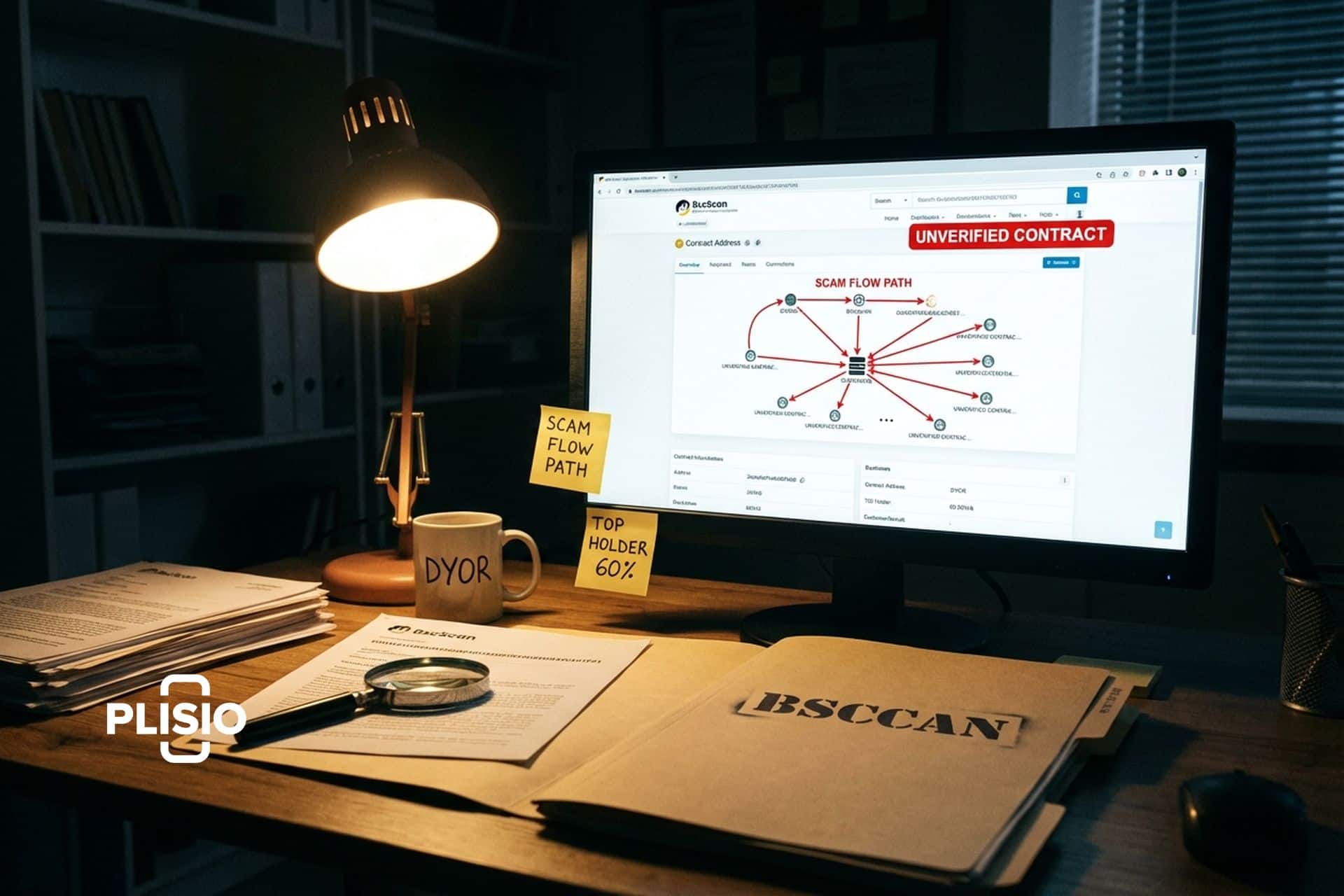
The first time I got rugged on BSC was in August 2021. A token called something-Moon-something. I bought $300 worth on PancakeSwap. Price looked great for about 20 minutes. Then I tried to sell and the transaction kept failing. I went to BscScan, pasted the contract address, and scrolled down to the source code section. "Not verified." That was my first red flag. I should have checked before buying. Then I looked at the holder list. The deployer wallet held 60% of supply. Second red flag. Then I read the contract bytecode and found a sell restriction that only let the owner address sell. Classic honeypot. My $300 was gone.
Everything I needed to know was on BscScan before I bought. I just did not look. That experience turned me from someone who used BscScan occasionally to someone who checks every single contract before interacting with it. If you trade on BNB Smart Chain, BscScan is not optional. It is your defense system.
BscScan is the blockchain explorer for BNB Smart Chain. Built by the same team behind Etherscan, it indexes every transaction, every wallet, every smart contract, and every token on BSC and presents the data in a searchable, human-readable format. Free. No account needed for basic use. Over 100 million page views per month from traders, developers, and researchers navigating the BSC ecosystem.
What BscScan does and who built it
BscScan is Etherscan's twin. Literally. The same company, Blockscan, built both platforms. When Binance launched BNB Smart Chain in September 2020, Blockscan deployed BscScan alongside it using the same codebase, UI patterns, and infrastructure they refined over years of running Etherscan. If you have used Etherscan to check Ethereum transactions, BscScan feels identical. Same search bar. Same transaction detail layout. Same contract verification system. Different blockchain underneath.
The explorer tracks everything that happens on BSC in real time. Every BNB transfer. Every BEP-20 token swap. Every smart contract deployment. Every NFT mint. Every failed transaction. Every gas fee. It processes all of this and makes it searchable within seconds of the transaction hitting the chain.
I think about BscScan the way I think about a car's dashboard. BSC is the engine running underneath. BscScan is the dashboard that tells you the speed, the fuel level, the warning lights. You can drive without looking at the dashboard. But you will miss the engine light until something breaks.
| BscScan overview | Details |
|---|---|
| URL | bscscan.com |
| Blockchain | BNB Smart Chain (BSC) |
| Built by | Blockscan (Etherscan team) |
| Launched | September 2020 |
| Cost | Free (Pro API available) |
| Account needed | No (optional for advanced features) |
| Monthly traffic | 100M+ page views |
| Token support | BEP-20, ERC-721, ERC-1155 |
How to use BscScan for everyday tasks
I use BscScan multiple times a day. Here are the workflows that matter most.
Checking if a transaction went through. You swapped tokens on PancakeSwap and nothing showed up in your wallet. Copy the transaction hash from your wallet history. Paste it into BscScan's search bar. The result page tells you everything: success or failure, what went in, what came out, how much gas was paid, which block it was included in. If the status says "Success" but you do not see the token in your wallet, the problem is your wallet not displaying the token yet. Add the contract address manually in MetaMask and it appears.
Looking up a wallet. Paste any BSC address into BscScan. You see the BNB balance, all BEP-20 token balances with dollar values, and the complete transaction history. I use this to research what large wallets are doing. When a known whale address starts accumulating a specific token, I see it on BscScan before any Twitter influencer mentions it. When the same whale starts sending tokens to Binance (the exchange), I know they are getting ready to sell.
Verifying a smart contract. This is the big one for security. Go to the contract address page on BscScan. Scroll down to the "Contract" tab. If you see a green checkmark and "Verified," the source code has been published and matches the deployed bytecode. Anyone can read the code and check for malicious functions. If you see "Contract source code not verified," the developer chose not to publish the code. Why? Either they are lazy or they are hiding something. For any new token, unverified contract = red flag.
Checking token approvals. Every time you use a dApp on BSC, you approve it to spend your tokens. BscScan has a Token Approval Checker (under "More" in the navigation). Paste your wallet address and see every contract you have ever given spending permission to. I check mine monthly and revoke approvals for dApps I no longer use. Each revoke costs a few cents in BNB gas. Cheap insurance against an old approval being exploited.
Reading contract source code. On verified contracts, BscScan shows the full Solidity code. I am not a developer, but I learned to spot a few danger patterns. Does the contract have a function called "setFee" that the owner can call to change the sell tax to 99%? Does it have a "blacklist" function? Does it have a "mint" function that can create unlimited tokens? You do not need to be a coder to search for these keywords in the source code.
How to use BscScan to spot scams on BSC
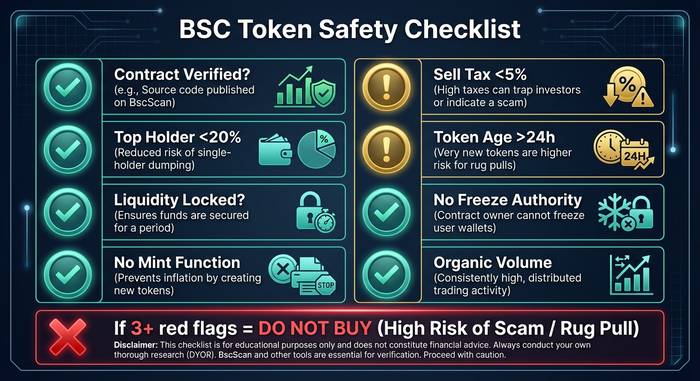
BSC had the worst rug pull problem of any chain during 2021-2022. Thousands of scam tokens launched daily. Many still do. BscScan is the frontline tool for avoiding them. Here is my checklist.
| Check | Where on BscScan | What to look for | Red flag |
|---|---|---|---|
| Contract verified? | Contract tab | Green checkmark | Unverified source code |
| Holder distribution | Holders tab | Top holders list | Any wallet >20% of supply |
| Liquidity locked? | Contract > Read Contract | Check LP token lock | No lock or short lock period |
| Owner can mint? | Contract source code | Search "mint" function | Mint function callable by owner |
| Sell tax hidden? | Contract source code | Search "fee" or "tax" | Owner-adjustable sell tax |
| Honeypot? | Try selling small amount | Transaction succeeds/fails | Buy works but sell fails |
| Token age | First transaction | Date of first transfer | Created minutes ago with hype |
| Deployer activity | Deployer wallet page | Transaction history | Sending to exchanges (dumping) |
I run through this list in under 3 minutes. It does not catch every scam. Sophisticated rug pullers write clean-looking contracts with hidden backdoors. But it catches the low-effort ones, which account for 90% of the scam tokens on BSC.
The holder distribution check is the fastest signal. If I see one wallet holding 40% of supply on a token with no public team and no audits, I do not care how good the chart looks. That wallet can dump at any time and the chart goes to zero. BscScan shows this data on every token page. Five seconds to check. Most people never look.
BscScan vs Etherscan: same team, different chain
I keep both bookmarked. The feature set is nearly identical because they share a codebase. The differences come from the underlying chains, not the explorer itself.
BSC transactions confirm in 3 seconds versus Ethereum's 12. So BscScan refreshes faster. Gas on BSC costs pennies versus dollars on Ethereum L1. So the gas tracker on BscScan shows numbers in the single gwei range while Etherscan's gas tracker shows 10-50+ gwei.
The contract ecosystem is different too. BSC has more low-quality tokens because deploying a contract costs almost nothing. Etherscan's token list is somewhat curated by cost (expensive gas filters out the laziest scammers). BscScan's token list includes everything because the barrier to deployment is near zero. This is why the scam detection workflow matters more on BscScan than Etherscan.
For developers, both platforms offer identical API structures. If you have written code that calls the Etherscan API, you can change the base URL to bscscan.com and the same endpoints work. The only adjustment is the chain ID and contract addresses.
One feature BscScan has that Etherscan users sometimes miss: BscScan shows opBNB (BSC's Layer 2) transactions alongside mainchain data. As opBNB adoption grows, this integrated view becomes more useful for tracking activity across both layers without switching explorers.
The BscScan API: data for developers and bots
BscScan's API mirrors Etherscan's API structure. If you know one, you know the other.
The free tier gives you 5 calls per second with access to account balances, transaction lists, token transfers, contract ABIs, and gas prices. That is enough for personal portfolio trackers, simple bots, and research scripts. I run a script that monitors 15 wallet addresses for large BEP-20 transfers and alerts me via Telegram. The free tier handles it without issues.
The Pro API unlocks higher rate limits (up to 30 calls per second on the highest tier), historical data queries, and additional endpoints for contract analytics. Pricing starts around $199 per month for the basic Pro tier. Enterprise pricing is custom.
Common API use cases on BSC: portfolio aggregation tools that pull wallet balances across dozens of addresses, DeFi dashboards that track PancakeSwap pool data, tax reporting integrations that export full transaction history, and trading bots that monitor mempool activity for new token launches.
The API documentation lives at docs.bscscan.com and follows the same conventions as Etherscan's docs. Code samples work across both platforms with minimal changes.
BNB Smart Chain in 2026: the context for why BscScan matters
BSC processes roughly 4-5 million transactions per day in 2026. The chain has over 700 million unique addresses created since launch. TVL on BSC sits around $5-6 billion, making it the third or fourth largest DeFi ecosystem. PancakeSwap alone processed over $2 trillion in cumulative swap volume.
The memecoin activity that characterized BSC in 2021-2022 has calmed somewhat, but new tokens still launch constantly. BscScan remains the first stop for anyone evaluating a new token, verifying a contract, or tracing funds. The explorer processes the entire fire hose of BSC activity and makes it searchable in a format that both beginners and professionals can use.
With opBNB (BSC's L2) growing and BNB Greenfield (decentralized storage) expanding the ecosystem, BscScan's role as the central intelligence tool for the BNB ecosystem is only getting more important. More chains and layers mean more data to navigate. BscScan is how you navigate it without getting lost.
I have used BscScan almost every day since September 2020. The interface has gotten cleaner. The speed has improved. The contract analysis tools have gotten deeper. But the core value is the same as day one: before you touch anything on BSC with your wallet, check it on BscScan first. The few minutes you spend could save you from the $300 lesson I learned the hard way.
Advanced BscScan features most people never use
There are tools buried in BscScan's menus that I did not discover until my second year of using the platform. They are worth knowing about.
Token Approval Checker. This one might be the most important security feature on the entire site. Go to bscscan.com/tokenapprovalchecker. Paste your wallet address. BscScan shows you every smart contract you have ever given permission to spend your tokens. Some of these approvals are from PancakeSwap swaps you did two years ago. Some are from dApps you tried once and forgot about. Each one is an open door. If any of those contracts gets compromised, the attacker can drain whatever tokens you approved. I found 47 old approvals on my main wallet when I first checked. Revoked all but the 5 I actually still use. Each revocation costs fractions of a cent in BNB gas.
Contract Diff Checker. Compares two smart contracts side by side. If someone tells you a new token contract is "a fork of PancakeSwap" or "based on SafeMoon's code," paste both addresses into the diff checker and see exactly what was changed. Added functions that the original does not have? That is where the scam lives. This tool saves you from trusting claims about code lineage.
Gas Tracker. Shows real-time gas prices and the top gas-consuming contracts on BSC. During a hot memecoin launch, gas prices spike because thousands of people try to buy simultaneously. The gas tracker tells you whether this is a good time to transact or whether you should wait 20 minutes for the congestion to clear. On BSC the difference is usually pennies, not dollars like Ethereum. But if you are making 50 swaps a day, pennies add up.
Validator Info. BSC runs on 45 validators (21 active per epoch). BscScan shows their uptime, commission rates, total delegated BNB, and blocks produced. If you stake BNB through a validator and want to know whether your validator is performing well or about to get jailed, this page gives you the data. I check it quarterly to make sure my staked BNB is not sitting with an underperforming validator.
Write Contract. This is the power user move. On any verified contract, BscScan lets you interact with the smart contract functions directly through the browser. Connect your wallet, pick a function, enter the parameters, and execute. Developers use this for testing. Traders use it to call specific contract functions that the dApp's front end does not expose. I have used it to manually claim staking rewards from a protocol whose website went down but whose contract was still running fine on chain.
The anatomy of a BscScan transaction page
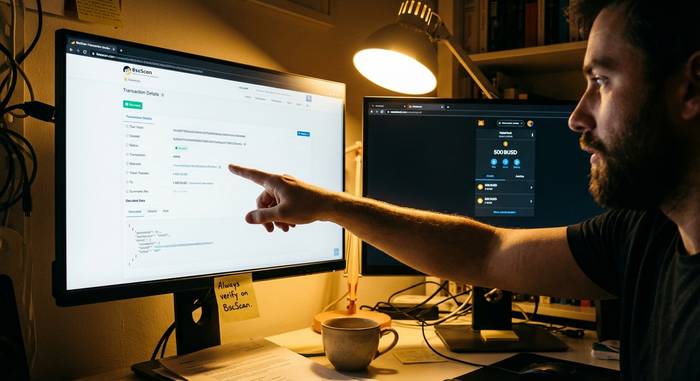
Let me walk you through what you actually see when you look up a transaction, because beginners often miss important details.
At the top: transaction hash, status (green checkmark for success, red X for failure), block number, and timestamp. If the status is failed, the page tells you why: out of gas, reverted, or another error code.
Below that: the "from" and "to" addresses. For a simple BNB transfer, this is the sender and receiver. For a smart contract interaction, the "to" address is the contract and the "from" is the user who called it.
The "Value" field shows how much BNB was sent with the transaction. For token swaps this is often 0 BNB because the value is in tokens, not native BNB.
The "Transaction Fee" shows what you paid in gas. On BSC this is typically $0.01-0.05. During peak congestion it might hit $0.10-0.20. Still nothing compared to Ethereum.
Scroll down and you get "Input Data" which shows the raw function call. For a PancakeSwap swap, this tells you the function name (swapExactTokensForTokens), the token amounts, and the routing path. BscScan decodes this into readable format on verified contracts.
The "Logs" section at the bottom shows all the events emitted during the transaction. Transfer events show token movements. Swap events show DEX trades. Approval events show permission changes. Reading the logs gives you the complete picture of everything that happened in that transaction, not just the surface-level summary.
Learning to read transaction pages took me about a week of looking at 5-10 transactions per day. After that, it becomes second nature. Every piece of information you need to understand what happened to your crypto is on that page. The blockchain hides nothing. BscScan just makes it readable.