What Is a Crypto Hardware Wallet? Beginner’s Security Guide
$2.2 billion. That is what thieves stole from crypto users in 2024, per Chainalysis. And almost 44% of it came down to one thing: somebody got hold of a private key.
Not broken cryptography. Bitcoin still works. Ethereum still works. The keys, though, were just sitting on the wrong device when the attacker came calling.
A crypto hardware wallet fixes that one specific problem, and not much else. Think of it as a USB stick with a screen. Your private keys live inside a sealed chip on the device. They sign transactions right there, on the device, and never get copied to your laptop or phone. If your computer is overrun with malware, the worst it can do is ask the wallet to sign something. The wallet shows you what it would sign. You read it. You decide.
If you keep crypto on an exchange or a browser extension and you have not yet pulled the trigger on a hardware wallet, this guide is for you. We will cover what the device actually does, what it cannot do, the real attacks people lose money to, and how to buy one without getting scammed in the process.
Cryptocurrency Hardware Wallets Explained Plainly
In plain English: a hardware wallet is a small physical device, often shaped like a thick USB stick, that stores the private key for your cryptocurrency offline. Some come with buttons. Some sport touchscreens. The pricey ones throw in Bluetooth. And none of them, despite the name, hold your actual coins. This part trips up almost every beginner.
Where do your coins live then? On the blockchain. The blockchain is a public ledger copied across thousands of computers worldwide. The wallet does not store the coins; it stores the cryptographic key that proves the coins are yours and lets you spend them. Imagine a vault somewhere with your gold inside. The vault is the blockchain. The wallet is the only key that opens it.
Lose the device without a backup, and your coins are still in the vault, just stuck. Hand someone the key, and they clean you out before you finish your morning coffee.
The wallet has one narrow job. Keep that key offline. Sign each transaction inside the device. Never let the key touch a laptop or phone that some attacker might have infected. End of story. That single design call is what separates a $129 wallet, a tiny physical piece of hardware, from the cold storage approach big exchanges use to protect billions in customer funds. Hardware wallets are considered the gold standard for self-custody, and honestly? The reason is that simple.
How Does a Hardware Wallet Work Behind the Screen
Three things make the wallet work. A secure chip, where the private key lives and a tiny custom operating system runs. A screen and buttons (or a touchscreen on the newer ones) so you can confirm what you are signing without trusting your laptop. And a companion app on your phone or computer that talks to the blockchain.
You want to see how the benefits of a hardware wallet show up in practice? Watch what happens when you send crypto from one. Step by step:
1. Open the companion app, hit Send, type the recipient address, type the amount. Say 0.1 BTC to your friend.
2. The app builds the unsigned transaction and shoves it over to the device, via USB or Bluetooth or a QR code if the wallet is air-gapped.
3. The hardware wallet shows the destination address and the amount on its own little screen.
4. You read both. Press the physical button to approve. Or reject and walk away.
5. The chip signs the transaction with the private key, right there inside the device. The key never moves.
6. The signed transaction goes back to the app, which broadcasts it to the blockchain. Done.
The private key never leaves the device. Period. Even if your laptop is crawling with malware, the malware cannot do more than propose a bad transaction. Your eyes on the wallet screen are the last line of defense. Engineers call this "what you see is what you sign." Older terminology calls the device a "signer," for the same reason — signing transactions is genuinely all the device does.
Hot Wallet vs Software Wallet vs Hardware Wallet
A hot wallet is any crypto wallet whose private keys are stored on a device that is constantly connected to the internet. Mobile wallets, desktop wallets, browser extensions like MetaMask, and exchange wallet apps. All hot. They are convenient. Tap, sign, send, done. They are also the front door for thieves.
A software wallet is the broader category that includes hot wallets and any application-based wallet. Within that group, custodial wallets keep the private key on a company's server (an exchange holds the keys for you), while non-custodial software wallets store the keys in your phone or browser. Most people use the terms loosely. A hardware wallet is the third type of wallet, and the only one where the private key offline guarantee actually holds.
The trade-off is real:
| Feature | Hot Wallet / Software Wallet | Hardware Wallet |
|---|---|---|
| Private key location | On a phone, laptop, or browser | Inside a sealed secure chip |
| Connect to the internet | Always | Only when you sign a transaction |
| Setup difficulty | A few minutes, free | 20-30 minutes, $50-$250 |
| Best for | Daily spending, small balances | Long-term storage, larger balances |
| Main risk | Malware, phishing, browser exploits | Lost device, lost seed phrase, user error |
| Recovery if lost | Reinstall app, enter seed phrase | New device, enter seed phrase |
Most experienced crypto users run both. They keep day-to-day spending money in a hot wallet on their phone, and the larger holdings in cold storage on a hardware wallet. Treat your crypto assets the way you treat cash: a few hundred dollars in your pocket, the rest in the bank. The hardware wallet is where the bulk of your digital assets sit when you are not actively spending them.
Cold Wallet, Cold Storage, and the Blockchain Truth
People throw the words "cold wallet" and "hardware wallet" around as if they mean the same thing. They almost do, but not quite.
Cold storage means your private key offline, with no live connection to the internet. A paper wallet, literally a piece of paper with a seed phrase written on it, is technically cold storage. So is a hardware wallet sitting in a drawer. The moment you plug the device into a computer to send a crypto transaction, it briefly becomes warmer. Still safer than a hot wallet, because the key stays inside the chip, but no longer fully air-gapped.
That is why some advanced users keep a separate "deep cold" wallet that they almost never connect at all, and a "warm" hardware wallet for actual use. Both are still hardware wallets. Both still keep the private key offline most of the time. The difference is how often you take the device out of its drawer.
Coinbase publicly states that 98%+ of customer assets sit in cold storage. That number is not marketing fluff. It is the same principle a retail investor with a $129 device is using on a smaller scale: the asset stays on the blockchain, but the keys to move it are kept far away from anything online. The blockchain part never changes. What changes is who controls the keys, and where those keys live.
Crypto Security Threats a Hardware Wallet Stops
So why hand over $129 for a slab of plastic? Easy. Take a look at how people actually lose crypto. TRM Labs counted up $2.1 billion stolen in just the first six months of 2025. Roughly 80% of those losses traced back to stolen private keys, seed-phrase heists, and front-end hijacks. Smart contract bugs? Barely made a blip. The wallet, not the protocol, is the main attack surface now.
Here is what a hardware wallet actually defends against:
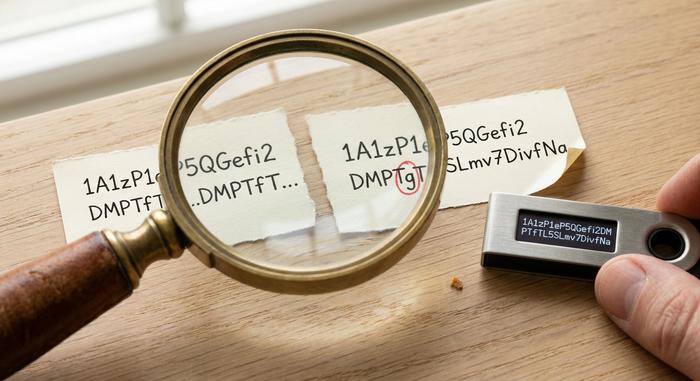
- Clipboard malware. Trojans like ClipBanker run silently in the background. You copy a wallet address. The malware swaps it with the attacker's address before you paste. Kaspersky logged 2,000+ ClipBanker detections in early 2025 alone. A hardware wallet shows the real destination on its own trusted screen, so you spot the swap before you press approve.
- Phishing pages and fake apps. Cloned exchange page, poisoned browser extension, sketchy "support" message on Telegram. They all want your seed phrase. A hardware wallet never asks for that phrase outside its own setup flow. If anything else, ever, anywhere, asks for the 24 words, it is a scam. Walk away.
- Exchange collapses. When FTX folded in late 2022, customers learned the meaning of "not your keys, not your crypto" in real time. Withdrawals froze. Funds were gone. With a hardware wallet, the only way somebody stops you from spending your crypto is if they take the device and the seed phrase from your hand.
- Address poisoning. A January 2025 academic paper logged 6,633 confirmed incidents between 2022 and 2024, totaling $83.8 million in losses. One trader lost $50 million in USDT in a single transaction in late 2025. The attack spams look-alike addresses into your transaction history, hoping you copy the wrong one when you fire off the next transfer. Verifying the full destination address on the wallet's screen kills it.
- Browser exploits and malicious JavaScript. Even the world's largest crypto custodian is not immune to a dirty front-end. The hardware wallet treats the laptop as untrusted by default, so a compromised browser cannot move your funds unless you press the button.
Spot the pattern? The device does not stop attacks. Attacks keep coming whether you own a wallet or not. What it does is put glass and silicon between the attacker and your key, then hand you the final call. Press approve. Press reject. Up to you.

Bitcoin Heists and the Hardware Wallet Lesson
February 21, 2025. The exchange Bybit ran what should have been a routine transfer between cold and warm wallets. About $1.5 billion in ether vanished. Three days later, the FBI's Internet Crime Complaint Center confirmed the obvious: this was the largest crypto heist on record. The culprit, almost certainly, was North Korea's Lazarus Group. And here is the part that should make you sit up. The attackers did not break a hardware wallet. They corrupted the front-end the human signers were staring at. The signers, several of them, approved the malicious transaction without checking the real destination on a trusted screen.
That is the single most important lesson in the entire space, and it cuts straight against the marketing. A hardware wallet is necessary. It is not sufficient. The minute you blind-sign a transaction, the minute you press approve without reading what is on the device's screen, you give up the only protection the device offers. TRM Labs pegs North Korea's share of H1 2025 thefts at roughly 70%. A meaningful chunk of that came from people who treated their hardware wallet as a magic box.
The Phantom Wallet incident on Solana in May 2025 hit retail users the same way. About 80 victims lost a combined $1.5 million after approving transactions whose actual contents were hidden behind opaque code. So look at the device. Read every line. If the address on screen does not match the one you typed, or the token amount is off by even a hair, reject. Walk away. Newer wallets call this "clear signing," which is a fancy phrase for the device showing you human-readable details instead of a raw blob of hex.
One more story worth knowing. Back in 2019, security researchers demonstrated that an attacker with physical access to a Trezor One or Model T could extract the seed phrase in roughly 15 minutes using voltage glitching. Sounds scary. The fix was almost embarrassingly simple: add a passphrase on top of the seed, which the device does not store. The lesson is that hardware is hard, but no device on Earth is bulletproof against an unlimited budget plus physical possession. Backup hygiene and a strong passphrase still matter, and they always will.
How to Choose a Hardware Wallet You Can Trust
The hardware wallet market is small but crowded. Ledger and Trezor together hold roughly 70% of the market. Ledger has shipped more than 8 million signers since 2014. Trezor has shipped more than 2 million. Plenty of strong alternatives exist, especially for Bitcoin-only or air-gapped use cases.
Five things to weigh before you buy a hardware wallet:
1. Open-source firmware. Trezor and Coldcard publish their firmware. Ledger does not fully, though it has committed to opening more. Open source does not guarantee no bugs, but it lets independent researchers review the code. For users who want belt-and-suspenders trust, this matters.
2. Secure element chip. Devices using a certified secure element (often EAL5+ or higher) resist physical tampering and side-channel attacks better than ones built on plain microcontrollers. Most modern wallets use one. Some Bitcoin-only purists prefer wallets without a closed secure element so the entire stack is auditable. The Trezor Safe 7, released in 2025, ships an open-source secure element called TROPIC01 and is the first attempt at squaring this circle.
3. Clear signing support. The device should display the full destination address, the token, and the amount in human-readable form on its own screen. Wallets that force you to blind-sign, to approve without seeing real details, are a known weak point. Security researcher reviews in 2025 ranked devices specifically on calldata decoding for this reason.
4. Air-gap or USB-only. Some wallets, like the Coldcard Q1 and the Foundation Passport, communicate by camera and microSD card, never plugging into a computer at all. That is overkill for most users but useful for very large balances. USB-only is fine for everyday use.
5. Where you buy it. Buy a hardware wallet directly from the wallet manufacturer. Never use a used hardware wallet from a stranger. The Ledger 2020 e-commerce breach exposed 1.1 million email addresses and 272,000 full names, phone numbers, and home addresses, fueling years of phishing emails and even physical-mail "fake replacement device" scams. The lesson is not that Ledger is reckless. The lesson is that any address list connected to a hardware wallet brand becomes a juicy target for criminals. Verify the holographic seal. If the box looks like it has been opened, do not initialize the device.
A hardware wallet from a reputable manufacturer, bought directly, set up by you, with a seed phrase nobody else has ever seen, is in a different security category from anything you will get on a phone. The security benefits of a hardware wallet only hold when the supply chain is clean.
Popular Hardware Wallets in 2026: A Quick Comparison
The market has settled around a handful of devices that handle the vast majority of real-world use. Prices below are official 2026 retail.
| Wallet | Price | Open Source | Secure Element | Connection | Best For |
|---|---|---|---|---|---|
| Ledger Nano S Plus | $79 | Partial | Yes | USB-C | Beginners on a budget |
| Ledger Nano X | $149 | Partial | Yes | USB-C, Bluetooth | Mobile users |
| Ledger Flex | $249 | Partial | Yes | USB-C, Bluetooth | Touchscreen, 5,500+ assets |
| Trezor Safe 3 | $79 | Yes | Yes | USB-C | Long-term Bitcoin holders |
| Trezor Safe 5 | $129 | Yes | Yes | USB-C, color touchscreen | Most everyday users |
| Trezor Safe 7 | $169 | Yes | Yes (open) | USB-C, Bluetooth, 2.5" screen | Open-source maximalists |
| BitBox02 | $149 | Yes | Yes | USB-C | Privacy-focused Europeans |
| Coldcard Mk4 | $158 | Yes (verifiable) | Yes | USB-C, microSD | Bitcoin-only, air-gap option |
| Coldcard Q1 | $249 | Yes | Yes | Camera, microSD, batteries | Air-gap maximalists |
| Foundation Passport V2 | $199 | Yes | Yes | Camera, microSD | Bitcoin-only, beautiful UX |
Year-over-year hardware wallet sales grew about 31% in 2025 according to industry data, driven mostly by post-FTX self-custody anxiety. North America accounts for nearly 40% of the global market. The category is no longer niche.
A note on the rebrand: Ledger has started calling its devices "signers" rather than wallets, on the argument that they do not actually store value. The terminology has not stuck broadly. Most people still say hardware wallet, but the framing is technically correct.
How to Use a Hardware Wallet With Multiple Wallets
A single hardware wallet can manage multiple wallets across multiple blockchains. One device, one seed phrase, hundreds of accounts. That is a feature, not a bug.
Setting one up looks roughly like this, regardless of brand:
1. Buy from the manufacturer. Verify the packaging seal.
2. Initialize the device yourself. Connect it to the computer, install the official companion app, and let the device generate a brand-new seed phrase on its own screen. Never use a seed phrase that came pre-printed in the box. Never accept a seed phrase from anyone.
3. Write the seed phrase down on paper. Twelve or twenty-four words, in order. Order matters. This is the only thing that can recover your funds if the device is lost. Anyone with this list can drain you.
4. Set a strong PIN. Most devices allow 4-8 digits, with progressive lockouts after wrong tries.
5. Optionally, add a passphrase. A passphrase is an extra word or sentence that the device does not store. It creates a hidden second wallet on top of the seed. If someone steals the seed but does not know your passphrase, they get an empty decoy. This is what defeats voltage-glitching attacks and most physical-coercion scenarios.
6. Send a small test transaction. Before moving real money, send a few dollars to the new wallet, then send a few dollars back out. Verify the addresses on the device screen each time.
7. Store the seed phrase in two separate physical locations. Steel plates beat paper for fire and water resistance. A safe deposit box plus a home safe is a common pattern. Never store the seed phrase digitally. No photos, no cloud backup, no password manager.
To send crypto, plug the device in, open the app, paste or scan the destination address, and read the address on the device screen before pressing approve. Every time. The clipboard malware and address-poisoning attacks above all rely on you skipping that one step.
For very large crypto holdings, it is common to split funds across multiple hardware wallets in different physical locations. A single hardware wallet is a single point of failure. Two devices with separate seeds, one for long-term storage and one for active use, is a healthy upgrade. Pair them with mobile wallets for daily spending, and you have software and hardware working together: the convenience of an app for small amounts of crypto, the safety of cold storage for the bulk of your funds.