How to play Google Block Breaker and win the world record

Back in May 2010, Google replaced its homepage logo with a playable Pac-Man Doodle for 48 hours. The productivity tracker RescueTime later ran the numbers and arrived at a figure that still gets quoted today: roughly 4.82 million hours and around $120 million in lost work, spread across 505 million Google homepage visitors over two days. That single Doodle made one thing very clear. People will, in fact, drop everything to play a game served at the top of the world's most-visited search box.
Fifteen years later, Google has done it again, more quietly this time, with a small playable game called Block Breaker. Search "block breaker" or "brick breaker" on google.com and a paddle appears below the search bar. The bricks are coloured in Google's familiar palette. The ball bounces. You play. You probably get to level three, watch your high score creep up, and then remember that you came here to look up a doctor.
This piece is your full guide to the new Google Block Breaker. We will cover what it is and how to start playing, where it came from (Atari, 1976, a couple of Steves, one of them upset), the controls and power-ups, simple tips to push your score higher, and a wider tour of the other Google easter eggs that still work in 2026. Most articles miss the fact that Block Breaker is a brand-new game, not the dead 2013 Images easter egg. We will straighten that out first.
What Google Block Breaker is and how to play it
Google Block Breaker is a small in-browser arcade game that Google quietly added to the main search results page in January 2025. There was no official Google Blog post; it was discovered and reported by Android Police, Android Central and Yahoo Tech, and within days it had been picked up across tech media. The trigger query is simple: type "block breaker" or "google block breaker" or "brick breaker" into Google Search and you will see an interactive panel appear above the regular results. A coloured grid of blocks sits on top, a paddle sits at the bottom, and a ball waits to be launched.
This is not the famous Atari Breakout easter egg from 2013. That one ran inside Google Images, turning your image thumbnails into bricks. The 2019 redesign of Google Images broke it, and by around 2020 it had been quietly retired. The new Block Breaker is a separate, modern game. It runs on the search results page, supports light and dark mode, has multiple stages, comes with power-ups, and includes a share button so you can post your score.
Controls are forgiving. On desktop you move the paddle with your mouse or with the left and right arrow keys, and you launch the ball by clicking or pressing the space bar. On mobile you tap and swipe. There are no settings to set up, no installer, no account, no ads, and the game is free. There is also no save state, which is the first thing most players miss: close the tab and your progress is gone. Each session starts at level one. You get three lives and the ball speeds up as you clear blocks, which is the entire game in one sentence. The challenge is keeping that ball alive long enough to chase a serious score.
A small but important detail: Block Breaker only loads if your Google Search interface is set to English. Several non-English locales will return ordinary search results for the same query. If the game does not appear, switch your Google language to English at google.com/preferences and try again. This is standard for many Google easter eggs.
From Atari 1976 to Google: a quick block breaker history
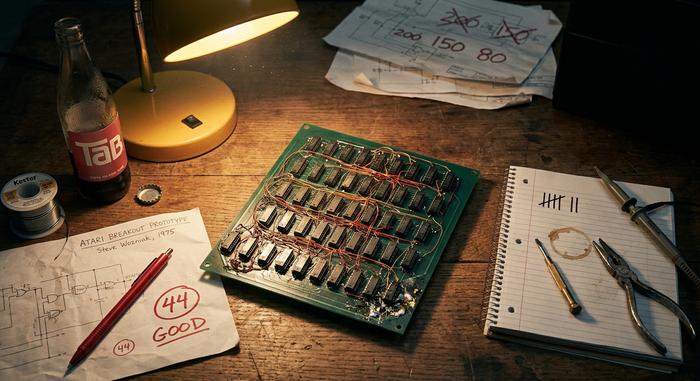
The classic block breaker is older than most of the people playing it. Atari released the original arcade machine in April 1976. Nolan Bushnell and Steve Bristow had the concept: a single-player Pong, but with a wall of bricks instead of an opponent's paddle. Bushnell wanted the prototype built fast and on as few chips as possible, so the contract went to a young Atari technician — Steve Jobs, employee number 40, hired in 1974 at five dollars an hour.
Jobs was not a hardware engineer. He sub-contracted the actual circuit design to his friend Steve Wozniak, then still working at Hewlett-Packard. According to IEEE Spectrum and Wozniak's own retelling, Woz built the prototype in four sleepless nights and crushed the chip count from a normal ~200 down to about 44. Bushnell had offered a $750 base plus $100 for every chip eliminated below fifty. Atari paid Jobs a $5,000 bonus. Jobs told Wozniak the bonus was only around $700 and gave him $350. Years later, Wozniak found out the real number from a magazine and reportedly cried about it on television.
Whatever you think of that story, Breakout shipped 11,000 cabinets and did roughly $11 million in revenue in 1976 dollars, which is around $62 million in today's terms. The game's hardware lessons fed straight into the Apple II: paddle controllers, colour graphics, beeper sound. Wozniak even wrote a clone called "Brick Out" in Integer BASIC to demo the new computer at the Homebrew Computer Club.
Google's first nod to all this came in May 2013, on the 37th anniversary, with the Atari Breakout image search trick — closer to a Google Doodle than a full game. It worked beautifully for years and became one of the most shared Google easter eggs ever. The 2019 Image Search redesign killed off the "View image" button it depended on, and by 2020 the egg was effectively gone. Fan archives, especially elgooG.im/breakout, preserved the original feel for nostalgia players.
| Year | Atari Breakout milestone | Source |
|---|---|---|
| 1976 | Arcade release, 11,000 cabinets, ~$11M revenue | Wikipedia, Den of Geek |
| 1976 | Wozniak prototype: ~44 chips, 4 nights | IEEE Spectrum |
| 1977 | Apple II ships with paddle/colour features inherited from Breakout | Wikipedia |
| 2013 | Google Images "atari breakout" easter egg launches | Search Engine Land |
| 2019–2020 | Image Search redesign breaks the easter egg; quietly retired | Google support thread |
| 2022 | Atari 50: The Anniversary Celebration compilation released | Wikipedia |
| 2025 | Google launches new "Block Breaker" on the SERP | Android Police |
The January 2025 Block Breaker is therefore not a remake of the 2013 trick. It is a brand-new in-house build — one that taps the same fifty-year-old reflex.
Quick tips to boost your score and break more blocks
Most strategy advice for this kind of classic arcade game is identical and has been since 1976. A few of the tips are different in Google's version, though, because stage layouts shift, indestructible blocks appear after level five or so, and the ball speed ramps faster than the old Atari original.
A short list of tactical tips that actually moves your score:
1. Tunnel a corner first. If you can punch a vertical channel up the side of the wall, the ball gets trapped above the bricks and clears two-thirds of the level on its own. This is the single biggest trick, and it works on every version of Breakout ever made.
2. Use the paddle edge to angle precisely. The ball bounces straight up off the centre and at sharper angles off the edge; do not park the paddle in the middle and hope. Nudge it to aim where the ball goes next.
3. With multiple balls, track the slow one. Multi-ball is fun but chaotic — keep your eye on the slowest ball, since the fast one is harder to follow and you score the same per brick either way.
4. Skip the laser when ball speed is already high. Power-ups are not always good: the laser pickup is great on slow levels and a nightmare when the ball is already moving like a hornet, because you take your eye off the ball to aim.
5. Learn the indestructible block patterns. They show up around level five. Once you know they are there, you stop wasting bounces on them and start angling around them.
A good run on Google Block Breaker can hit five or six figures of points. A reddit thread from r/gaming earlier this year posted a session score of 144,500, which is well above the average and comes mostly from corner-tunnelling on the early stages. To master the higher levels you need patience more than reflexes. World-record hunters keep pushing higher, but Google does not maintain a public leaderboard, so most "world record" claims are unverified social-media posts.
Power-ups, levels, and the gameplay loop
The gameplay loop is the same as classic Atari, with a modern paint job. You launch a ball, you bounce it off your paddle, the ball breaks colored blocks, and the level ends when the wall is empty or you run out of lives. The ball speed climbs as the screen empties out, which is the part that wrecks most runs. You also break the standard arcade rhythm with a small set of power-ups that drop randomly when certain blocks shatter.
The three regular power-ups in the modern version are simple. Multi-ball splits the ball into two or three; great for chewing through dense walls, punishing if you lose track. Paddle expansion widens your paddle for a short window — the most useful pickup on tricky angle stages. Lasers let your paddle take a shot upward to break a few blocks directly, and they work best on slower stages where the ball is not already a blur.
Levels add new patterns: rows that move, indestructible blocks that need to be played around, and gem-like bricks that give a bonus point per hit. Combo multipliers reward fast consecutive hits, so a run that keeps the ball alive in a tight pattern scores far more than one that loses the ball every layout. The whole loop runs anywhere between thirty seconds (a quick tunnel and you are done) and several minutes per stage. There is no save, no checkpoint, and no story. That is, by design, the charm.
Other Google easter eggs you can play right now
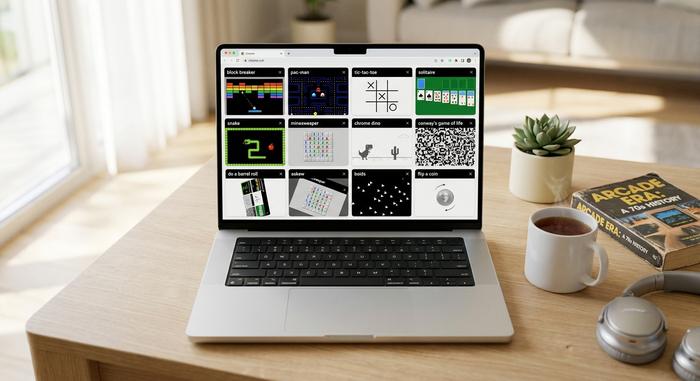
Block Breaker is the most recent addition to a long Google tradition of hiding playable games and silly animations in plain sight. As of 2026 the living set is bigger than most casual users realize. Here is what still works without leaving the search box:
| Game / trigger | How to play | Year added |
|---|---|---|
| Block Breaker | search "block breaker" | January 2025 |
| Pac-Man | search "pac-man" | May 2010 (Doodle), embedded since |
| Tic-Tac-Toe | search "tic tac toe" | ~2016 |
| Solitaire | search "solitaire" | 2016 |
| Snake | search "snake" | 2013 (Year of the Snake), later embedded |
| Minesweeper | search "minesweeper" | 2018 |
| Conway's Game of Life | search "conway's game of life" | 2020 |
| Boids / starlings | search "boids" or "starlings" | 2024 |
| Flip a coin / roll a die | exact phrase | 2015–2016 |
| Chrome Dino (T-Rex) | offline tab in Chrome, or chrome://dino | September 2014 |
| Do a barrel roll | search "do a barrel roll" | 2011 |
| Askew | search "askew" | ~2013 |
A few of the recent additions are pure pop culture. Searching "67" or "six seven" triggers a 2025 page-shake riff on a TikTok meme. "John Cena" pulls a "you can't see me" overlay tied to his post-retirement run. "Aurora borealis" or "northern lights" paints the page with an aurora animation. On May 7, 2026, 9to5Google reported that searching "David Attenborough" briefly triggered a tribute animation for his 100th birthday.
Two famous eggs are dead inside Google itself. The Atari Breakout trick disappeared with the 2019 Images redesign. Zerg Rush, launched in April 2012, where Google's letter Os attacked your search results, was retired a few years later. Both live on at fan archives such as elgooG.im, which deliberately preserves them.
The numbers behind a few of these are stunning. Pac-Man Doodle's 48 hours on the homepage in 2010 cost an estimated $120 million in productivity, per RescueTime. The Chrome Dino, released in September 2014 under the codename "Project Bolan", was being played roughly 270 million times a month back in 2018, the last figure Google publicly shared. Add up the headcount across all of them and Google's quiet little games — Pac-Man, Solitaire, Snake, Dino, and now Block Breaker — might be the most-played video games on the planet.
Why a 50-year-old game is still this fun
I keep coming back to one thought when I open Block Breaker: nothing about this retro mechanic should still work. The genre is from 1976, the visuals are deliberately simple, and the game runs in a tab next to a search bar. And yet it gets you, every time, for ten minutes. That is the trick Google understands very well. A clean dopamine loop, an old reflex, and a surface you were already on. The result is quietly addictive, and it is fun precisely because it is small.