Crypto Fees Explained
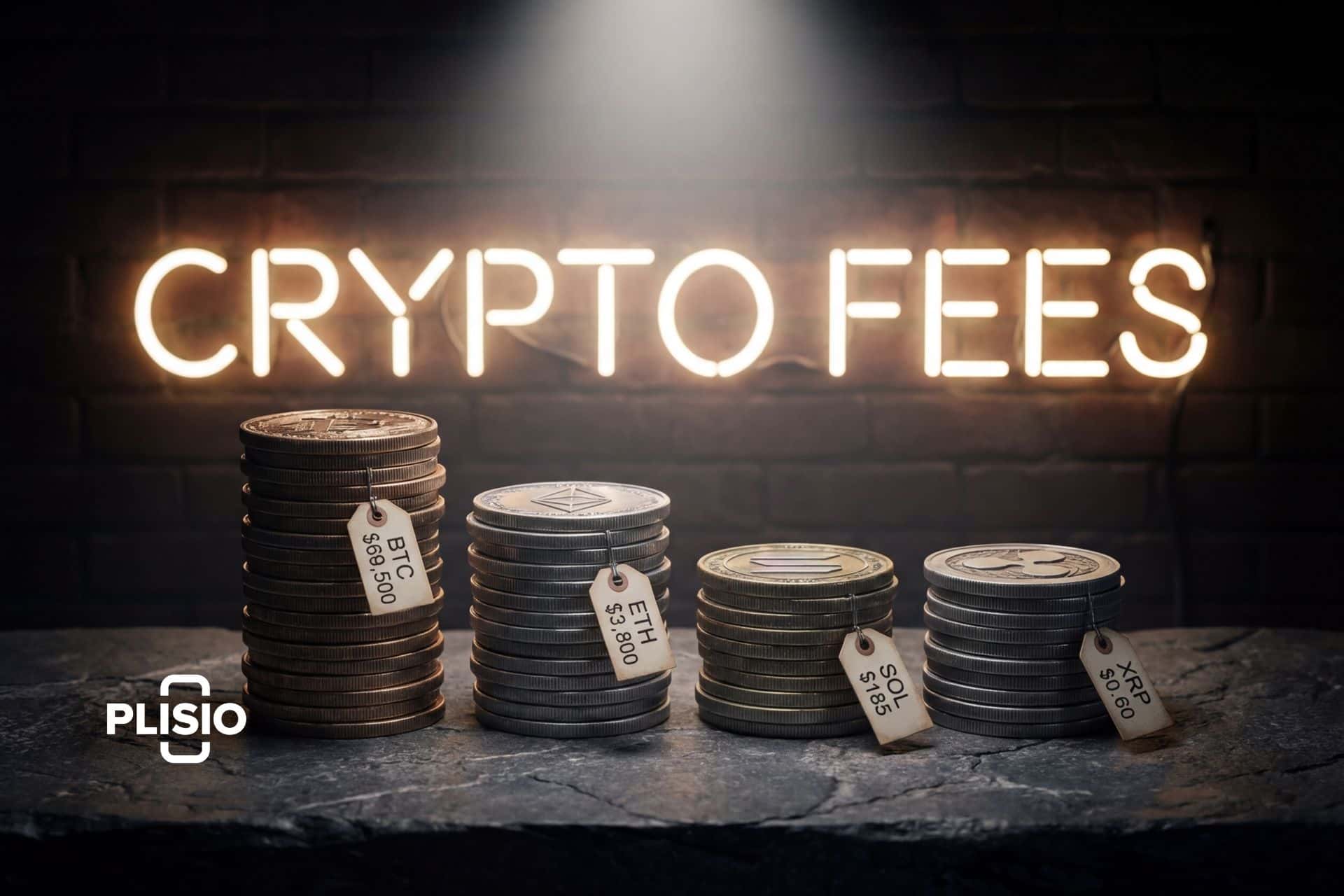
Every time somebody new to crypto makes their first transaction and sees the fee breakdown, they have the same reaction: "Wait, I'm paying for what?" Network fee. Gas fee. Trading fee. Withdrawal fee. Spread. It adds up fast, and most people don't understand where the money goes.
Here's the thing though. Crypto fees aren't arbitrary. Every one of them exists for a reason, usually to pay the people keeping the network secure or to keep an exchange profitable enough to stay open. Some you can avoid. Some you can minimize. Some you just have to live with.
I'm going to break down every type of crypto fee you'll encounter, tell you what's reasonable and what's a ripoff, show you which blockchains charge the least, and give you actual tactics for spending less on fees. No fluff. Just the numbers.
Network fees: the cost of using the blockchain
This one's unavoidable. Every time you move crypto from one wallet to another, the blockchain charges you. That money goes to miners on Bitcoin, validators on Ethereum and Solana. It's their payment for confirming your transaction and keeping the network secure. Without it, nobody would bother running the hardware.
Why isn't it free? Space. Bitcoin squeezes about 2,800 transactions into each block. Ethereum's main chain does maybe 15-30 per second. When more people want to transact than there's room for, it turns into an auction. Offer a bigger fee, your transaction gets priority. Offer less, sit in the queue. It's supply and demand in its purest form.
What actually hits your wallet depends hugely on which blockchain you're using.
| Blockchain | Typical fee (2026) | Peak fee | Speed |
|---|---|---|---|
| Bitcoin | $1-5 | $20-60+ during hype | ~10 min confirmation |
| Ethereum (L1) | $0.50-5 | $50-100+ in NFT mints | ~12 seconds |
| Ethereum (L2: Arbitrum, Base) | $0.01-0.30 | Under $1 | Seconds |
| Solana | ~$0.002 | Still under $0.01 | ~400ms |
| Litecoin | ~$0.01 | Rarely above $0.05 | ~2.5 min |
| XRP | ~$0.0002 | Nearly always flat | 3-5 seconds |
| Nano | $0.00 | $0.00 (feeless) | Under 1 second |
| TRON | ~$0.00 for TRX transfers | USDT-TRC20 ~$1 | ~3 seconds |
| Dash | ~$0.0002 | Rarely spikes | ~2 seconds (InstantSend) |
Nano deserves a mention here because it genuinely has zero transaction fees. It uses a block-lattice architecture instead of a traditional blockchain, and each account has its own chain. No miners, no validators taking a cut, no fee at all. The trade-off is that it's a much smaller network with less security and liquidity.
Gas fees: Ethereum's special pricing system
If you've touched Ethereum you know about gas. It's Ethereum's way of pricing computation. Sending ETH? Costs gas. Swapping tokens on Uniswap? Gas. Minting an NFT? More gas. Everything you do on-chain consumes "gas units" and you pay for each unit in gwei (0.000000001 ETH).
After the 2021 London upgrade the math works like this:
Gas fee = Gas units x (Base fee + Tip)
Quick example. A basic ETH transfer eats about 21,000 gas units. Base fee is 20 gwei, you toss in a 2 gwei tip. 21,000 x 22 = 462,000 gwei = 0.000462 ETH. At $2,100 per ETH that's roughly $0.97. Fine.
Now here's why people complain. The base fee adjusts with demand. Blocks more than half full? Fee goes up. During the Bored Ape Otherside NFT mint in May 2022, people were paying $200+ for a single transaction. Some swaps cost thousands. It was pandemonium. When the hype died, fees came back down. But the reputation stuck.
The actual solution that's working right now: Layer 2 networks. Arbitrum, Optimism, Base, zkSync. They process transactions in bulk off the main chain and settle back to Ethereum periodically. Fees? $0.01 to $0.30 for most things. That's where all the smart DeFi users went. If you're still paying $5 for a token swap on L1, you're doing it wrong.
Exchange fees: what Coinbase, Kraken, and Binance charge you
When you buy, sell, or trade crypto on an exchange, you're paying the exchange for the service. These fees come in several flavors.
Trading fees are what you pay per trade. Most exchanges use a maker-taker model. Makers add liquidity to the order book (limit orders that don't fill immediately). Takers remove liquidity (market orders or limit orders that fill instantly). Makers pay less because they're helping the exchange. Takers pay more because they're consuming liquidity.
| Exchange | Maker fee | Taker fee | Notes |
|---|---|---|---|
| Coinbase Advanced | 0.00-0.40% | 0.05-0.60% | Tiered by volume |
| Kraken | 0.16-0.25% | 0.26-0.40% | Lower at higher tiers |
| Binance | 0.02-0.10% | 0.04-0.10% | BNB discount available |
| Gemini ActiveTrader | 0.02-0.20% | 0.04-0.40% | Regular Gemini is pricier |
| OKX | 0.02-0.08% | 0.05-0.10% | Competitive for high volume |
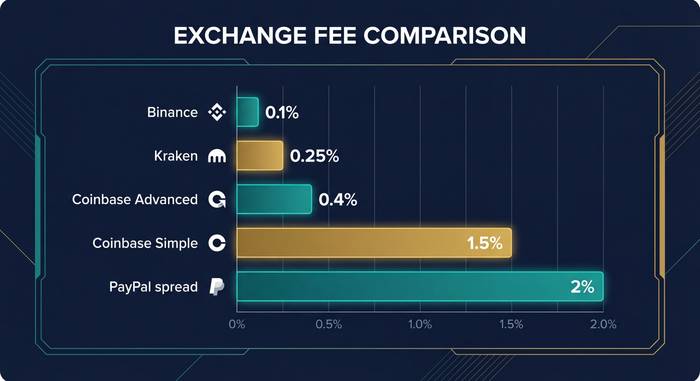
Coinbase gets a special callout because they have two interfaces. Coinbase Simple (the default app experience) charges 0.5-1.5% per trade plus a spread. Coinbase Advanced uses the maker-taker model above. Same company, wildly different fees. If you're using Simple Coinbase to buy $1,000 of BTC, you might pay $15 in fees. On Advanced, maybe $2-4. Always check which interface you're on.
Spread is the hidden fee. When you buy bitcoin on any platform, you don't get the exact market price. You get a slightly worse price. The difference between the buy and sell price is the spread, and it's how many platforms make money on top of the stated fees. PayPal and Cash App are notorious for wide spreads. You might see "0% commission" but actually pay 1-2% more than the real price.
Withdrawal fees: getting your crypto off the exchange
Once you've bought crypto, you might want to move it to your own wallet. Exchanges charge a withdrawal fee for this, and it varies a lot.
Some exchanges charge a flat fee per withdrawal. Binance charges 0.0005 BTC to withdraw Bitcoin (about $35 at current prices). Others like Kraken charge the actual network fee plus a small markup. Coinbase charges the network fee only for most coins.
The chain matters too. Withdrawing USDT on Ethereum might cost $5-15 in gas. Same USDT on TRON costs about $1. On Solana, pennies. Many exchanges let you choose which network to withdraw on. Always pick the cheapest one if your destination wallet supports it. Sending USDT via TRC-20 (TRON) instead of ERC-20 (Ethereum) is the single easiest way to save money on withdrawals.
Hidden fees most people miss
Beyond the obvious stuff, there are fees that don't show up as a line item but cost you money.
Deposit fees are rare but they exist. Credit card purchases on Coinbase carry a 3.99% surcharge. Debit card is around 1.5%. Bank transfer (ACH) is usually free. If you're buying crypto with a credit card, you're paying a massive premium.
Inactivity fees have become less common but some platforms still charge them. If you don't trade for 6-12 months, they might ding your account.
Conversion fees hit you when swapping one crypto for another. Some exchanges charge extra for crypto-to-crypto conversions versus crypto-to-fiat.
Slippage isn't technically a fee, but it costs you money. When you place a large order on a thin order book, the price moves against you as your order fills through multiple price levels. On low-liquidity coins, this can easily cost 1-3%. Use limit orders to avoid it.
How to actually pay less in crypto fees
I'm not going to give you some generic "use low-fee coins" advice. Here are specific moves that save real money.
Use Layer 2s for Ethereum. Bridging your ETH or tokens to Arbitrum, Base, or Optimism takes one transaction. After that, every swap, transfer, and interaction costs pennies instead of dollars. There is no reason to be paying Ethereum L1 gas fees for routine DeFi in 2026.
Use the exchange's advanced trading interface. Coinbase Advanced instead of Simple. Kraken Pro instead of regular Kraken. The regular interfaces are designed for beginners and they charge you for the convenience. Switching to the advanced view usually takes two clicks and saves 50-80% on trading fees.
Set limit orders, not market orders. Limit orders make you a maker, which gets lower fees on every exchange. Market orders make you a taker and also expose you to slippage. Unless you're in a rush, always limit.
Withdraw on the cheapest network. USDT on TRON. SOL natively. BTC on Lightning if your wallet supports it. Don't default to Ethereum for everything.
Buy with bank transfer, not cards. ACH is free on most U.S. exchanges. Credit card adds 2-4%. That's $20-40 extra on a $1,000 purchase for zero reason.
Time your transactions. Bitcoin and Ethereum fees drop on weekends and late at night (U.S. time) when fewer people are using the network. If you're not in a rush, waiting a few hours can cut your network fee in half.