Krea AI Review 2026 : Real-Time Creative AI Video Suite
Watch an image appear as you type. That is the best way to describe Krea AI. Slide a text prompt in word by word and the canvas redraws in real time, live. Add a model like FLUX.1 or Krea 1 and the same surface turns into a video workstation. Or a 3D scene builder. Or a training lab for new Krea-hosted AI tools. That breadth, plus 30 million users and a $500 million valuation, is why Krea has spent 2025 and 2026 elbowing its way into conversations that used to belong to Midjourney and Runway among AI generators.
What you will find in this review: every working piece of the platform as of April 17, 2026. Products. Pricing. Model roster. Pro use cases. Limits. And an honest side-by-side against the alternatives. No marketing gloss. Just what Krea actually does now, where it shines, where it trips. Thinking about trying it? Upgrading your plan? Swapping it for whatever creative AI tool you currently use? This review is written for you.
What is Krea AI? A 2026 creative AI overview
At its simplest? Krea is a web-based creative AI suite. Generate images and videos, edit them, upscale them, drop 3D assets into a scene. All inside one interface. Founded in March 2022 in San Francisco by two Spanish engineers, Victor Perez and Diego Rodriguez, it started as a real-time Stable Diffusion front-end. It is now something much bigger: a platform that wraps most of the best generative AI models behind one clean UI. Using Krea feels less like running a single model, more like running a control tower over a fleet of them. For a lot of professional creators, Krea is the first versatile AI platform that actually works as a daily workspace rather than a one-off toy.
Boil the pitch down to three ideas. Speed first. Real-time previews update as you type, powered by the company's own distilled models tuned for low latency. Selection second. You swap between 40+ image and video generators without leaving the page. Workflow third. Edit, Upscale, Train, Nodes, and Stage/Canvas tools take a generation beyond the first frame and into something you can ship to a client.
Inside Krea: the company behind the tools
So who actually runs Krea? Two people, mainly. Victor Perez and Diego Rodriguez. They met during an HF0 residency, shipped a weird little tool called "Krea Diffusion" in late 2022, and somehow turned that into a company worth half a billion dollars within three years.
The funding timeline tells the story. First came a $3 million seed in early 2023. Then a16z led a $33 million Series A in June 2023, with Abstract Ventures along for the ride. Then, the big one. April 2025, Bain Capital Ventures wrote a $47 million Series B. Total raised so far: roughly $83 million. Post-money valuation: about $500 million. TechCrunch reported the ARR at that round was around $8 million, up 20x in the previous fourteen months.
Users climbed fast too. 20 million in April 2025, per internal numbers. The homepage counter now shows 30 million, spread across 191 countries. Paying customers? They skew pro. Pixar, LEGO, Samsung, Perplexity, and Loop Earplugs are all confirmed. Studios and agencies make up most of the rest. Freelance artists, motion designers, and product visualization teams fill in the long tail.
What does Krea actually want to be? Not "another Midjourney," despite the easy comparison. The team talks about Krea as the operating system for creative AI, a single layer between you and every image, video, and 3D model worth using. That framing is how you get both the tool breadth on offer and the partnership deals Krea has signed over the past eighteen months.
Real-time generation: the Krea difference
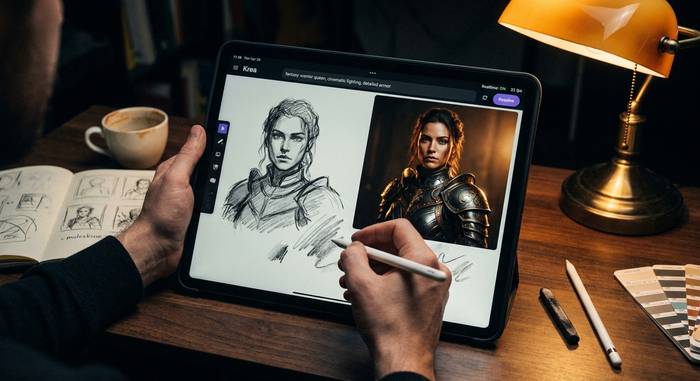
The signature feature. Type a prompt in Krea's Realtime canvas and the image redraws before you finish the sentence, with sub-50ms latency on most sessions. Sketch a rough outline with the cursor and the AI interprets it in real time. Adjust a slider and the image shifts along the new axis without a full regeneration.
Technically, this works because Krea runs distilled versions of diffusion models optimized for speed. In October 2025, the company released Krea Realtime 14B, an autoregressive video model that can stream at roughly 11 frames per second on a single Nvidia B200 GPU using LCM-style latent consistency distillation. That is not a record, but it is the first 14-billion-parameter model in the class that is genuinely usable interactively rather than in batch.
For a creator, the real-time surface changes the feedback loop completely. Instead of writing a prompt, waiting 40 seconds, adjusting, waiting again, you see the output evolve as you adjust. Composition becomes painterly rather than prompt engineering. The difference is easier to feel than to describe. Anyone who spent months fighting Midjourney's rerolls will understand the appeal in about thirty seconds.
Image model selection: FLUX, Krea 1, and more
Image generation, text-to-image specifically, is where Krea started, and it remains the most mature part of the platform. The image model roster includes both proprietary and partner options, letting you generate images from a simple text description in seconds or from more detailed text prompts when you want full control.
The flagship proprietary models:
- Krea 1 (launched June 17, 2025), trained for photorealistic detail and prompt adherence. It is Krea's answer to MJ v6 and FLUX Pro.
- FLUX.1 Krea [dev] (July 31, 2025), co-developed with Black Forest Labs. Open weights on Hugging Face. The version that gets benchmarked against FLUX.1 dev and often wins on aesthetic tests.
- Krea Realtime 14B for anything where latency matters more than peak quality.
Third-party models available inside Krea include FLUX.2 max / pro / flex / klein (from Black Forest Labs), Ideogram, Google's Gemini image models, Recraft, Ideogram 3, Nano Banana, and the Seedream series. Each has its own strengths. FLUX.2 max is still the reference for photoreal product shots. Ideogram 3 remains the best text-in-image renderer. Krea 1 and Krea-finetuned FLUX are the default choices for stylized work.
What makes this meaningful is you can jump between models without leaving your project. A prompt that worked on Krea 1 can be re-run on FLUX.2 pro in one click.
Krea Video: Veo, Sora, Kling, and Seedance 2.0
Krea Video was a beta afterthought a year ago. Today it is the fastest-growing product on the platform. Two reasons. Model partnerships. Rebuilt pipeline.
Start with partnerships. Krea Video now runs Google's Veo 3.1, OpenAI's Sora 2, Kling 2.6, Luma Ray, Runway, Pika, and ByteDance's Seedance 2.0. All inside one interface. In April 2026, Krea ran a promo called "Week of Unlimited Seedance 2.0 for new customers." That tells you how aggressively they are pushing video.
Product side. February 2026 shipped Realtime Edit for video. A canvas where you tweak clips in near-real-time instead of re-rendering the full sequence. Then April brought Seedance Effects. A new library that applies motion and style effects to any video with one click. Film grain. Hand-drawn animation. Stop-motion. All without writing a prompt.
Pricing runs on compute credits, not per-video. Rough ballpark: 5-10 seconds of Veo 3 at 1080p burns about $1-2 of credits. Sora 2 is cheaper, roughly $0.10 per second. Kling 2.6 comes in near $0.07 per second. Those numbers shift when credit packs are on promotion.
Edit images, upscale, and Krea Enhance tools
Generation is only half the story. The Edit stack is where Krea differentiates from pure image generators.
The rebuilt Edit tool shipped on March 9, 2026. It supports mask-based inpainting and outpainting, multi-image blending, text-guided regional edits, and reference-based style transfer. Inside Edit, you can switch between 10+ edit models including Flux Kontext. For anyone who has used Photoshop's Generative Fill, the Krea version feels closer to a full creative workflow than a feature bolted onto a photo editor.
Krea Enhance, the AI enhancer and upscaler, is separate. It targets up to 22K resolution for images and up to 8K at 120 fps for video, with optional AI frame interpolation. Among current upscalers in the market, it is the easiest way to enhance images from a tiny thumbnail into a print-ready asset. The quality sits close to Topaz Gigapixel for photos and competitive with Magnific for AI-generated work. For product visualization, architectural renders, or old-photo restoration, Enhance is the most underrated tool on the platform.
To edit images inside Krea, you open any generated output and hit Edit, or you upload an existing file. Train custom LoRAs on your own source images, then Enhance the result at 4K or 8K. That loop, generate to edit to enhance, is the workflow most pros seem to settle on.
Train custom models and LoRAs using Krea
For consistent character art, branded product shots, or house-style illustration, a custom model beats any prompt engineering. Krea's Train feature lets you upload 10-30 reference images, name the concept, and train a LoRA that can be used in any subsequent generation.
Typical training time is 15-40 minutes depending on queue depth. The result plugs into Krea 1, FLUX-family models, and, increasingly, Krea Video. Character consistency is the headline use case. Brand style transfer is the second. Product visualization is the third.
Training cost is metered in compute units rather than charged per model. On the Pro plan, most users train 5-10 LoRAs a month comfortably. Max and Business plans remove practical limits.
Krea API and enterprise workflow options
Krea quietly became an API company in 2025. The Krea API exposes 40+ image and video models through a single endpoint, with per-call pricing that undercuts most model vendors buying direct. Representative prices as of April 2026:
| Model | Type | Price |
|---|---|---|
| Veo 3 | Video | $0.20 per second of output |
| Sora 2 | Video | $0.10 per second of output |
| Kling 2.6 | Video | $0.07 per second of output |
| FLUX image models | Image | ~$0.04 per image |
| Krea 1 | Image | Bundled into credits |
For teams running production pipelines, that unified surface is a real workflow simplifier. Enterprise accounts add SSO, usage reporting, content policy controls, shared LoRA libraries, and account-level creative budgets. Custom SLAs apply at that tier. The platform's partnership with Black Forest Labs is part of why this pricing works: Krea and BFL share distribution and compute, which rolls through to end-user costs.
Generate 3D objects and interactive scenes
The 3D tools are the newest piece of Krea, and the least mature. Text to 3D spits out meshes you can drop into game engines or product viz workflows, with PBR material presets and mesh export in .glb, .fbx, .obj. Output looks good for stylized pieces. Rougher for photoreal objects.
Then there is Stage/Canvas. Drop multiple 3D objects into a scene, light them, hit render, get a finished 2D output in one click. This is where real-time generation quietly shines. Move an object, the render updates live. No waiting.
Industry-wide, generative 3D is still a year or two behind generative image. Krea's offering reflects that. For concept art, mood boards, and rapid prototyping? Already useful. For final production assets? Most teams reach for Blender plus a specialist AI tool instead.
Krea pricing plans: free, Pro, and Max
Pricing as of April 17, 2026. Subscription plans are compute-credit based, with annual pricing about 20% cheaper than monthly.
| Plan | Monthly | What you get |
|---|---|---|
| Free | $0 | 100 compute units per day, watermarked outputs, basic models |
| Basic | $9 | Higher daily limits, most image models, removed watermark |
| Pro | $35 | Full video access, Train, Enhance, priority queue |
| Max | $70 | Highest compute allotments, fastest queue, all models |
| Business | from $200 | Team seats, shared LoRAs, usage reporting |
| Enterprise | Custom | SSO, custom SLA, private deployments, dedicated support |
Credit consumption varies by model. A single Sora 2 generation burns through far more credits than a Krea 1 image. Pro is the sweet spot for working creators. Max makes sense if video is your main workflow. Free is genuinely usable as a playground, with the watermark as the main trade-off.
Krea AI vs Midjourney, Runway, and DALL-E
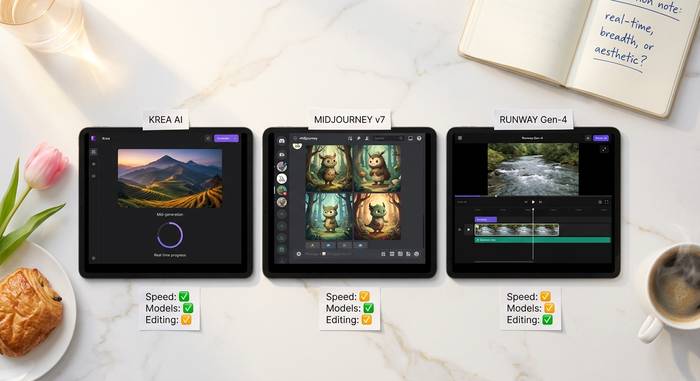
Here is the straight comparison. No marketing. Krea beats the big names on some axes and loses on others.
- Krea vs Midjourney. Speed goes to Krea. Model selection too. Editing tools, Krea, again. But Midjourney still nails raw aesthetic consistency on portraits and stylized work out of the box. Midjourney v7 carries a cultural cachet Krea has not earned yet.
- Krea vs Runway. For pure video, Runway Gen-4 is the more polished standalone product. Krea wins on breadth, because you run Runway, Sora, Veo, Kling, and Pika all from inside Krea. Real-time preview is another Krea edge.
- Krea vs DALL-E and ChatGPT image. DALL-E 4 inside ChatGPT wins on conversational workflow. Krea dominates the moment you need to edit, upscale, train, or export. DALL-E is the casual pick. Krea is the pro one.
- Krea vs Stable Diffusion + ComfyUI. Self-hosted ComfyUI offers maximum control at zero per-call cost, but the setup friction is real. Krea gives you maybe 80% of that power with none of the setup pain.
Pick Krea for breadth and live feedback. Pick Midjourney for a single best-in-class aesthetic. Pick ComfyUI if you want raw control and accept the setup tax.
Who uses Krea AI: Pixar, LEGO, Samsung
Krea's customer list is one of the most mainstream in the creative AI space. Confirmed enterprise users include Pixar, LEGO, Samsung, Perplexity, and Loop Earplugs. The homepage also lists partnerships with Lego, Samsung, Nike, Microsoft, and Shopify, though not every relationship has been publicly detailed.
The common thread across these accounts is iteration speed. A visualization team at a toy company, an automotive design studio, a concept art group at an animation house: all of them are using Krea to compress what used to be week-long cycles into hours. The real-time surface plus Krea Video together let them prototype a campaign or product shoot before anyone books a physical set.
Freelancers and solo creators account for the bulk of the 30 million users. The typical Pro or Max subscriber is a motion designer, illustrator, concept artist, or small agency creative director. The second-biggest user segment is architecture and product visualization: the same prompt that makes a stylized illustration is perfectly capable of rendering a dining room or a sneaker.
Download Krea: iPad app and app store access
Krea was browser-only for a long time. Early 2025 changed that. The team launched the Krea iPad app on the iOS App Store, bringing the Realtime canvas to Apple Pencil. Pressure-sensitive sketching, where every stroke triggers an immediate AI interpretation. It feels closer to drawing than prompting. Try it once and you will see.
Want to download Krea on iPad? Open the App Store. Search "Krea AI Images and Videos." Install. Done. The mobile experience is read-only on generation history and still watermarks free-tier outputs, mirroring the web tier structure. A Mac desktop client has been rumored but nothing has shipped as of mid-April 2026.
A separate Krea mobile app for phones is not available yet. The team has said publicly iPhone support is on the roadmap. No firm date attached.