What Is Ideogram AI? The Image Generator That Actually Gets Text Right
Ask Midjourney to write "Happy Birthday" on a cake and see what comes back. "Hapy Brithday." "Hppy Birhday." Something that looks like the alphabet had a panic attack. I've been testing AI image generators for two years and the text problem was the one that never got fixed. Midjourney, DALL-E, Stable Diffusion, Flux, they all produce gorgeous images and they all turn into toddlers the moment you ask them to spell a word.
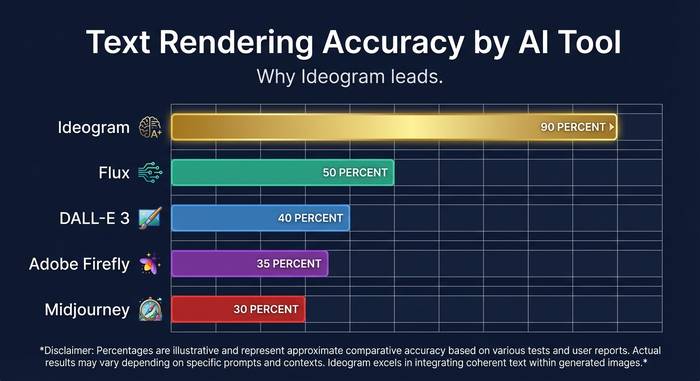
Ideogram flipped that. Four Google Brain researchers left the company in 2022, set up shop in Toronto, pulled in $96.5 million from Andreessen Horowitz and Index Ventures across two rounds, and shipped a model that could actually render text. At about 90% accuracy, which doesn't sound mind-blowing until you compare it to the 30% everyone else was getting. That gap turned Ideogram into the default choice for anyone who needed words on their images. Logos with real company names. Event posters with correct dates. Social media graphics with readable quotes. Product packaging mockups with actual label text. Book covers where the title doesn't look like it was written by someone who learned English from watching TV with the sound off. All the stuff that every other image generator botched.
I've been using Ideogram on and off since version 1.0 and have generated probably a thousand images at this point. Here's what I've learned about how it works, where it shines, where it falls short, and whether the hype matches reality in 2026.
The company behind Ideogram: who built it and why
The founding story matters because it explains why the product is good at what it's good at. Mohammad Norouzi, William Chan, Chitwan Saharia, Jonathan Ho. Four researchers. All from Google Brain. Saharia co-authored the Imagen paper, which was Google's own text-to-image model. These guys didn't read about diffusion models in a blog post and decide to start a company. They helped invent the stuff.
They set up in Toronto in 2022. Went public August 22, 2023, with version 0.1. Andreessen Horowitz led the seed at $16.5 million. Index Ventures co-invested. Six months later, February 2024, the Series A closed at $80 million. Just under $100 million in total funding for a product that had existed publicly for half a year. VCs were fighting to get into anything AI-related in that window, sure. But the Ideogram team had a pitch that was easy to verify: open Midjourney, type a prompt with text in it, watch it fail, then do the same thing on Ideogram and watch it work. That demo sold itself.
How Ideogram AI works: the technology explained
Under the hood, Ideogram runs on diffusion models. Same basic idea as Midjourney and Stable Diffusion: start with random noise, progressively remove it while steering toward your prompt, and an image materializes. The magic isn't in some radically new architecture. It's in how the model was trained and what the team prioritized during that training.
What happens when you type a prompt? Your text hits a language model that chops the description into visual concepts. "Vintage coffee shop sign with 'OPEN DAILY' in hand-painted letters, warm autumn colors" becomes: vintage aesthetic, coffee shop scene, those specific words to render, brush-style lettering, warm palette. Standard stuff for any diffusion model.
Where Ideogram splits from the pack is how it handles the text part. Midjourney and Stable Diffusion treat text as a pattern, same as they'd treat a tree or a face. The model sees squiggles that kind of look like letters and reproduces squiggles that kind of look like letters. It has no concept of spelling. Ideogram's training specifically focused on text-image alignment: teaching the model that letters have a fixed sequence, that "B" looks different from "D," and that "BIRTHDAY" is not an acceptable output when you asked for "BIRTHDAY" (which sounds obvious but apparently took $96 million in VC to solve). The 90% accuracy number means about 9 out of 10 generations get the text right. The tenth one usually has a minor issue, a duplicated letter or a spacing problem, that's easy to catch and re-roll.
The platform offers several generation modes: Realistic (photographic quality), Anime, 3D rendering, Watercolor, and Typography (optimized for text-heavy designs). Each mode adjusts the model's parameters to favor different visual characteristics. You can also upload reference images for style guidance, and version 3.0 supports up to three style references with what Ideogram claims are over 4.3 billion possible style combinations.
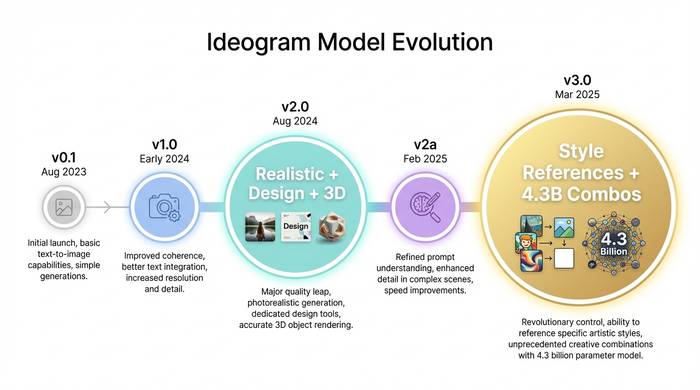
Model evolution: from version 0.1 to 3.0
Ideogram has iterated fast. Five model versions in under two years.
| Version | Release | What changed |
|---|---|---|
| 0.1 | August 2023 | Initial launch, basic text rendering, proof of concept |
| 1.0 | Early 2024 | Quality improvements, faster generation, better prompt understanding |
| 2.0 | August 2024 | Major upgrade: realistic, design, 3D, and anime modes with improved text |
| 2a | February 2025 | Optimized for graphic design and photography use cases |
| 3.0 | March 2025 | Improved realism, complex text layout understanding, style reference system |
Version 2.0 was the inflection point. Before it, Ideogram was a niche tool that crypto Twitter types and small business owners used for quick graphics. After 2.0, the image quality got serious enough that designers started paying attention. The realistic mode could produce images that competed with Midjourney on aesthetic quality, while still handling text far better than anything else.
Version 3.0 added the style reference system, which turned out to be more useful than I expected when I first tested it. You upload one to three images that represent the aesthetic you want, and the model extracts the visual DNA: color palette, lighting style, texture approach, mood. Then it applies that DNA to whatever you prompt. For brands maintaining visual consistency across dozens of generated assets, this single feature probably justifies the Pro plan on its own. I tested it with a mock brand kit and the results were surprisingly coherent across twenty different prompts.
What Ideogram does well and where it struggles
The honest breakdown, after months of using it for actual work.
What works. Text on images. Full stop. This is still the killer feature. Logos with legible company names. Posters with event dates. Social media graphics with quotes. Product mockups with packaging text. If your prompt needs readable words in the image, Ideogram is the best option available as of early 2026. The 90% accuracy claim holds up in my testing. About one in ten generations will misspell something, but that's a minor inconvenience when the alternative is 70% failure rates elsewhere.
The Magic Prompt feature is genuinely helpful for non-designers. You type "coffee shop poster" and it auto-expands into a detailed prompt with lighting, composition, color palette, and atmosphere specifications. It's like having a junior art director translate your vague idea into a proper brief. The Canvas Editor handles inpainting (modifying parts of an image) and outpainting (extending the image beyond its borders) without needing Photoshop. And batch generation through CSV upload is something I haven't seen on other consumer platforms.
What struggles. Photorealistic human faces. Ideogram can do decent portraits but it's not at Midjourney's level for photographic realism. Complex scenes with multiple people interacting often produce anatomical weirdness: wrong number of fingers (the classic), merged limbs, or facial features that drift into uncanny valley territory. The upscaler sometimes changes details on upscale, altering eye color or adding features that weren't in the original.
Multilingual text is a mixed bag. Latin-script languages (English, Spanish, French, Italian) work well. But non-Latin scripts, Chinese characters, Arabic, Hindi, are still unreliable. If your business operates in languages that use non-Latin alphabets, this is a real limitation right now. Given the global market for design tools, I'd expect this to be a priority for the Ideogram team, but as of early 2026 it's not solved.
The API pricing is another sore point. At 6-7x the cost of web credits according to MindStudio's analysis, it's prohibitively expensive for any application that needs to generate images at scale. A SaaS product that lets users create branded graphics on the fly would blow through API budget in days. Until the API pricing comes down or a higher-volume tier appears, Ideogram is primarily a tool you use directly through the website, not something you build into a product.
Pricing: what you get at each tier
Ideogram runs a freemium model. The free tier is functional but limited.
| Plan | Monthly price | Annual price (per month) | Credits/month | Key features |
|---|---|---|---|---|
| Free | $0 | $0 | ~10/week (slow) | Public images, JPEG only at 70% quality |
| Basic | $11.99 | $7 | 400 priority | Priority processing, queue bypass |
| Plus | $28.99 | $15 | 1,000 priority | Private mode, style saving, PNG downloads |
| Pro | $85.99 | $42 | 3,500 priority | Batch generation, all features |
I tried running on the free plan for a week and switched to Basic within three days. The gap between free and paid is sharp. Free tier images are public (anyone can see them), JPEG-only at 70% compression quality, and processed in a slow queue that can take minutes during peak hours. Paying $7/month on the annual Basic plan removes the queue and gives you 400 priority generations, which translates to roughly 1,600 images per month.
The API exists but it's expensive. MindStudio's analysis puts API costs at 6-7x more than web interface credits, which makes it impractical for high-volume applications. If you're building a product that needs Ideogram's image generation under the hood, the API cost structure is a real consideration.
Ideogram vs the competition: where it fits in 2026
The AI image generation market has fragmented into specialties. Nobody does everything best.
| Tool | Best at | Text rendering | Price (entry paid) | Open source |
|---|---|---|---|---|
| Ideogram | Text in images, logos, graphics | ~90% accuracy | $7/mo | No |
| Midjourney | Artistic quality, photorealism | ~30% accuracy | $10/mo | No |
| DALL-E 3 (ChatGPT) | Ease of use, prompt following | ~40% accuracy | $20/mo (ChatGPT Plus) | No |
| Stable Diffusion | Customization, local running | ~25% accuracy | Free (self-hosted) | Yes |
| Adobe Firefly | Commercial safety, Adobe integration | ~35% accuracy | $9.99/mo | No |
| Flux | Open-source quality, flexibility | ~50% accuracy | Free (self-hosted) | Yes |
If your workflow requires readable text on images, Ideogram is the default choice. If you're after fine art aesthetics and don't need text, Midjourney is still ahead on raw visual quality. If you need commercial licensing certainty and Adobe suite integration, Firefly wins. If you want to run everything locally without paying a subscription, Stable Diffusion and Flux are the open source options.
Most professionals I talk to use two or three of these tools depending on the project. I reach for Ideogram whenever text is part of the design. Midjourney when I want pure visual quality and don't need words in the frame. Gemini's image generation when I'm inside a conversation and want a quick visual without switching apps. The idea that you'd use one AI image generator for everything is like saying you'd use one camera lens for every shot. Different tools for different jobs.
One trend worth noting: text rendering is getting better everywhere. Flux's open-source model has made real progress on text. DALL-E 3 improved significantly over DALL-E 2. Midjourney v6 is less terrible at text than v5 was. The gap that made Ideogram special is narrowing. Whether they can stay ahead depends on whether the 3.0 style system and canvas editor give users enough reason to stay even after competitors catch up on the text front.