What is a cold wallet? The offline crypto storage that keeps your keys safe

I lost $2,400 in crypto in 2021 because I kept everything in a MetaMask hot wallet and clicked a malicious approval on what looked like a legitimate airdrop site. The transaction drained every ERC-20 token I had approved. Gone in 30 seconds. I sat there watching the Etherscan page as my USDC, LINK, and UNI left my wallet one after another. The private key was not stolen. I never gave anyone my seed phrase. But the hot wallet was online, the approval was unlimited, and the attacker's contract did exactly what I had unknowingly authorized it to do.
I bought a Ledger Nano X the next day. Moved everything that was not actively being traded into cold storage. That was three years ago. I have not lost a single token since. Not because I became smarter about clicking links. Because my private keys now live on a device that is not connected to the internet, and no malicious website can reach them.
That is the whole argument for cold wallets in two paragraphs. Your private key is the one thing that controls your crypto. If it lives online, it can be stolen or tricked into authorizing bad transactions. If it lives offline, attackers cannot touch it without physically getting their hands on your device. Everything else is details.
How cold wallets work: the private key stays offline
Let me simplify this with an analogy I use when explaining it to friends who are not in crypto.
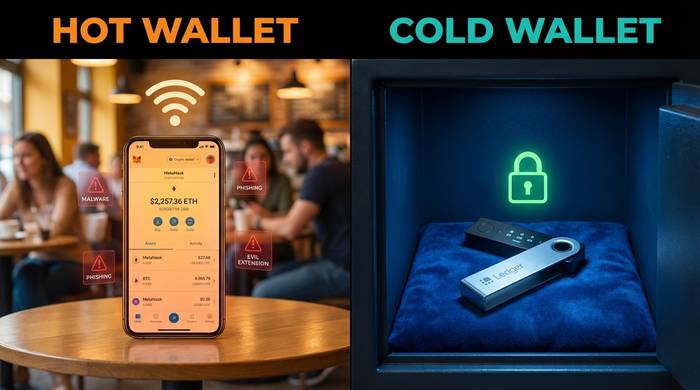
Your private key is like the signature stamp on a bank account. Whoever has the stamp can withdraw the money. A hot wallet is like keeping that stamp in your desk drawer at work. Convenient. You grab it when you need it. But everyone who walks past your desk could theoretically grab it too. Your computer, your browser, your phone extensions, every website you visit while MetaMask is unlocked, they all have proximity to that stamp.
A cold wallet is like keeping the stamp in a locked safe at home. When you need to sign something, you go home, open the safe, stamp the document, lock the safe back up, and bring the signed document to the bank. The stamp never leaves the house. Nobody at the office ever sees it.
In technical terms: MetaMask, Trust Wallet, Coinbase Wallet, Phantom, these are hot wallets. Your private key sits on a device that is online 24/7. A cold wallet stores that key on a device that physically cannot connect to the internet (or connects only briefly to transmit a signed transaction). The key stays on the device. What gets sent to the blockchain is the signed output, not the key itself.
For an attacker to steal from a cold wallet, they need your physical device, your PIN, and your seed phrase backup. For a hot wallet, a single malicious browser extension is enough. I learned that the expensive way.
| Aspect | Hot wallet | Cold wallet |
|---|---|---|
| Private key location | On internet-connected device | On offline device |
| Security level | Vulnerable to online attacks | Protected from remote exploits |
| Convenience | Instant access, always online | Requires physical device to sign |
| Cost | Free (MetaMask, Trust Wallet) | $50-400 for hardware wallets |
| Best for | Daily trading, small amounts | Long-term holding, large amounts |
| DeFi compatibility | Direct, seamless | Through MetaMask/WalletConnect bridge |
| Recovery | Seed phrase | Seed phrase + physical device |
| Risk profile | Malware, phishing, rogue approvals | Physical theft, lost device, supply chain attacks |
Types of cold wallets: hardware, paper, and air-gapped
"Cold wallet" does not always mean a little USB-looking gadget from Ledger. It means anything that keeps your private key away from the internet. Three forms exist in practice, and only one of them makes sense for most people.
Hardware wallets are the obvious choice and what 95% of people mean when they say "cold wallet." Ledger. Trezor. Keystone. Tangem. Small devices with secure chips that store your key and sign transactions when you press a physical button. Cost: $50 to $250 depending on the model and how fancy you want your screen.
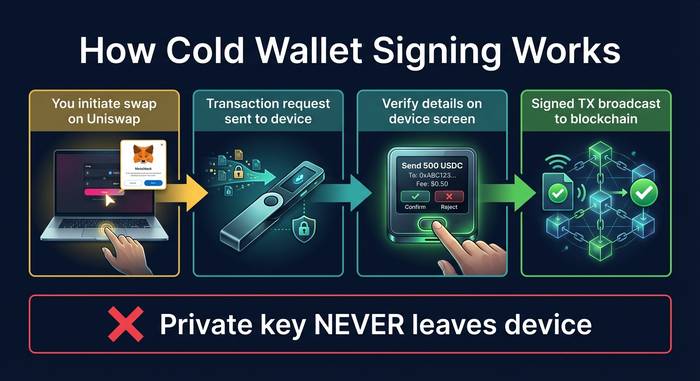
My daily driver is a Ledger Nano X. Bluetooth for phone, USB-C for laptop. When I do anything in DeFi through MetaMask, the Ledger's screen shows me exactly what I am about to approve. "Send 500 USDC to 0x7a3b..." I read it, verify it matches what I expect, press both buttons. If a phishing site is trying to sneak a different recipient address, the Ledger screen shows the real destination and I catch it. That tiny screen saved me more times than I want to admit. Hot wallets show you what the website tells them to show. The Ledger shows you what the smart contract actually says.
Paper wallets are the crypto equivalent of writing your password on a sticky note. Your seed phrase or private key, printed on paper, stored somewhere safe. Free. Offline. Also one house fire, one spilled coffee, or one curious house guest away from disaster. Paper wallets made sense in 2015 when a Ledger cost $100 and most people held $200 in Bitcoin. In 2026, hardware wallets start at $55. There is no reason to use paper as primary cold storage anymore. Steel plates (Cryptosteel, Billfodl) are the modern version: your seed phrase stamped into fireproof, waterproof metal. But those are backup storage for your seed phrase, not a replacement for a hardware wallet.
Air-gapped devices are for people who think Bluetooth and USB are attack surfaces (they are, technically). A phone or tablet that has never connected to any network. Keys generated on the device, transactions signed via QR code scanning. Keystone 3 Pro built their entire product around this idea. No USB port. No Bluetooth radio. No WiFi chip. You see a QR code on Keystone, scan it with your phone camera, and the signed transaction hits the blockchain. The device itself has zero electronic path to the internet. If that level of paranoia speaks to you, Keystone is what you want.
The top cold wallets in 2026
I have used three hardware wallets personally and tested two more. Here is what the market looks like.
| Wallet | Price | Connection | Secure element | Coins supported | Best for |
|---|---|---|---|---|---|
| Ledger Nano S Plus | $79 | USB-C | Yes (CC EAL5+) | 5,500+ | Budget hardware wallet |
| Ledger Nano X | $149 | USB-C + Bluetooth | Yes (CC EAL5+) | 5,500+ | Mobile users, DeFi |
| Ledger Stax | $279 | USB-C + Bluetooth | Yes (CC EAL5+) | 5,500+ | Premium, E-Ink screen |
| Ledger Flex | $249 | USB-C + Bluetooth | Yes (CC EAL5+) | 5,500+ | Touchscreen experience |
| Trezor Safe 3 | $79 | USB-C | Yes (Optiga) | 9,000+ | Open source purists |
| Trezor Safe 5 | $169 | USB-C | Yes (Optiga) | 9,000+ | Color touchscreen, Shamir |
| Keystone 3 Pro | $149 | QR code only (air-gapped) | Yes (3 chips) | 5,500+ | Maximum air-gap security |
| Tangem | $55-70 | NFC (tap to sign) | Yes | 6,000+ | Simplest setup, card format |
Ledger dominates the market by unit sales. Their Ledger Live app is the best companion software in the space. The controversy: in May 2023, Ledger announced "Ledger Recover," an optional feature that would shard your seed phrase and store encrypted pieces with third-party custodians. The crypto community went ballistic. The whole point of a hardware wallet is that nobody else holds your key. Offering to split it across custodians felt like a betrayal of the core value proposition. Ledger kept the feature but made it opt-in. Sales dipped temporarily. They recovered. But the trust damage lingered among security-focused users.
Trezor is the open source alternative. All firmware is public, auditable, and reproducible. The Trezor Safe 5 added Shamir backup, which splits your seed phrase into multiple shares where you need a minimum number of shares (like 3 out of 5) to recover the wallet. If one backup gets stolen, it is useless without the others. I keep a Trezor as my backup device.
Keystone 3 Pro is for the paranoid (I say that with respect). No USB. No Bluetooth. No WiFi. Transactions happen through QR codes. The device displays a QR code, your phone scans it, and the signed transaction gets broadcast. Zero electronic connection to the internet, ever.
Tangem is the wildcard. Credit-card-sized NFC cards. Tap your phone to sign. No screen on the device, which is a security tradeoff (you cannot verify transaction details on the card itself). But the simplicity is unmatched. My mom could use a Tangem. She cannot use a Ledger without calling me.
The Ledger data breach: why even cold wallets need caution
December 2020. Hackers broke into Ledger's marketing database and walked out with names, emails, phone numbers, and home addresses of 270,000 customers. Not the private keys. The devices worked fine. But what happened next was ugly.
Attackers used the leaked addresses to send phishing emails that looked exactly like Ledger support messages. "Your device is compromised. Enter your seed phrase here to secure your funds." Some customers received physical letters at their homes, printed on fake Ledger letterhead. I know at least two people from a Discord server who fell for the email version and lost five figures each. They typed their 24 words into a phishing page. Everything drained in minutes.
The cold wallet did its job perfectly. The chip held the key safe. The firmware had no vulnerability. But a human read a fake email, panicked, and gave away the master key voluntarily. No hardware on earth protects against that.
I stamp my seed phrase into a steel plate. It lives in a fireproof safe at a location I will not describe on the internet. I have never typed those 24 words into any device that connects to a network. Ledger support will never ask you for your seed phrase. Trezor support will never ask either. If anyone asks, they are trying to rob you. Full stop.
Using cold wallets with DeFi: it is not either/or
A common misconception: if I use a cold wallet, I cannot use DeFi. Wrong. You can run every DeFi protocol through a hardware wallet. The workflow is slightly different but the security upgrade is worth it.
Here is my setup. Ledger Nano X plugged into my laptop via USB. MetaMask open in Chrome with the Ledger account selected. I go to Uniswap. Click "swap 500 USDC for ETH." MetaMask sends the request to my Ledger. The Ledger screen lights up: "Review transaction. Swap 500 USDC..." I read it. Looks right. Press both buttons. Transaction signed, broadcast, confirmed. My key never left the Ledger. The whole thing added maybe 15 seconds compared to a software wallet.
For mobile, WalletConnect does the job. Open a DeFi app on your phone, scan the QR code with Ledger Live, approve on the device. I use this for quick governance votes when I am away from my desk. Works with Aave, Lido, most major protocols.
One warning from personal experience about DeFi with hardware wallets: blind signing. I hit this the first week I connected my Ledger to MetaMask. Some smart contracts send data that the Ledger's screen cannot fully parse. Instead of showing "send 100 USDC to 0xABC..." it shows a wall of hex characters and asks you to "confirm this data." That defeats the whole point. You are back to trusting the screen on your computer, which is exactly the scenario you bought a cold wallet to avoid.
Ledger and Trezor have gotten better at parsing common DeFi contracts. Uniswap swaps, Aave deposits, basic ERC-20 transfers all show readable details now. But exotic protocols, new contracts, and anything that uses unusual function calls still show raw hex. My rule: if the Ledger cannot tell me in plain text what I am signing, I do not sign it. I go check the transaction data manually on Etherscan. It takes an extra minute. That minute has saved me from at least two sketchy approvals that I would have blindly confirmed on MetaMask alone.
The hardware wallet market keeps growing. Global sales crossed $500 million in 2025, up from roughly $350 million in 2023. Every major exchange hack, every DeFi exploit, every high-profile wallet drain drives another wave of people from hot wallets to cold storage. The trend is clear: the more money people lose to online attacks, the more hardware wallets they buy. The industry is responding with better screens, better parsing, better companion apps, and lower entry prices.