How to speed up a Bitcoin transaction (or cancel it) when it’s stuck

You sent bitcoin and it's been sitting in "pending" for an hour. Maybe two. The recipient is waiting, you're refreshing the block explorer every 30 seconds, and nothing is happening. The transaction is stuck in the mempool, and you're starting to wonder if your money is gone.
It isn't. A stuck bitcoin transaction is fixable in almost every case. The funds aren't lost; they just haven't been picked up by a miner yet because the fee you attached wasn't high enough for the current network demand. This happens more often than you'd think, especially when the mempool fills up during price spikes, NFT launches, or BRC-20 token minting waves.
This guide covers every method to speed up or cancel a pending bitcoin transaction: RBF (Replace-by-Fee), CPFP (Child Pays for Parent), transaction accelerators, and simple prevention strategies so you don't get stuck again.
Why Bitcoin transactions get stuck
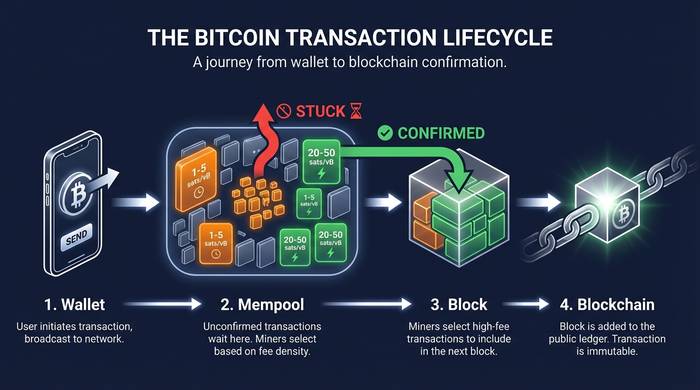
Every bitcoin transaction goes through the same path. You broadcast it from your wallet to the Bitcoin network. It enters the mempool, a waiting room where unconfirmed transactions sit until a miner picks them up and includes them in a new block. Blocks arrive about every 10 minutes, and each block has limited space (roughly 1-4 MB depending on SegWit usage).
Miners choose which transactions to include based on one thing: fee per byte. A transaction offering 50 satoshis per virtual byte (sat/vB) gets priority over one offering 5 sat/vB. When the mempool is quiet, even low-fee transactions confirm within a block or two. When it's busy, thousands of transactions compete for the same block space, and anything with a below-average fee gets pushed to the back of the line.
Here's what typically causes a stuck bitcoin transaction:
You set the fee too low. Many wallets let you choose between "economy," "normal," and "priority" fee tiers. If you picked the cheapest option during a busy period, your transaction might sit for hours or days.
The network got congested after you sent. You picked a reasonable fee, but 20 minutes later a popular Ordinals mint flooded the mempool with high-fee transactions, pushing yours down the queue.
Your wallet estimated poorly. Some wallets calculate fees based on the last few blocks, which can underestimate demand if activity is rising.
| Mempool state | Fee to confirm in ~1 block | Typical wait at 5 sat/vB |
|---|---|---|
| Quiet (<20 MB) | 1-5 sat/vB | 10-20 minutes |
| Moderate (20-50 MB) | 10-30 sat/vB | 1-4 hours |
| Busy (50-100 MB) | 30-80 sat/vB | 4-24 hours |
| Very congested (100+ MB) | 80-200+ sat/vB | Days, or won't confirm until congestion clears |
You can check the current mempool state on mempool.space, one of the best real-time dashboards for Bitcoin network conditions.
Method 1: Replace-by-Fee (RBF)
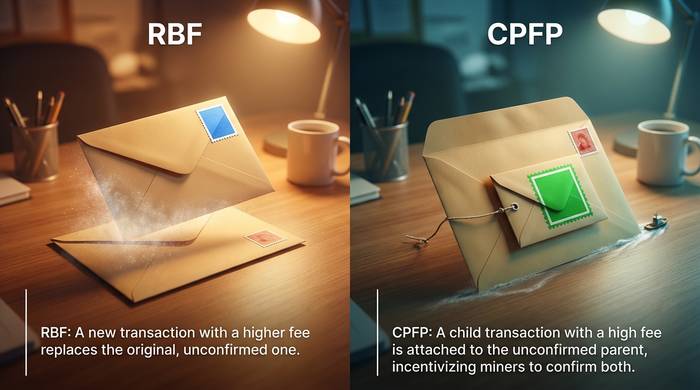
RBF is the most reliable way to speed up a stuck bitcoin transaction. It lets you broadcast a replacement transaction with a higher fee, essentially telling miners "ignore the old one, pick this one instead."
How it works: Your original transaction included an RBF flag (most modern wallets enable this by default). You create a new transaction with the same inputs but a higher fee. Miners will prefer the new, higher-fee version. Once the replacement confirms, the original transaction is dropped from the mempool.
Step by step:
1. Open your wallet and find the pending transaction
2. Look for a "Speed up" or "Bump fee" option (this uses RBF behind the scenes)
3. Set a new, higher fee. Check mempool.space for the current recommended rate
4. Confirm and broadcast the replacement transaction
5. The new transaction replaces the old one. Same amount to the same recipient, just a higher fee
Which wallets support RBF:
- Electrum (full manual RBF control)
- BlueWallet
- Sparrow Wallet
- Bitcoin Core
- Ledger Live (via replace transaction)
- Trezor Suite
Important: RBF only works if the original transaction was flagged as replaceable. Most wallets do this automatically, but some older or simpler wallets don't. If RBF wasn't enabled, you need Method 2.
Can you cancel a bitcoin transaction with RBF? Yes, sort of. Instead of sending the replacement to the original recipient, you can send it back to your own address with a higher fee. The miner picks up your self-send, and the original transaction gets dropped. You lose the fee on the replacement, but the bitcoin comes back to you. This is the closest thing to canceling a pending bitcoin transaction.
Method 2: Child Pays for Parent (CPFP)
CPFP works when RBF isn't available. Instead of replacing the stuck transaction, you create a new transaction (the "child") that spends the unconfirmed output from the stuck one (the "parent").
How it works: The child transaction includes a fee high enough to cover both itself and the parent. Miners see that confirming both together earns them more than confirming other transactions, so they include both in the next block.
When to use CPFP:
- Your wallet didn't flag the original transaction for RBF
- You're the recipient, not the sender (recipients can CPFP too)
- You need the transaction confirmed but can't modify the original
Step by step:
1. Identify the unconfirmed transaction in your wallet
2. Create a new transaction that spends the unconfirmed change output (or the unconfirmed received funds if you're the recipient)
3. Set the fee on the child transaction high enough to compensate for the parent's low fee
4. Broadcast the child. Miners will pick up both transactions together
The math: if the parent is 250 bytes at 3 sat/vB (too low) and you need the combined effective rate to be 30 sat/vB, the child needs to cover the gap. The child's fee should be calculated as: (desired rate x total size of parent + child) minus the parent's existing fee.
Wallets that support CPFP: Electrum, Sparrow, Bitcoin Core, Trezor Suite, and Exodus all have some form of CPFP support.
Method 3: Bitcoin transaction accelerators
If you can't use RBF or CPFP (maybe you're using a basic wallet with no advanced fee controls), external accelerator services can help. These services submit your transaction ID directly to mining pools and ask them to prioritize it.
Free accelerators:
- mempool.space (visual mempool, helps you understand your position)
- bitAccelerate
- bitcoinjumper
Paid accelerators:
- ViaBTC (connected to a major mining pool)
- BTC.com accelerator
- Binance Pool accelerator
Paid services typically cost $5-30 depending on urgency. They work because mining pools can prioritize specific transaction IDs when building the next block.
Caution: Only use accelerators from reputable sources. Never give your private keys or seed phrase to any accelerator service. All they need is your transaction ID (txid), which is public information visible on any block explorer. There are scam sites posing as accelerators that will ask for your wallet credentials. Legitimate accelerators never need anything beyond a txid.
How well do accelerators work? Results vary. During mild congestion, a paid accelerator connected to a large mining pool can get your transaction into the next 1-3 blocks. During extreme congestion (100+ MB mempool), even paid accelerators may not help because the fee gap is simply too wide. In those cases, RBF or CPFP are more reliable because they actually change the fee economics rather than relying on a mining pool's goodwill.
Method 4: Just wait
This sounds like non-advice, but it's legitimate. If the mempool is temporarily congested and you're not in a rush, waiting is free. Bitcoin's mempool doesn't hold transactions forever. By default, most nodes drop unconfirmed transactions after 14 days. Once dropped, the bitcoin returns to your wallet as if the transaction never happened.
In practice, most congestion spikes resolve within hours or days. The fee market adjusts as high-fee transactions get confirmed and leave the mempool. Your low-fee transaction gradually moves up the queue.
Check mempool.space and look at the "purging" threshold. If your fee is above it, your transaction will eventually confirm. If it's below, it'll get dropped and your funds return.
Here's the thing most guides don't mention: a stuck transaction doesn't put your bitcoin at risk. The worst case is inconvenience and delay. Your BTC either confirms at the original destination or returns to your wallet after the mempool purge. It doesn't disappear into a void. The only scenario where you truly lose money is if you panic and pay exorbitant fees to unstick a transaction that would have confirmed on its own in a few hours. I've seen people pay $40 in RBF fees to speed up a $50 transaction that would have confirmed within the next block anyway.
How to prevent stuck transactions in the first place
The best fix is prevention. A few habits save you from the RBF/CPFP headache entirely:
Check the mempool before sending. Spend 10 seconds on mempool.space before every transaction. If the recommended fee for next-block confirmation is 40 sat/vB and your wallet suggests 5, you know you'll get stuck.
Use SegWit addresses. SegWit (addresses starting with bc1q or bc1p) reduces your transaction size, which means lower fees for the same priority. If your wallet still uses legacy addresses (starting with 1), switch.
Enable RBF by default. In Electrum, Sparrow, and Bitcoin Core, you can set RBF as the default for all outgoing transactions. There's no downside.
Batch transactions. If you need to send bitcoin to multiple addresses, batching them into a single transaction costs less than sending each one individually.
Use the Lightning Network for small payments. The Lightning Network is a Layer 2 solution that processes bitcoin payments instantly for near-zero fees. For anything under a few hundred dollars, Lightning is faster and cheaper than on-chain transactions. Wallets like Phoenix, Breez, and Muun support Lightning natively. The Lightning Network avoids the mempool entirely because payments happen off-chain through payment channels. No miners, no block space competition, no stuck transactions. The trade-off is that it requires the recipient to be set up on Lightning too, and it's not ideal for very large amounts.
Double-check the recipient address. This has nothing to do with speed, but while we're talking about preventing problems: always verify the address before hitting send. A bitcoin transaction, once confirmed on the blockchain, cannot be reversed. Sending to the wrong address means the funds are gone permanently. Copy-paste carefully, and if your wallet supports address book labels, use them.
Know when the network is typically quiet. Bitcoin mempool activity follows patterns. Weekends tend to be lighter than weekdays. US nighttime hours (UTC 04:00-12:00) often see lower fees because major trading markets are closed. If your payment isn't urgent, timing it for a quiet window saves money and avoids the risk of getting stuck in the first place.