Runway AI: The AI Video Generator Reshaping Film
Type a sentence, wait under a minute, and get back a few seconds of footage that looks like it came out of a real camera. That is the pitch behind Runway AI, the best-known name in a young field called AI video generation. The idea sounds like a party trick until you notice who is paying attention. In September 2024, the Hollywood studio Lionsgate signed a deal to build a custom Runway model trained on its film catalog. By early 2026, investors valued the company at $5.3 billion. Not bad for software that, two years earlier, mostly produced melting faces. What began as a research curiosity is now treated as infrastructure for how video gets made.
This guide walks through what Runway AI does, how its models evolved, what it costs, how it stacks up against rivals like Sora and Veo, and the legal questions hanging over the whole field.
What Runway AI Actually Does for Creators
Runway is not a single button that spits out clips. It is a generative video platform, and the difference matters. Describe a scene in plain text and the system builds it. Upload a still image and watch it move. You can also edit footage you already have, right inside a web browser: swap a background, track motion, recolor a shot, nothing to install.
The company behind it is American, based in New York City and founded in 2018 by Cristobal Valenzuela, Alejandro Matamala, and Anastasis Germanidis, three people who met at NYU. Before video generation was a market, Runway helped co-create Stable Diffusion, the open image model released in 2022. So the team has been working on this longer than most of the competition has existed. For a creator, the practical takeaway is simple: Runway aims to be the place where you both generate raw AI video and finish it, rather than bouncing between five separate apps.
Who actually uses it tells you what it is for. Marketing and advertising teams build ad concepts and social clips in an afternoon instead of booking a shoot. Independent filmmakers storyboard scenes that would never fit a budget. Music video directors, agencies, and solo YouTubers all pull on the same toolset. The output ranges from a throwaway Instagram loop to a polished, cinematic sequence with real visual fidelity, and the gap between those two results is mostly down to the prompt and the time you put in, not the plan you pay for.
From Gen-1 to Gen-4.5: Runway's AI Models
The history of Runway AI is really a history of version numbers. Each jump in the model bought longer shots, steadier motion, far more control. The interface barely changes; the engine underneath does all the work.
The Gen-4 and Gen-4.5 leap
Gen-1 and Gen-2 were proof that text and images could become moving pictures at all. Barely. The results wobbled, melted, and forgot how gravity works. Gen-3 Alpha tightened things up. The real shift came with Gen-4 in March 2025, which finally kept a character or object looking consistent from shot to shot — the thing that had made earlier AI video useless for actual storytelling. A Gen-4 Turbo variant followed, trading a little quality for much faster, cheaper generation. Then Runway Gen-4.5 arrived in December 2025 and, according to the independent Artificial Analysis Video Arena, ranked first among all video models, ahead of Google and OpenAI. That ranking does not last forever in this field, but it showed Runway could still set the pace. The leap mattered enough that Adobe folded a Runway model into Firefly, letting Photoshop and Premiere users reach the generator without leaving Adobe's apps.
Act-One, Aleph, and the editing tools
Runway AI is more than a generator. Act-One, launched in October 2024, lets you drive a character's facial expressions by filming yourself on a phone, a cheap form of motion capture that used to need a studio. Aleph handles in-context editing, changing things inside a clip you already have. The Frames image model feeds stills into the pipeline. Together these turn a prompt box into a real animation and editing workflow, where you generate, tweak, and revise without ever leaving the platform.
What the models still can't do
The limits are real. Base clips run short, often around ten seconds, so longer pieces mean stitching several together. The motion can look strikingly realistic one second and fall apart the next; physics still breaks in odd ways, hands and on-screen text remain weak spots, and heavy iteration eats credits fast. Audio is improving but still patchy compared with rivals that generate sound natively. Runway AI is a strong draft tool for filmmaking, not a replacement for a crew. Anyone who tells you otherwise is selling something.
How to Make a Video With Runway AI
The workflow is genuinely easy. The skill is not the software; it is learning to write a good prompt and accepting that you will iterate.
Getting started and writing prompts
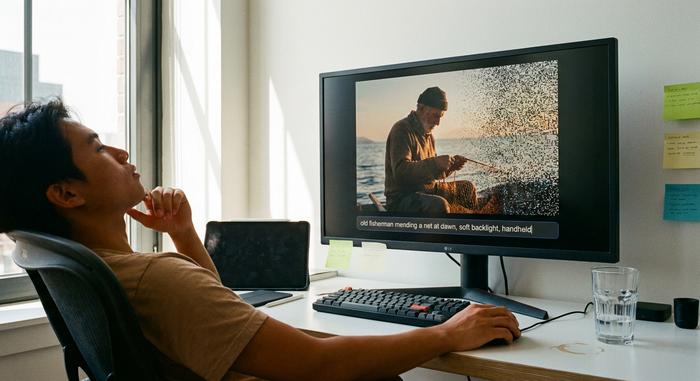
Sign in at runwayml.com, pick a model, and you land in a prompt box. The trick is to write like a director, not a search engine. Name the subject, the camera move, and the lighting in one go: "a slow push-in on an old fisherman mending a net at dawn, soft backlight, handheld." Vague prompts give vague video. Then you generate and wait, usually under a minute. The first result is rarely the keeper. So you change a few words and run it again. And again.
Image-to-video, motion brush, and camera controls
Text is only one way in. Upload a still and Runway can animate it, which gives you far more control over how a shot looks before it moves. Many creators generate a frame in an image model first, get the composition exactly right, then hand that frame to Runway to set it in motion. The motion brush lets you paint which part of the frame should move and which should stay locked — useful when you want the subject to move but the background to hold still. Camera-control presets add pans, zooms, and orbits without you touching a keyframe. When a clip is close, you extend it, revise it, and export. That loop — generate, then nudge, then export — is the whole job, and it gives you more creative control over the final shot than most browser-based tools have any right to.
Runway AI Pricing: Is It Free to Use?
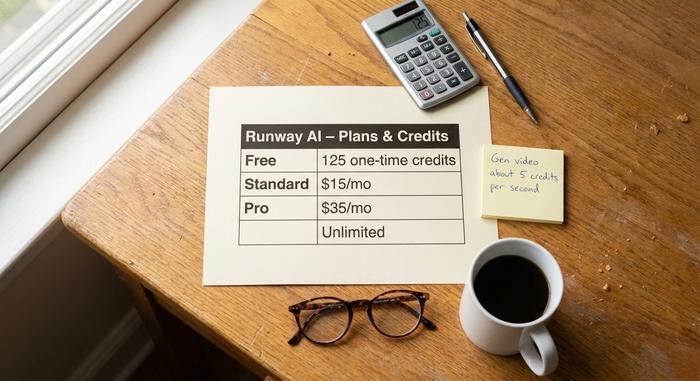
Yes, there is a free plan, and no, it will not carry a real project. The free tier hands you a one-time pool of 125 credits and locks the newest video models behind a paywall. It is a test drive, not a workhorse. Credits are the actual currency here, and Gen video burns through them at roughly five per second, so a few rounds of iteration can drain a small balance quickly. Paid plans, listed on Runway's pricing page, add monthly credit refills, faster generation, and commercial rights.
| Plan | Approx. price (2026) | What you get | Best for |
|---|---|---|---|
| Free | $0 | 125 one-time credits, older models | Trying it once |
| Standard | ~$15/mo | Monthly credits, Gen-4.5 access | Hobbyists, creators |
| Pro | ~$35/mo | More credits, faster runs, commercial use | Freelancers, marketing |
| Unlimited | Higher tier | Unlimited slower generations | Heavy iteration |
| Enterprise | Contact sales | Custom models, API, support | Studios, teams |
The honest read: budget for a paid plan if you intend to ship anything. The free credits exist to get you hooked, and they work. One thing worth planning for is how quickly costs scale with iteration. A single ten-second shot is cheap. A real edit might need twenty attempts before one lands, and every failed generation still burns credits. I have watched a balance drain in an afternoon chasing one stubborn shot that never quite worked. Heavy users routinely report blowing through a monthly allowance in a week, then either upgrading or rationing. If you are pricing this against a freelance video budget, it still comes out far cheaper than a shoot, but it is not the flat, all-you-can-eat deal the word "AI" sometimes implies.
Runway AI vs Sora, Veo, Kling, and Pika
For a while Runway was the only serious option. That is over. By 2026 the field is crowded, and each tool has a personality. OpenAI's Sora 2 generates synchronized audio and video together and leans cinematic. Google's Veo 3.1 brings native sound and tight prompt adherence, backed by Google's compute. Kling, made by the Chinese firm Kuaishou, has scaled fastest by user count, reporting around 60 million users and roughly $240 million in annual run-rate revenue. Pika raised an $80 million round and chases the social, meme-friendly crowd, while Luma's Dream Machine competes on speed and price.
| Tool | Company | Country | Standout | Rough pricing |
|---|---|---|---|---|
| Runway | Runway | USA | Editing suite + Gen-4.5 quality | Free to ~$35/mo+ |
| Sora 2 | OpenAI | USA | Audio + video, cinematic | App/credits |
| Veo 3.1 | USA | Native audio, prompt accuracy | Via Google AI plans | |
| Kling | Kuaishou | China | Scale, value, motion | Credit-based |
| Pika | Pika Labs | USA | Social, fast, fun | Free tier + paid |
| Luma | Luma AI | USA | Speed, low cost | Free tier + paid |
The practical way to read this table: pick by job, not by hype. Want sound baked in? Sora and Veo lead. Want sheer volume at low cost? Kling is hard to beat. Want to generate and finish in one place? Runway's editing suite is the reason people stay. Where Runway wins is that full loop — it is one of the few tools that pairs top-tier generation with a real editing toolkit. Where it can lose is raw reach and price, which is exactly where Kling has been eating into the market, and where Google's distribution gives Veo an unfair head start. The field keeps widening, too: lighter and cheaper AI video generators like Haiper and Krea now court creators who find the big names too expensive for everyday clips.
The Company and Money Behind Runway AI
A roughly 140-person startup carrying a $5.3 billion price tag is a strange object. It only makes sense if you read it as a bet that whoever builds the best world model, an AI that learns how the physical world looks and moves, owns the next medium. In February 2026, Runway raised a $315 million Series E at that $5.3 billion valuation, bringing its total raised to around $860 million, with backers that have included General Atlantic, Nvidia, Google, and Salesforce.
The Hollywood angle is what makes investors comfortable. Lionsgate's 2024 partnership gave Runway access to a library of more than 20,000 titles to train a studio-specific model, and AMC Networks signed on for marketing use in 2025. Those deals matter beyond the headlines: they signal that established media companies are willing to fold generative tools into real production pipelines, not just experiment at the edges. The wider market gives the strategy context. AI video generation was worth about $717 million in 2025 and is projected to reach $3.35 billion by 2034, growing near 19% a year. Runway wants to be the enterprise standard inside that curve, not just a consumer toy, which is why so much of its public messaging now talks about world models and agents rather than fun clips.
Is Runway AI Chinese? Plus Other Questions
No, it is not. Runway is an American company, headquartered in New York since day one. The confusion usually traces back to Kling, which is built by the Chinese firm Kuaishou, and occasionally to other rivals. They all do AI video, the names blur together, and the assumption sticks. If country of origin matters for your data or compliance rules, Runway sits firmly on the US side.
Runway AI Risks: Lawsuits and Deepfakes
The caveats are not technical; they are legal and ethical. As of early 2026, Runway faces at least two active copyright suits, including an artist class action and a separate case from a YouTube creator alleging the company trained on scraped videos without permission. None of that is settled, and the outcome could reshape how every AI video model is trained. There is also the obvious deepfake problem: a tool that animates faces from a phone clip can impersonate people who never agreed to it. And on the user side, paying customers on forums like Reddit regularly complain about two things, credits draining too fast and content filters that block harmless prompts. None of this makes Runway uniquely bad. It makes it a real product operating in an unsettled space.
Runway AI is one of the most capable video tools available, and it is getting better on a timescale measured in months, not years. The technology question is mostly answered; the open questions are about copyright, consent, and what counts as authorship. My advice is unglamorous: spend the free credits first, learn how prompting actually behaves, and decide whether the loop fits your work before you pay for it.