SeaArt AI Review: Is This AI Image Generator Free?
Start with the numbers SeaArt AI likes to quote. More than 30 million people use it every month, it churns out around 20 million images a day, and it is splashy enough to be a Google Cloud case study. Now the numbers it does not put on the homepage. Its Trustpilot score sits at 1.9 out of 5, and last year it was publicly accused of scraping the work of the very independent creators it competes with.
Both of those pictures are real. So this review puts them side by side and answers the four questions people actually type: is SeaArt AI free, is it safe, do you own what you make, and is it worth your time. I have opinions, and I will not bury them.
What Is SeaArt AI and Who Built Seaart.ai?
SeaArt AI is an all-in-one AI art platform: you type a prompt, pick a model, and it generates images, and increasingly video. It is not some weekend project. Seaart.ai is run by Star Cluster Pte. Ltd., a Singapore company, and the product launched in March 2023.
The growth has been genuinely fast. The company says it crossed more than 30 million monthly active users and 50 million registered accounts, though those are its own figures, not an audited count, so treat them as direction rather than gospel. Independent traffic trackers do back up the scale: tens of millions of monthly visits, with Japan as the single largest audience at roughly a fifth of all traffic. That Japan skew is not random. The platform leans hard into anime and character art, which is exactly the lane where it beats slicker rivals, and it shows in who shows up. SeaArt says users generate around 20 million images and half a million videos a day, a volume that only works because it runs on serious cloud infrastructure rather than a few rented GPUs.
Here is what makes the rest of this review interesting. None of this is the profile of a scam. It is a real company with real engineering behind it. That is exactly why the trust problems below are worth taking seriously rather than waving away as growing pains.
What You Can Make: AI Image, Video, and Models
The breadth is the real pitch. SeaArt is not one generator with one trick; it is a suite of AI tools. That is a strength and a trap at the same time, because breadth is good at hiding where the quality dips and where the catches are buried.
Text-to-image and the model library
The core is text-to-image. You write a prompt, add a negative prompt to steer it away from what you do not want, and pick from a library that reviewers peg at hundreds of thousands of community AI models and styles. Most of those models are uploaded by users, which is what makes the library so deep and, as we will see later, where some of the trust trouble starts. Anime and stylized character work are where SeaArt clearly shines. Photoreal output is doable but needs more fiddling with samplers and steps before it stops looking plasticky, and even then a trained eye spots the tell-tale smoothness. For experimenting across styles in one place, though, the range is hard to beat at this price.
LoRA training, face swap, and editing
This is where the AI-powered toolkit gets deep. You can train your own LoRA, a small custom model that teaches the generator a specific character or style, directly inside the product. This is how people build consistent AI characters that show up the same way across dozens of images. There is ControlNet for pose and composition control, image-to-image and remix tools for restyling an existing picture, a face swap tool, a 4K upscaler, and a general AI editor for background removal and touch-ups. For a free or cheap platform, that is a lot of machinery in one place.
AI video and the app
SeaArt has pushed hard into video creation. It bundles its own SonoVision model alongside licensed engines like Kling, turns a still image into a short clip, and can even generate matching audio in one pass. Clips top out around five to ten seconds, and consistency frays past that. SeaArt has also bolted on AI chats with custom characters, leaning into the same anime fanbase that drives its traffic, so the platform is drifting from a pure image tool toward a broader creative content hub. There are Android and iOS apps too, running the same credit system as the website.
Is SeaArt AI Free? Stamina, Credits, and Plans
Short answer: yes, there is a real free tier. Longer answer: "free" is metered by a stamina-and-credit system that even friendly reviewers find confusing, and the paid plans are where most of the anger lives.
The free tier
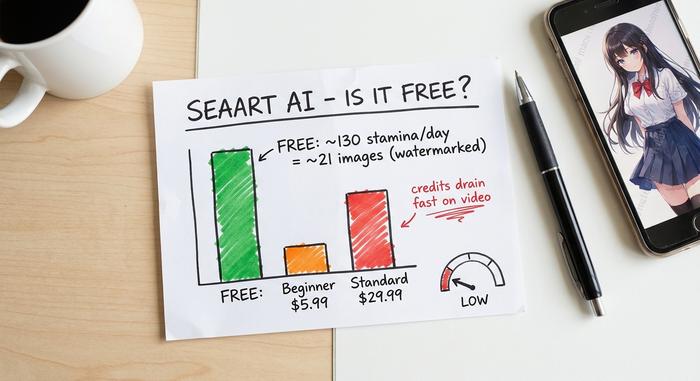
On the free plan you get a daily allowance of stamina, reported around 130 to 150 points (which works out to roughly 20-odd basic images a day, depending on your settings). Output is watermarked, and at busy times the free queue can stall. It is genuinely usable for play and learning. It is not enough to run a workflow on.
What the paid plans cost
Paid tiers buy more daily stamina, faster queues, no watermark, and broader rights. Exact prices are a moving target, and that is not me hedging: reviewers openly note there is no single canonical pricing page, and the numbers drift between sources and promotions.
| Plan | Reported price | What you get |
|---|---|---|
| Free | $0 | ~130–150 daily stamina, watermark, slower queue |
| Beginner | ~$5.99 / mo | ~300 daily stamina, fewer limits |
| Standard | ~$29.99 / mo | Higher limits, batch generation, no watermark |
| Top tier | up to ~$149.99 / mo | Large stamina pools, priority, commercial use |
Treat that table as a guide, not a quote. Check seaart.ai before you pay, because the tiers and stamina numbers shift.
The credit confusion and billing complaints
The stamina system is the most common gripe after pricing. Credit depletion can feel unpredictable, since different models and resolutions cost wildly different amounts; a single high-resolution video can burn through more stamina than dozens of basic images, and the cost is not always obvious before you hit generate. Worse, a recurring complaint is being auto-charged for an annual plan before a trial ends, with a cancellation path that is hard to find. That pattern, more than the image quality, is what drags the Trustpilot score down to 1.9. The lesson is not "avoid SeaArt." It is "treat it like any subscription that wants your card on file." If you pay, set a calendar reminder a day before any renewal and screenshot the plan you bought, so a disputed charge is your word plus evidence, not just your word.
Image Ownership and Commercial Use on SeaArt
This is the question that actually bites freelancers, and SeaArt's own paperwork does not give one clean answer. Its FAQ suggests you hold the rights to what you generate. But reviewers who read the separate Terms pages found conflicting language about commercial use, and the rights you get appear to depend on your plan tier.
So if you are making images for a client or a product, do not assume. Get written confirmation from support about commercial rights for your specific plan before anything ships, and keep it. A free-tier image with a watermark is a different legal animal from a paid-tier export, and support, not the marketing page, is the source that counts.
There is a second layer here that has nothing to do with SeaArt: in the US, the Copyright Office has held that purely AI-generated images are not eligible for copyright on their own, and several lawsuits over the data used to train these models are still working through the courts. You can use the picture. Owning it, in the legal sense, is murkier than the marketing implies. For a logo or a paid campaign, that gap is not academic; it decides whether a competitor can legally copy your AI-made artwork wholesale.
Is SeaArt AI Safe and Legit? The Controversies
SeaArt AI is legit in the sense that it works and millions of people use it without incident. But "legit" and "safe to trust with your data, your money, and your art" are different questions. Three documented issues deserve a clear look before you commit.
Scraping creators' models
In April 2025, an independent model creator documented that roughly 1,800 of their LoRAs had been copied from CivitAI onto SeaArt without consent, and they were not alone in the complaint. Think about what that means. A platform whose biggest selling point is a vast model library was accused of filling part of that library with the unpaid work of the same independent creators it competes with for users. Whether or not every case holds up, the pattern undercuts the trust a creative tool needs, and it is the kind of thing that ends up in a lawsuit, not just a forum thread.
| Trust signal | What the record shows |
|---|---|
| Trustpilot score | 1.9 / 5 |
| Model scraping | ~1,800 LoRAs copied from a CivitAI creator, April 2025 |
| NSFW concerns | reports of underage-adjacent content surfaced June 2025 |
| Data trackers | traffic reported to TikTok and Yandex trackers |
| Moderation | content rules tightened late 2025 |
NSFW, deepfakes, and your data
SeaArt has a history with not-safe-for-work content, and reports of underage-adjacent material surfaced in mid-2025, which it has since moved to moderate harder. Any face swap tool also carries deepfake risk. On privacy, reviewers have flagged data being sent to third-party trackers, so the simple rule is this: do not upload sensitive or private photos of yourself or anyone else. Treat it as a public playground, not a vault.
The regulation closing in
The rules are catching up fast. The European Union's AI Act transparency obligations require AI-generated content to be labeled as such, with key provisions landing in August 2026. In the US, the TAKE IT DOWN Act, signed in May 2025, targets non-consensual intimate deepfakes directly. If you publish AI images at any scale, labeling them is about to stop being optional.
SeaArt AI vs Midjourney and Leonardo AI
SeaArt's pitch is simple: everything, cheap or free. The trade-off is polish and trust. That framing decides which tool you should reach for.
| SeaArt AI | Midjourney | Leonardo AI | |
|---|---|---|---|
| Entry price | Free tier + ~$5.99 | ~$10 / mo, no free tier | Generous free tier |
| Model library | Huge community library + LoRA training | Single house model | Curated models |
| Video | Yes, built in | Limited | Limited |
| Best at | Anime, breadth, experimenting | Polished, painterly images | Game and product art |
| Main worry | Trust, billing, moderation | Cost, Discord-first | Smaller toolkit |
Midjourney is the premium choice; it produces the most consistently gorgeous images and earns its reported half-billion-dollar revenue from roughly 21 million users, but there is no meaningful free tier and it still leans on Discord. Leonardo AI sits in the middle with a friendly free plan and a tilt toward game and product art. SeaArt wins on breadth and price and loses on trust. None of them is "best" in the abstract; the right one depends on whether you value polish, budget, or range. If you are still learning, SeaArt's free tier is the cheapest way to find out what you even need, and you can graduate to a paid tool once your taste sharpens.
How to Start With the SeaArt App in Minutes
Getting going is genuinely fast, and free AI art is only a few clicks away. Sign up on the web or grab the app, pick a model that matches your style, write a prompt plus a short negative prompt, then create AI images and download the one you like. Run a quick upscale if you want high-quality, print-ready output. That whole AI creation loop takes a couple of minutes.
Protecting yourself takes two extra minutes and is worth more than any prompt tip. Start on the free tier and learn how fast your stamina drains before you pay a cent. Use a throwaway email if you are privacy-minded. Screenshot the commercial-use terms for your plan. And if you do subscribe, find the cancellation path on day one, not the day before renewal. Do that, and the experience is a lot less stressful than the Trustpilot page suggests.
The Verdict: Is SeaArt AI Worth It?
SeaArt AI is the most generous all-in-one AI art playground you can use for free right now, and for hobbyists, students, and anyone learning to prompt, that alone makes it worth opening. The toolkit is wider than almost anything in its price class. What it is not — and this is the part the glossy reviews skip — is a place to park sensitive images, client-critical artwork you need to own outright, or a credit card you might forget to cancel. Use it with those guardrails and it is a genuine bargain. So the real question is not whether SeaArt is impressive. It clearly is. The question is whether you trust it with the part of your work that actually matters.