What Is a Tor Browser? Dark Web, VPN & Safety

Few pieces of software carry as much baggage as Tor Browser. People treat it as either a digital invisibility cloak or the seedy back door to the dark web, and both reputations are mostly wrong. The plainer truth is more useful. Tor Browser is a free, open-source browser, built on Firefox and run by a nonprofit, that sends your traffic skipping across thousands of volunteer relays so no website can pin down who or where you are. It is not magic, and it is not contraband. Millions of people open it every day, and although the stereotype is some hooded figure in a basement, the reality is closer to journalists, researchers, and ordinary privacy-minded folks (the kind who got tired of being followed around the internet by ad networks they never agreed to). What follows is the honest version of how it works, what it actually protects, how it measures up against a VPN, and where crypto fits in.
What a Tor Browser actually is
The first surprise is how ordinary it looks. Launch Tor Browser and you are staring at Mozilla Firefox, because that is what it is underneath: a hardened build of Firefox, rewired so every request detours through the Tor network instead of going straight to the site. The Tor Project, a US nonprofit, maintains it and hands it out for free. Because the current build, version 15.0.9, follows Firefox 140 ESR and only landed in April 2026, you can be confident nobody has quietly abandoned this; it ships security updates on roughly the same cadence as Firefox itself, which matters when those updates are what keep you patched against the latest tracking tricks.
The free part trips people up, reasonably enough. Who pays? The Tor Project ran on roughly $7.3 million in 2023-24, and the share of that money coming from US government grants has fallen from 53.5% to about 35% as ordinary donations picked up the slack. The technique itself predates the project by decades, since onion routing came out of the US Naval Research Laboratory in the 1990s (yes, the same Navy), where it was built to protect government communications before being opened up as free software. I find that openness reassuring rather than suspicious, because while a closed product asks you to trust a company's word, anyone can read Tor's code, audit it, or spin up their own relay, and hundreds of thousands of Americans quietly do exactly that.
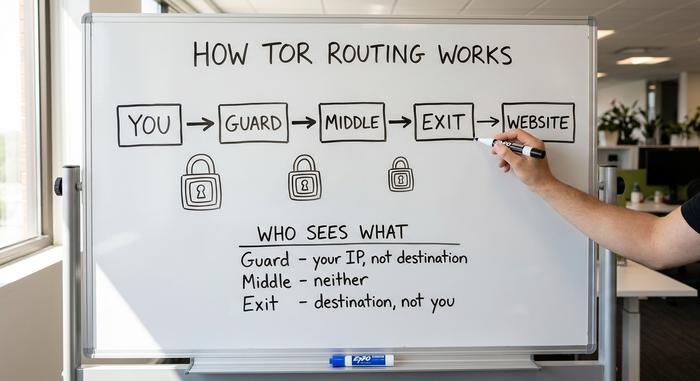
How Tor Browser works: onion routing
The whole design rests on one stubborn principle: no single machine in the chain should ever know both who you are and what you are doing at the same time. Tor enforces that by splitting the knowledge across three separate relays, each operated by a different volunteer somewhere in the world, and by wrapping your data in nested layers of encryption before it ever leaves your laptop.
The three relays
When you load a page, your traffic is routed through three hops. The guard (entry) relay sees your real IP address but not your destination. The middle relay only passes encrypted data between the other two and knows neither end. The exit relay, finally, forwards your request to the website and sees the destination, although it has no idea who you are, because that part of the puzzle was stripped away two hops earlier. The table below shows who sees what.
| Relay | Knows your IP? | Knows the destination? |
|---|---|---|
| Guard (entry) | Yes | No |
| Middle | No | No |
| Exit | No | Yes |
| The website | No (sees the exit) | Yes |
Why it is called "onion"
Picture those layers like the skin of an onion. Your request is sealed inside three of them, one for each relay, and every relay strips off exactly one layer, just enough to learn the next hop and nothing more. That image is where the whole system gets its name. At any given moment the network runs on around 8,000 active relays, and your browser quietly rebuilds its route every few minutes, so you are never locked to a single path that an observer could sit on and memorize.
The exit-node weak point
The exit relay is the part to respect, because it has to decrypt that final layer in order to speak to the website (the request has to be readable for the destination to act on it), which means that if you visit a site over plain HTTP, whoever operates that exit node can read the traffic in the clear. This is not hypothetical: during one stretch across 2020 and 2021, a single actor managed to run as much as 23% of all exit nodes, apparently in order to tamper with cryptocurrency traffic as it passed through. Modern Tor Browser pushes HTTPS everywhere to close this gap, which is why the HTTPS padlock matters even more here than usual.
Tor, the dark web, and .onion services
Here is where the myths breed, so let's be precise. The dark web is not Tor Browser, and Tor Browser is not the dark web. Tor is the network. The dark web is just the small set of sites that choose to live only inside it, reachable through ".onion" addresses instead of normal domains.
Most hidden services are dull or downright wholesome. The BBC and ProPublica run .onion mirrors so readers behind censorship can still reach them. SecureDrop lets whistleblowers hand documents to newsrooms without burning themselves. Do illegal markets exist here too? They do. Chainalysis put their crypto inflows around $2.5 to $2.6 billion in 2025. Real money, but a sliver of total crypto activity, and not where most Tor traffic goes. Opening Tor Browser does not dump you into a marketplace. You reach a .onion site only if you type its address on purpose.
The association sticks because drug markets make better headlines than whistleblower drop boxes. Keep the proportions in mind, though. Most Tor traffic heads to ordinary sites on the open internet. It is a private route to the regular web first, and a door to hidden services a distant second.
Is Tor Browser safe? What it protects
Here is the honest answer most guides dodge. Tor Browser is safe against the everyday adversaries: your internet service provider, advertisers, the websites you visit, and anyone doing passive surveillance on your local network. They see that you are using Tor, but not what you are looking at.
What Tor genuinely protects against
Against commercial tracking and routine monitoring, the protection is genuinely strong, because your ISP cannot build a profile of the sites you read, a website cannot log your real IP, and anyone sniffing the coffee-shop Wi-Fi (the classic threat people picture) gets nothing but encrypted noise. For the threats most people actually face day to day, that is a meaningful upgrade over a normal browser.
What it cannot stop
Tor was never designed to beat an adversary who can watch the entire network at once. If someone can observe the traffic entering the guard relay and leaving the exit relay, they can line up the timing and correlate the two ends. This is not just theory. A November 2025 paper described an attack called RECTor that improved correlation accuracy by up to 60% over earlier methods while using less computing power. And in a 2024 German case, investigators deanonymized a hidden-service user through long-term timing analysis combined with cooperation from internet providers. State-level actors with that reach are the real threat model, not your neighbor.
How users break their own anonymity
Most real-world deanonymizations are not broken cryptography. They are mistakes. Log into your real email through Tor and you have just told that site who you are. Open a downloaded document outside the browser and it can phone home with your true IP. Maximize the window and you hand over a more unique screen size for fingerprinting. Tor protects the connection; it cannot protect you from linking your anonymous session to your real identity. Online anonymity is a habit as much as a tool.
Tor Browser vs a VPN: which to use
People love to frame this as Tor versus VPN. They actually solve different problems. A VPN sends your traffic through one company's server, which is fast and simple and works well against your ISP or sketchy public Wi-Fi, although it means you are trusting that one provider not to keep logs (a promise you mostly have to take on faith). Tor splits that trust across three independent relays, so that no single party ever sees the whole picture, even though you pay for that guarantee in speed.
| Tor Browser | VPN | |
|---|---|---|
| Who can see the full path | No single party | The VPN provider |
| Speed | Slower | Fast |
| Cost | Free | Usually paid |
| Best against | Tracking, censorship, surveillance | ISP snooping, geo-blocks |
| Trust model | Trust no single node | Trust one company |
Neither wins outright. For streaming or everyday browsing, a trusted VPN is the practical pick. For anonymity that does not hinge on one company's promise, Tor takes it. Some people run Tor through a VPN for a belt-and-suspenders setup, but for most that just adds friction. Match the tool to the threat you actually have — not the most layers you can stack.

How to download and use Tor Browser
One rule above all: download Tor Browser only from torproject.org. Fake "Tor" apps are everywhere, and some have shipped malware, so the source is not a corner to cut. The real site serves around 100,000 downloads a day, and running copies phone home with roughly two million update pings, which hints at how many people lean on it.
Installing takes a minute. Using it well takes a few habits. Set the security slider to Standard, Safer, or Safest depending on how much speed and convenience you will trade away. Don't maximize the window; a custom size makes you easier to fingerprint. Don't log into accounts tied to your real name if anonymity is the point. Stay on HTTPS. On Android, grab the official Tor Browser for Android, or use Orbot to push your other apps through the network. On iPhone there is no official build, so the Tor Project points you to Onion Browser instead.
Use Tor for crypto and censorship
Two of the most legitimate uses of Tor Browser are the ones generic explainers skip. Start with crypto privacy. Broadcast a Bitcoin transaction over a normal connection and your IP can be tied to it at the network layer. Route the wallet through Tor and that link breaks; Bitcoin Core and privacy-focused wallets support it out of the box. It won't anonymize the blockchain itself — every transaction is still public and traceable on-chain — but it stops anyone from pinning the moment you broadcast a payment to your home address. Plenty of exchanges and wallets publish .onion addresses too, so you can reach them without exposing the connection.
The second use is beating censorship. When a government blocks Tor outright, the network fights back with bridges, unlisted entry points, and Snowflake, which quietly borrows volunteers' browsers as temporary relays. Use of these tools spiked across Russia and Iran through 2025 as the screws tightened. The Tor Project is also rewriting the core in Rust, a project called Arti that hit version 2.0.0 in February 2026 and points to a faster, leaner network ahead.
Should you use the Tor browser?
So should you use it? It depends entirely on who you are trying to hide from. For a journalist protecting a source, an activist under a hostile government, or anyone who simply refuses to have every click logged and sold to advertisers, Tor Browser is one of a small handful of tools that genuinely delivers. For someone who just wants to reach a geo-blocked show, it is heavy machinery for a light job, and a VPN will frustrate you far less. What I keep coming back to is that Tor is a precise instrument, not a force field. Use it for what it does well, stay honest with yourself about where it stops, and it gives you something almost nothing else can. The real question was never whether Tor is safe. It is safe from whom?