Incogniton: Anti-Detect Browser for Crypto Multi-Accounting

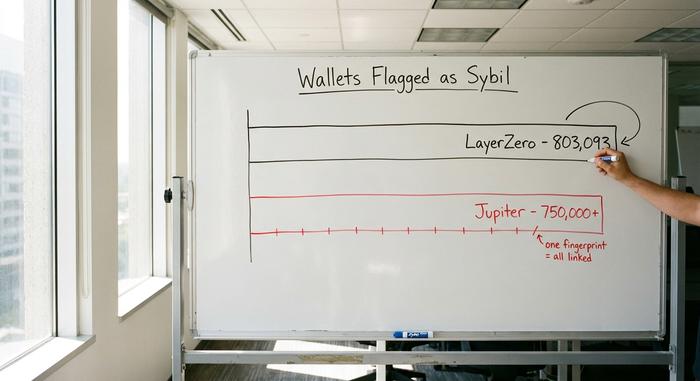
Two of the biggest airdrops in recent memory threw out hundreds of thousands of wallets before paying a cent. LayerZero flagged 803,093 addresses as Sybils. Jupiter cut more than 750,000 before its January 2025 distribution. The wallets were not deleted because of anything on-chain. They were caught because the same browser, the same fingerprint, and the same IP sat behind dozens of "different" accounts. That is the exact problem Incogniton is built to hide.
This guide covers what Incogniton actually is, why crypto multi-accounting now lives or dies on your browser fingerprint, what the tool does, what it costs, how to set it up safely, and the one risk almost nobody warns you about: what happens to your wallets if the browser itself gets breached.
How the Incogniton anti-detect browser works
An anti-detect browser is not a VPN. A VPN changes the IP your traffic comes from. An anti-detect browser changes who the browser claims to be. Incogniton spins up isolated browser profiles, and each one carries its own faked digital fingerprint: a different user agent, canvas and WebGL signature, font list, timezone, screen resolution, and audio context. To a website, two profiles look like two separate machines in two separate rooms.
Why bother? Because the modern web identifies you without cookies. An EFF study found that 84% of browsers were uniquely identifiable from their fingerprint alone, in its Panopticlick results. Later research by INRIA put real-world uniqueness at 33.6% across two million fingerprints at ACM WWW 2018 — lower, but still enough to single most people out. Canvas fingerprinting, the trick of asking your browser to draw a hidden image and hashing the tiny rendering differences, sits on thousands of top sites. Incogniton's job is to break that signal, profile by profile.
It helps to clear up a common mix-up here. Incogniton has nothing to do with your browser's incognito or private mode. Incognito just forgets your history when you close the window; the sites you visit still see the same machine. An anti-detect browser does the opposite. It remembers each profile perfectly and keeps them apart, but makes every profile look like a different device to the outside world. One mode hides you from yourself. The other hides you from the website.
Why crypto multi-accounting needs anti-detect
In crypto, running many accounts is normal, not shady. You farm a testnet, chase an airdrop, hold funds across several exchanges, split positions to manage risk. The catch is that detection moved off the blockchain and onto your device. One leaked fingerprint, and every "separate" account you run is suddenly one person in the eyes of the platform — which is exactly the gap Incogniton is designed to close.
How airdrops catch Sybil farmers
Sybil filtering is no longer a threat, it is routine. LayerZero publicly flagged 803,093 wallets out of roughly six million it analyzed, in its May 2024 Sybil report. Jupiter's Jupuary round cut more than 750,000 wallets as bots or Sybils before distributing 700 million JUP to about two million real users, documented in its January 2025 guidance. These projects cluster wallets using on-chain funding patterns and timing, then confirm with off-chain signals like shared IPs and matching browser fingerprints. Run fifty wallets from one Chrome window and you have already failed.
| Airdrop | Wallets flagged as Sybil | When |
|---|---|---|
| LayerZero | 803,093 (of ~6M analyzed) | May 2024 |
| Jupiter (Jupuary) | 750,000+ (before 700M JUP to ~2M) | Jan 2025 |
Exchange bans and device fingerprinting
Centralized exchanges play the same game from the other side. They tie your KYC identity to a device fingerprint and an IP, then watch for overlap. Two accounts sharing one fingerprint can get linked, and linked accounts get frozen, limited, or closed, especially around bonuses and region rules. The exchange does not need proof you broke a rule. A matching fingerprint is enough to act.
One profile, one identity
The fix is boring and it works. Give each account its own browser profile and its own dedicated proxy, so each one presents a unique device and a unique location. Incogniton handles the profile and fingerprint side; you bring the proxies. Done right, account number forty looks exactly as ordinary as account number one.
What is at stake is real time and money. A farmer who spends six months interacting with a testnet, only to get clustered with their own other wallets, loses the entire allocation in a single filtering pass. There is no appeal process worth the name. The whole point of profile isolation is that there is nothing left to cluster in the first place.
Features of Incogniton: profiles and proxies
Strip away the marketing and a few features actually matter for multi-accounting.
Browser profiles and fingerprint management
The core of the product is the browser profile. Each profile is an isolated environment with its own cookies, storage, and a unique browser fingerprint that Incogniton can generate automatically or let you tweak. The engine is Chromium-based, so sites behave the way they do in Chrome. One real limit worth knowing up front: the Incogniton browser runs on Windows and macOS only. No Linux build, no mobile app, no cloud version. If your workflow lives on Linux, this is a dealbreaker before you start.
Proxy setup: one IP per profile
Incogniton does not sell proxies. You connect your own, and it supports the common protocols and integrates with well over a dozen proxy providers. For crypto multi-accounting this is where people cut corners and pay for it. A datacenter IP shared across ten profiles is a flashing red light; a residential IP dedicated to a single profile is not. One profile, one IP, every time.
The proxy type matters as much as the count. Datacenter proxies are cheap and fast, but their address ranges are well known and trivial for platforms to flag in bulk. Residential and mobile proxies route through real consumer connections, so they blend into ordinary traffic. For anything sensitive, like an exchange login, paying for a clean residential IP is not really optional.
Automation, API and team workflow
For anyone scaling past a handful of accounts, Incogniton offers automation through Selenium and Puppeteer, plus a REST API on the paid tiers. There is a Synchronizer that mirrors one action across many profiles at once, a Cookie Collector to warm up new profiles so they look aged, and a "paste as human typing" feature for entering text without the telltale instant-paste signature. Teams can share profiles with role permissions. Useful for web scraping and repetitive tasks, and the same tooling that makes affiliate marketing workflows scale.
Incogniton pricing plans and the free trial
Incogniton's headline pull is the most generous free plan in the category. You get 10 browser profiles for the first two months, after which the free tier settles at a permanent 3 profiles. That two-month-to-three-profile drop is the catch reviewers love to point out, so plan for it.
| Plan | Price (approx, monthly) | Profiles | API / automation |
|---|---|---|---|
| Free | $0 | 10 for 2 months, then 3 | No |
| Starter | $19.99 | 10 | No |
| Entrepreneur | $29.99 | 50 | Yes (Selenium, API) |
| Professional | $79.99 | 150 (team up to 3) | Yes |
| Multinational | $149.99 | 500 (team up to 10) | Yes |
A semi-annual plan knocks roughly 30% off. Per profile, Incogniton lands around $2, pricier than some rivals that reach about $0.49 at scale, per its pricing page. For a beginner testing the waters, the free plan alone is enough to learn the workflow before paying anything.
Set up Incogniton to manage multiple accounts
The order you do things in matters, because the goal is to leave no link between accounts from the very first session.
Start by downloading Incogniton from its official site, and double-check the URL. This matters more than it sounds, for reasons the security section gets into. Install it, then create your first browser profile and let it generate a fresh fingerprint. Before you log in to anything, assign that profile a dedicated proxy, ideally a residential IP you do not use anywhere else. Open the profile, let the Cookie Collector warm it up by browsing a little, and only then log in to the account it belongs to.
Repeat for the next account in a brand-new profile with a brand-new proxy. The single rule that keeps you safe is simple: never reuse a proxy or a fingerprint across two accounts you want to keep separate. The moment you do, you have rebuilt the exact link you were trying to avoid.
Do not rush the warm-up, either. A profile that registers, logs in, and fires off a high-value action all on day one looks automated, because it usually is. Let a new profile pick up a little ordinary browsing history first. The Synchronizer earns its keep once you run many profiles at once, but treat each account's first few sessions as something to do slowly, by hand.
Wallet security risks in an anti-detect browser
Here is the part the review sites skip. An anti-detect browser concentrates a lot of valuable logins in one place, which makes the tool itself a target. This is not hypothetical. In February 2026, security firm SlowMist documented a supply-chain attack on a fingerprint-browser wallet extension that drained about $4.1 million from roughly 30,000 users inside a 72-hour window, in its analysis of the fingerprint-browser industry. Incogniton itself has a past incident on its record, cited repeatedly by competitors, involving leaked data and stolen crypto with no compensation paid.
So treat the browser as hostile infrastructure, even when it is doing its job. Download only from the official source, never from a forum mirror. Do not store seed phrases or private keys inside a browser profile, ever. Keep real funds on a hardware wallet and use the anti-detect profiles for access and activity, not custody. The point of all this fingerprint work is privacy, and privacy is worthless if the convenience of keeping everything inside the Incogniton browser is what gets you drained.
Incogniton alternatives and how they compare
Incogniton is not the only option, and it is honest to say where it loses. Rivals advertise 55-plus fingerprint parameters and call Incogniton's coverage basic. AdsPower claims more than nine million users and offers cloud and mobile profiles Incogniton does not. Multilogin and GoLogin push harder on hardware-level fingerprint spoofing.
| Tool | Free tier | OS | Built-in proxies | Best for |
|---|---|---|---|---|
| Incogniton | 10 then 3 profiles | Win, macOS | No | Cheap entry, learning |
| Multilogin | Trial only | Win, macOS, Linux | No | Premium fingerprinting |
| AdsPower | 2 profiles | Win, macOS | Add-on | Scale, mobile profiles |
| Dolphin Anty | 10 profiles | Win, macOS, Linux | No | Affiliate teams |
Is Incogniton worth it for multi-accounting?
For a crypto user learning how to run accounts without linking them, Incogniton is a sensible, affordable place to start, as long as you pair it with proper one-IP-per-profile proxies and keep your keys out of it. It will not match the premium tools on raw fingerprint depth, and the lack of Linux and mobile is a real gap. But the thing that should keep you up at night is not detection. It is what you left sitting inside a profile the day the browser itself gets breached. So before you import a single wallet, ask yourself: if this whole setup leaked tomorrow, what would you actually lose?