Proxy SwitchyOmega in 2026: Setup, Status, Safer Forks

The version number tells the whole story. The official Proxy SwitchyOmega repository on GitHub last shipped a meaningful release in 2018, eight years ago. Its maintainer formally declared the project dead in an issue thread on January 12, 2025. And yet, in May 2026, the search results for "proxy switchyomega" still serve up dozens of install guides that read as if none of that ever happened.
This article is the version that does account for it. The extension still has a story worth telling and a few legitimate uses left, particularly on Firefox. But for anyone on a Chromium browser in 2026, the right thing to install is not the one bearing the original name; it is the community fork called ZeroOmega. And for crypto users, there is a December 2024 supply-chain attack on a counterfeit SwitchyOmega clone that should change how you handle browser-extension trust forever. We will get to all of it.
What Is Proxy SwitchyOmega? A Brief History
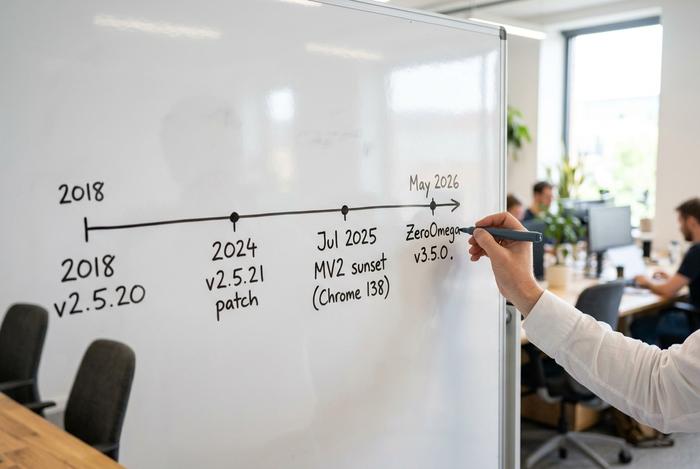
Proxy SwitchyOmega is a browser extension. It lets you keep multiple proxy configurations and flip between them with one click. The original author goes by FelisCatus on GitHub. His real name is Cao Chenchen. The first unified release was v2.5.0, shipped on August 3, 2017. After that, a handful of small compatibility patches trickled out over the years. The last one, v2.5.21, landed on August 27, 2024. Repository sits at roughly 22,500 stars today, with around 800 open issues, and is licensed under GPL-3.0. The codebase is CoffeeScript — which itself dates the project to roughly the early 2010s.
What does the extension actually do? Think of it as a proxy manager parked in your browser toolbar. You create one or more profiles. Each profile stores a single proxy configuration — protocol, IP, port, credentials. The toolbar icon flips your active profile instantly. An Auto Switch profile applies different proxies to different URL patterns. That is the part most users care about: routing only certain domains through a particular network and leaving everything else alone. A PAC (Proxy Auto-Config) profile takes it further by letting a small JavaScript file decide which proxy to use, page by page. None of this is novel. What made the SwitchyOmega extension popular was the bundle — one free tool, identical behaviour on Google Chrome and on Firefox, no OS-level proxy settings to touch.
Then came the wind-down. The maintainer's "we are done" announcement went up in GitHub issue #2513 on January 12, 2025. The reasoning given was the engineering burden of migrating the entire codebase to Chrome's Manifest V3 specification, which is a substantial rewrite for an extension this old. The repository is now effectively a museum piece. Over on Mozilla Add-ons, the Firefox version still sits at v2.5.10 with a last-updated date of January 28, 2018. Around 14,172 weekly active users keep that 2018 binary running in 2026.
The Manifest V3 Problem: Why Chrome Killed the Original
Manifest V3, usually shortened to MV3, is the current Chrome extension API specification. Its predecessor, Manifest V2, was the technical foundation under SwitchyOmega and thousands of other extensions. The two are not compatible. MV3 changes how an extension handles network requests, background scripts, and remote code execution. An MV2 codebase does not just keep working under MV3. It requires a real rewrite.
Chrome's transition timeline ran across roughly eighteen months and is worth knowing exactly. New MV2 submissions stopped being accepted in January 2024. In May 2024, the Chromium team published the formal "Manifest V2 phase-out begins" blog post. Through June 2024, existing MV2 extensions were progressively disabled on new installs. The final sunset came with Chrome 138 on July 24, 2025. After that release, a user could not re-enable a disabled MV2 extension even by digging into the developer settings. On that date, the original Proxy SwitchyOmega stopped working on Chrome and on every Chromium-based browser — Edge, Brave, Opera, Arc.
Firefox is the exception. Mozilla announced in 2024 that Firefox would continue to support MV2 indefinitely, alongside MV3. The original SwitchyOmega still functions on Firefox for exactly that reason. If you are on Firefox and you have an existing SwitchyOmega configuration that works, you do not strictly need to migrate yet. If you are on Chrome or any Chromium browser, the original is gone. What you see in the Chrome Web Store under the SwitchyOmega name today is not the original — and that brings us to the part most readers miss.
The result is a messy proxy management situation. Multiple parties have published Chrome Web Store listings using the SwitchyOmega name or branding, none of which are operated by the original author. One listing titled "Proxy SwitchyOmega V3" claims roughly 100,000 active users at version 3.0.5, last updated March 26, 2026, published by a developer account called "Master Tools." A separate listing titled "Proxy SwitchyOmega MV3" lists about 10,000 users at version 1.0.0, last updated August 31, 2024, by a developer called "greenvitaminrev." Both are independent reimplementations. Neither is associated with FelisCatus or the original GPL-3.0 repository.
The December 2024 Supply-Chain Attack on a Fake Fork
This is the section that matters most for any reader who uses a hardware wallet, MetaMask, or any browser-based crypto interface. On December 25, 2024, the security firm SlowMist published a report identifying a supply-chain compromise of a counterfeit "SwitchyOmega MV3" Chrome extension. The attack injected malicious JavaScript into web pages the user visited, with a particular focus on capturing private key prompts and seed phrase input fields on dApp interfaces.
The numbers are sobering. SlowMist estimated 2.6 million devices ran the compromised extension during a 31-hour window before the attack was detected and the malicious version pulled from the Chrome Web Store. Crowdfund Insider confirmed the incident in a March 2025 follow-up. The fake fork was not the work of the original author, was not ZeroOmega, and was not affiliated with any reputable proxy provider; it was a different extension that had simply used the SwitchyOmega name to inherit the trust of an established brand.
The practical lessons compound. First, for crypto users, a browser proxy extension is the worst-case attack surface because it is granted permission to read every page in every tab. An honest extension uses that permission to read URLs and decide on a proxy; a malicious extension uses it to read your wallet's transaction-signing prompts. Second, brand-name squatting on the Chrome Web Store is real. A listing titled "Proxy SwitchyOmega" with thousands of users is not, by itself, evidence of legitimacy. Third, the only reliable way to vet an extension is to cross-check it against an open-source repository whose maintainer is verifiable.
| Listing | Status | Verified source |
|---|---|---|
| Original FelisCatus/SwitchyOmega (GitHub) | Archived, last release 2018 | github.com/FelisCatus/SwitchyOmega |
| ZeroOmega (zero-peak) on Chrome / Edge / Firefox | Active, MV3-compatible | github.com/zero-peak/ZeroOmega |
| "Proxy SwitchyOmega V3" by Master Tools | Independent, unaffiliated | No matching public repo |
| "Proxy SwitchyOmega MV3" by greenvitaminrev | Independent, unaffiliated | No matching public repo |
| The December 2024 compromised fork | Removed, harmful | n/a — do not install |
If you remember nothing else from this article, remember the second row. ZeroOmega is the project to install.
How to Install ZeroOmega — the Real MV3 Successor
ZeroOmega is maintained by a GitHub user called zero-peak. It is an explicit MV3-compatible fork of the original codebase. Licensed under GPL-3.0. Roughly 7,400 stars and 337 forks. As of May 2026 it sits at version 3.5.0, released May 17, 2026. The fork ships on Chrome, Microsoft Edge, and Firefox.
The install path is the same as any other extension. Visit the Chrome Web Store, Edge Add-ons, or Mozilla AMO listing linked from the ZeroOmega GitHub README. Click install. Accept the permissions prompt. Before doing any of that, verify two facts. First: the publisher name shown in the store should match the maintainer in the GitHub repository. Second: the version number in the store should match the latest GitHub release. If both line up, you have the right extension. If they do not, walk away.
Setting Up Your First Proxy Profile in SwitchyOmega
The flow is identical whether you are running the original on the Firefox browser or ZeroOmega on Chrome. Click the extension icon, choose Options. Click New Profile, give it a name, and select the type "Proxy Profile." On the profile page, enter the protocol (HTTP, HTTPS, or SOCKS5), the proxy server's IP address, and the port number. Proxy authentication — if your provider requires it — is handled by clicking the small lock icon and entering the username and password. Save Changes, then Apply Changes — the Apply Changes button is the one developers most often forget. Back on the toolbar, click the extension icon and select the new profile from the dropdown to activate it. Verify the routing is working by visiting an IP address checker such as ipinfo.io and confirming the displayed address matches the proxy. Last step: export your proxy settings as a .bak file or use Gist Sync in ZeroOmega so a future reinstall does not erase your work.
Auto-Switch Mode and PAC Scripts Explained
Two features separate SwitchyOmega from a basic proxy toggle. The first is Auto Switch. Create a profile of type "Switch Profile," then add a list of conditions: URL wildcard, hostname wildcard, or regular expression. Each condition is mapped to a target profile — Direct, a specific proxy, or PAC. The browser checks the active URL against the conditions in order and routes traffic accordingly. Most users only ever need this.
The second feature is PAC, short for Proxy Auto-Config. PAC is a JavaScript file containing a single function called FindProxyForURL(url, host) that returns a string telling the browser which proxy to use. A trivial example:
```javascript
function FindProxyForURL(url, host) {
if (shExpMatch(host, "*.example.com")) return "PROXY proxy.local:8080";
return "DIRECT";
}
```
PAC is the right tool when routing decisions depend on logic more complex than wildcards — for example, to determine which proxy to use based on time of day, source IP range, or DNS resolution. For ninety-nine percent of users, Auto Switch is enough.
Crypto Use Cases: Geo-Restrictions and dApps
The honest version of the crypto use case is this. Many large exchanges geo-block users from certain countries: Binance has hard blocks on at least eight jurisdictions; Bybit lists more than thirty restricted countries; OKX has its own list. Using a proxy to access an exchange from a restricted country is a clear Terms of Service violation. Binance and several others have publicly stated that detected VPN or proxy use will result in account freezes, sometimes permanent. Treat that as a real risk before doing it.
There are legitimate uses. Accessing public DeFi protocols and decentralized exchanges from countries where the protocol's hosted frontend is blocked is a grey area, since the smart contracts themselves are jurisdiction-agnostic. Privacy from on-chain analytics tools that try to fingerprint your wallet via your IP is a real concern. Developers routinely route test traffic through proxies to validate multi-region behaviour. Multi-account testing across separate residential IPs is standard practice in the proxy industry.
Two safety notes. A proxy is not a VPN: only the request is redirected, the payload is not encrypted. For real privacy, pair the proxy with a VPN or use HTTPS-only sites. And never use free proxies for anything involving credentials or wallets — free proxy operators are often the threat themselves, logging traffic or injecting content. Web scraping workflows and multi-account testing are the legitimate uses where a reliable proxy from an established vendor makes sense; for wallet interactions, the risk calculus is entirely different.
Best Alternatives to Proxy SwitchyOmega in 2026
If ZeroOmega does not suit, the options are real and mature.
| Alternative | Browsers | Distinguishing edge |
|---|---|---|
| ZeroOmega | Chrome / Edge / Firefox | Canonical MV3 fork, GPL-3.0 |
| FoxyProxy Standard | Chrome / Firefox | Mature (since 2006), regex routing |
| Proxyverse | Chrome | MV3-native, scraping focus |
| Smart Proxy Switcher | Firefox / Chrome | Real-time request monitor |
| Proxy Helper | Chrome | Lightweight, sync settings |
| Oxy Proxy (Oxylabs) | Chrome | Vendor-managed, residential focus |
Browser-native settings are the no-extension option: Chrome and Edge inherit the system proxy settings configured at the OS level, Firefox has its own internal proxy configuration under Network Settings. Native proxy settings work for single-proxy setups but cannot do per-domain routing — that is where a dedicated proxy extension earns its place.
Troubleshooting Proxy SwitchyOmega Quick Reference
Connection refused — the proxy server IP or port is wrong, or the proxy is offline. DNS leak — Chrome's Secure DNS is overriding the proxy, disable it under chrome://settings/security. SOCKS5 proxy authentication fails — Chrome does not support SOCKS5 auth natively, use the Firefox browser or switch to HTTP. Rules not matching — verify the Auto Switch profile is the active toolbar profile, not the underlying proxy profile. Slow browsing — simplify rule patterns; complex regex rules add latency on every page load. If Proxy SwitchyOmega settings appear to reset after a browser update, re-export your .bak backup and re-import — the proxy details are preserved in that file.