Pixelscan: Check Your Browser Fingerprint & Proxy

A browser rarely gets caught for being unusual. It gets caught for contradicting itself. Your IP says Berlin, your clock says New York, your language settings say Manila, and somewhere in that mismatch a website decides you are not who you claim to be. Pixelscan is the tool built to find those contradictions before a bank, an ad network, or an exchange finds them first. This guide walks through what Pixelscan actually checks, how to read the result it hands you, and how to fix the specific leaks it flags. No product to sell here, just the honest read.
What a browser fingerprint really is
A browser fingerprint is not a single tracker you can delete. It is the sum of dozens of small signals your web browser gives up the moment a page loads: your screen size, installed fonts, graphics card, timezone, language, the exact way your device draws an image. Stitched together, those details often identify one machine out of millions, and nothing has to be stored on your side. There is no cookie to clear.
How identifying is it, really? The honest answer is that it depends on the crowd you are standing in. The Electronic Frontier Foundation's early Panopticlick study found 83.6% of browsers were unique across a sample of roughly 470,000. A larger 2018 study of over two million users put uniqueness closer to 33.6%, and a 2025 academic measurement of a US browsing population landed near 60%. The technique is also widespread: canvas fingerprinting alone showed up on 12.7% of the top 20,000 websites in a 2025 survey. So the question is not whether you have a fingerprint. You do. The question is whether yours holds together under inspection.
What is Pixelscan and how Pixelscan works
Most fingerprint checkers answer one question: are you unique? Pixelscan.net answers a sharper one: are you consistent? That difference is the whole point.
Consistency over uniqueness
Pixelscan reads your fingerprint the way a fraud-detection system would. It does not just collect your parameters; it cross-references them and flags every inconsistency — combinations that should not occur together. A real iPhone in Tokyo has a predictable cluster of traits. A Linux server pretending to be that iPhone usually slips somewhere. Pixelscan hunts that slip. This is why the tool is sometimes described as the "consistency police" of the fingerprinting world, and why a technically perfect-looking profile can still fail.
What data it collects
When you run a scan, Pixelscan executes JavaScript in your browser and gathers the result in seconds. According to documentation from antidetect vendors, it weighs roughly 73 separate parameters for signs of automation or internal contradiction. Nothing needs to be installed, and the core checker is free. Pixelscan provides a single consistency report rather than a pile of raw numbers, grouping its findings into readable buckets: time and language, navigator data, location, and hardware.
Bot and automation detection
Pixelscan also looks for the tell-tale traces of automation. Flags like navigator.webdriver, the signatures left by Puppeteer, Playwright, or Selenium, and canvas hashes that match known headless setups all push a result toward "suspicious." Its bot detection compares your canvas output against a database of genuine devices, so a value that looks synthetic stands out even when every individual field seems plausible.
What Pixelscan checks: browser fingerprint vectors
To read a result, it helps to know what each part of the fingerprint analysis is actually measuring. The signals fall into three rough families, and a leak in any one can undo the others. The table below maps the main vectors Pixelscan analyzes.
| Vector | What it reveals | Common leak |
|---|---|---|
| Canvas / WebGL / Audio | Your GPU and rendering stack | Identical hash reused across profiles |
| IP address & geolocation | Where the network thinks you are | Datacenter IP, or geo far from timezone |
| Timezone & language | Where your system thinks you are | Clock or locale not matching the IP |
| WebRTC | Your real IP behind a VPN | WebRTC leak exposing the true address |
| DNS | Which resolver you actually use | DNS leak pointing to your real ISP |
| HTTP headers | Browser and OS you claim to be | User-agent contradicting the hardware |
Hardware signals: Canvas, WebGL, audio
Canvas, WebGL, and audio fingerprints are derived from how your specific hardware renders an image or processes sound. They are powerful because they are hard to fake convincingly. Two browser profiles that produce the exact same canvas hash are almost certainly the same machine wearing different hats, and Pixelscan will say so.
Network signals: IP, geolocation, timezone, language
This family is about location, and location is where most people get caught. Your IP address suggests one country; your timezone, language, and locale should agree with it. When they do not, the contradiction is obvious. A residential IP in Spain paired with a US English locale and a Moscow clock is not a person, it is a configuration that was never aligned.
The silent leaks: WebRTC and DNS
The dangerous leaks are the ones you never see. A WebRTC leak can hand a website your real IP address even when a VPN or proxy is active, because WebRTC talks directly to the network. A DNS leak does something similar, revealing the resolver your traffic really uses, often your home ISP. Pixelscan runs a leak test for both, catching WebRTC leaks and DNS issues that quietly cancel out everything else you set up, so these are worth checking first.
How to use Pixelscan and read the results
Using the checker is simple. Open pixelscan.net, start the check, and wait a few seconds while it runs. Then read the verdict.
The headline result is close to binary: a green "consistent" status means your signals agree, and a "suspicious" or inconsistent status means something contradicts. But the real value sits below that headline, in the per-parameter warnings, usually color-coded green, yellow, and red. A yellow flag on your timezone is telling you exactly what to fix.
The report is organized into a few groups, and it pays to read them in order. Time and language come first, then navigator data such as your user-agent and platform, then location, then the hardware fingerprints. Work top to bottom and you usually find the contradiction before you reach the end, because the easy mismatches, like a clock that disagrees with your IP, sit near the top.
One counterintuitive point is worth keeping in mind. A flawless, sterile profile with no history and impossibly clean values can itself look suspicious, because real users are slightly messy. As one anonymity researcher put it, a profile with a couple of minor warnings often outlives a profile that looks too perfect. The goal is to blend in, not to score 100%.
Pixelscan proxy check: is your proxy stealthy?
A proxy hides your IP. It does not hide your contradictions — and that, in my experience, is the single most common reason a "working" proxy still gets an account flagged. Pixelscan is where you find out whether your proxy setup actually coheres.
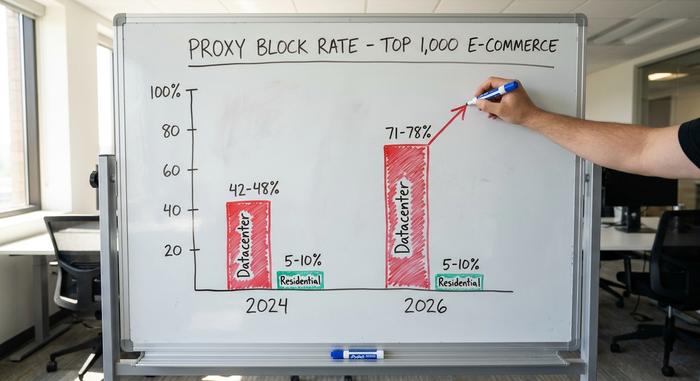
The proxy landscape has also gotten harsher. Datacenter IPs, the cheapest option, are increasingly burned: block rates on the top 1,000 e-commerce sites climbed to the 71–78% range, up from roughly 42–48% a couple of years earlier, as of early 2026. Residential proxies, routed through real home connections, fare far better and slip past IP-reputation checks in the large majority of sessions. Pixelscan reports your IP type, whether it sits on an IP blacklist, and how its geolocation lines up with the rest of your fingerprint. If the proxy geo and your browser settings disagree, you will see it here, on the pixelscan proxy view, before a target site does.
Antidetect browsers and bot detection
An antidetect browser spoofs the fingerprint itself, giving each profile its own canvas, fonts, timezone, and headers. Pixelscan is how you verify the spoof holds before it costs you anything. The two tools form a loop: spoof, test, adjust, retest.
This is a large economy. AdsPower, one antidetect vendor, reported more than 9 million users and 2.2 billion managed profiles in early 2026, which gives a sense of how many people run multiple accounts for affiliate marketing, ad buying, and ecommerce. But passing is getting harder, not easier. A 2025 industry report found only 2.8% of websites were fully protected against bots, down from 8.4% a year earlier, while the bot-security market grew to around $1.27 billion. That gap matters in both directions: detection is spreading, and the antidetect setups that pass today are the ones tuned for consistency rather than raw masking. Over-spoofing is its own giveaway.
How to fix leaks and use Pixelscan safely
Most guides stop at "use residential proxies." That is one fix among many, and it ignores the rest of the fingerprint. To use Pixelscan safely and well, treat each flagged check as its own problem. The table below pairs the common failures with their likely cause and the actual fix.
| Failed check | Likely cause | Fix |
|---|---|---|
| Timezone mismatch | Clock not matched to proxy geo | Set the timezone to the proxy's country |
| WebRTC leak | WebRTC exposing real IP | Disable or route WebRTC through the proxy |
| DNS leak | Resolver bypassing the proxy | Force proxy-side DNS resolution |
| Repeated canvas hash | Same profile cloned | Apply per-profile canvas noise |
| webdriver flag raised | Automation on a live profile | Do not run automated tools on a checked profile |
| Datacenter IP on a blacklist | Cheap, burned IP | Switch to a clean residential or ISP proxy |
The principle behind every row is the same: coherence. You are not trying to erase your digital footprint, which is impossible, and you are not trying to look like the rarest browser alive. You are trying to look like an ordinary, internally consistent person from wherever your IP says you are. Fix the contradictions, leave a little natural messiness, and retest until the warnings that remain are minor. That last part trips people up. They keep tuning until every field is green, and the result is a profile so clean it reads as artificial.
Fingerprinting and your privacy online
It would be a mistake to think this only matters to affiliate marketers. Fingerprinting has quietly become the dominant way the web tracks people now that cookies are fading, and the trend is moving against users. Chrome runs more than 30 fingerprinting techniques with no built-in defense; Google reversed its stance against fingerprinting in December 2024 and shelved its Privacy Sandbox plans in 2025. Apple's Safari, with on-by-default protection, is close to alone in pushing the other way.
For anyone in crypto the stakes are concrete: your digital fingerprint can link a wallet to an exchange login, tie several accounts to one person, or quietly de-anonymize activity you assumed was separate. Checking your own browser is a small act of self-defense, and one I think is worth the two minutes it takes. Pixelscan is one option among several: BrowserLeaks dumps raw data for the technically minded, Whoer gives a friendlier score, and CreepJS pushes the strictest analysis of all. None of them, Pixelscan included, can tell you what a specific website actually does with your data. What they can do is show you what you are giving away. The honest question to leave with is simple: if you ran the check right now, would your browser tell one story, or several?