CreepJS: How the Browser Fingerprint Test Sees You

Open one ordinary web page and, before you click anything, it can already pick your browser out of a crowd of millions. No login, no cookie, no permission prompt. Clear your history, switch to incognito, route everything through a VPN, and the page can often still recognize you. It works not from your address, but from the thousands of tiny quirks your web browser hands out for free. CreepJS is the tool that proves how exposed you are, and once you have watched it work, the web stops feeling quite so anonymous. This guide explains what CreepJS is, how it sees you, how to push back against browser privacy erosion, and why anyone running more than one crypto account should care.
What is browser fingerprinting?
Browser fingerprinting is identification without a tag. Instead of dropping a cookie on your device and reading it back later, a script quietly collects the dozens of details your browser reveals just by loading a page, then combines them into a single value that is often unique to you. Your screen resolution, your installed fonts, your time zone, your user agent string, the exact way your graphics card draws an image, each one is mundane on its own, yet stacked together they describe one browser and almost no other.
How unique is that combination? In a landmark EFF study, Peter Eckersley found that 83.6% of browsers were unique among visitors who tested themselves, rising to 94.2% once plugin details were included, with the fingerprint carrying about 18.1 bits of identifying information. A later 2018 study of two million visitors to a mainstream site put real-world uniqueness lower, around 33.6%, because ordinary users cluster on common setups. The truth sits between those numbers, and either way, the more unusual your browser, the more your unique fingerprint gives you away.
The technique is also far more common than most people realize. A Princeton crawl of the top million websites found canvas fingerprinting running on about 1.6% of them, climbing past 5% of the most popular sites, and later measurements put it near 10% of the top hundred thousand by 2021. It bites unevenly too, since research from AmIUnique found roughly 90% of desktop browsers were unique against about 81% on mobile, where hardware tends to be more uniform. One way or another, fingerprinting quietly rides along on a large slice of the pages you already visit.
What is CreepJS and who made it?
CreepJS is not a tracker trying to sell your data; it is an open-source fingerprinting library and mirror, built by developer Abraham Juliot to show how thin most privacy defenses really are and how fingerprinting works in practice. You point your browser at the live demo, it runs its tests, and it hands you back a report on how identifiable and how honest your browser looks.
The project lives on GitHub under a permissive MIT license with roughly 2,400 stars, and it bundles more than twenty categories of tests into one page. It is best understood as a research benchmark rather than a real-world bot blocker, the yardstick that privacy researchers and anti-detect vendors use to measure their own work. If your stealth setup cannot survive CreepJS, it will not survive a serious commercial fingerprinting service either, which is exactly why the tool has become the unofficial exam everyone studies for.
The report it produces is unusually detailed for a free tool. Alongside the headline trust score, it lists every signal it measured, marks the ones that look manipulated, and shows how stable your fingerprint stays when you reload the page. That is why developers reach for it first when they want to know whether a privacy tweak actually changed anything or just felt like it did.

How CreepJS works under the hood
Most fingerprinting checks simply read your settings. CreepJS goes further, because it makes your browser actually do things, draw an image, render 3D, run audio fingerprinting on a generated sound, fire off timers, and then it studies how your machine performs each task. The how is far harder to fake than the what, and that is where CreepJS earns its reputation.
The signals CreepJS collects
The tool pulls from a wide spread of sources, and each of these browser attributes leaks something slightly different about your device. The table below shows the main ones and what they give away.
| Signal | What it reveals |
|---|---|
| Canvas | Tiny pixel differences when your device renders text and shapes |
| WebGL / GPU | Your graphics hardware and driver, exposed through 3D rendering |
| Web Audio | How your audio stack processes a generated sound wave |
| Installed fonts | The exact font list your system carries |
| Screen resolution | Display size, color depth, and pixel ratio |
| User agent | Browser, version, and operating system claims |
| WebRTC | Local network details that can leak past a VPN |
A script reads most of these through ordinary JavaScript and browser APIs, including the plugins your browser reports. CreepJS then runs the same probes inside web workers and hidden frames to cross-check the answers, since a browser that has been tampered with often gives one answer in the main window and a different answer somewhere else.
Trust score, entropy, and lies
CreepJS folds every signal into a hash, a compact value that stands in for your whole profile. Around that it reports a trust score, which is less about how rare you are and more about how consistent and expected your browser looks. A plain, coherent setup scores well even if it is common.
The clever part is the lie detection. CreepJS watches for "lies," the small contradictions that appear when someone tampers with their browser, such as a user agent claiming macOS while the installed fonts and graphics stack clearly say Windows. Spoof one value and you create a mismatch somewhere else, and that mismatch is often louder than the original signal you tried to hide.
It goes deeper than checking labels. CreepJS also times how long certain operations take and inspects the way your JavaScript engine rounds math results, because different engine versions round trigonometric calculations in subtly different ways, and a faked version number cannot change how the real engine actually computes. Stack enough of these quiet checks together and a confident disguise starts to look like a costume.
What CreepJS reveals about headless browsers
This is the part that makes scrapers and bot builders nervous. Plain browser automation tools light up almost instantly, because a default Selenium or Playwright session carries obvious tells, the navigator.webdriver flag set to true, a HeadlessChrome user agent, and signals that simply do not line up the way a real person's browser would. Stealth patches dim those tells, but rarely turn them off.
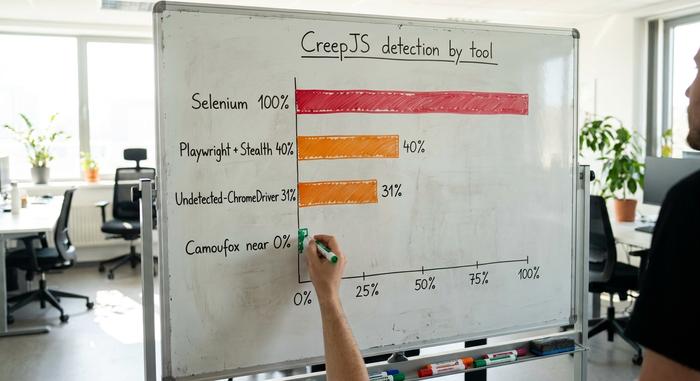
Independent testing against CreepJS shows how wide the gap is between a raw bot and a careful one. The figures below come from anti-bot detection write-ups that ran each tool through the same fingerprint test.
| Automation setup | CreepJS detection |
|---|---|
| Vanilla Selenium / Playwright | ~100% detected |
| Playwright with stealth plugin | ~40% detected |
| Undetected-ChromeDriver | ~31% detected |
| Camoufox (hardened Firefox) | near 0% headless score |
The lesson for anyone building a web scraper is blunt. Turning off one flag is not enough, because CreepJS checks whether the whole profile hangs together, and a half-disguised automation tool on CreepJS often scores worse than an honest one. The goal is not to strip a browser down until it has nothing to report, since an empty profile is itself suspicious, but to make a headless session render, behave, and time itself exactly like a real browser on a real screen, which is a far taller order than flipping a single setting to false.
Beating CreepJS detection for crypto accounts
Here is the angle I rarely see a CreepJS explainer cover. Exchanges and airdrop platforms fingerprint visitors for the same reason casinos watch the floor — to catch one person quietly running many accounts, and a single shared fingerprint can link a whole farm of "separate" wallets back to one machine.
Why exchanges and airdrops fingerprint you
The stakes here are real money. When the LayerZero protocol ran its airdrop sybil crackdown in May 2024, it flagged 803,093 addresses as suspected multi-account farming, and by the end roughly 59% of all applicants were removed. Device and browser fingerprinting is one of the strongest tools platforms use to tie those accounts together. You can mint new wallets in seconds, but building a genuinely new fingerprint is much harder.
What anti-detect browsers actually do
This is where anti-detect browsers come in, the category that includes Multilogin, GoLogin, AdsPower, and Dolphin Anty. Rather than hiding your fingerprint, they give each profile its own complete and internally consistent one, so each account looks like a different ordinary person rather than the same person in a disguise. Demand has exploded, and AdsPower alone reports growth from about 100,000 users in 2020 to roughly 9 million in 2025. The thing they get right is coherence, since a profile that is fully consistent beats one that is cleverly patched in three places and contradictory in a fourth. Under the hood, each profile ships a matched set of values. A believable user agent, a font list, a GPU string, a screen size, and a time zone all belong to the same imagined device, and the better tools rotate them as a single unit rather than editing one field and hoping the rest still fit. One honest caveat belongs here, though. A clean fingerprint protects your login privacy, it does not replace self-custody and sober opsec, and running many accounts can breach a platform's terms.
How to lower your CreepJS trust score
A concrete walkthrough is rarer than you would think, and the counter-intuitive rule behind it is that looking ordinary and consistent beats looking spoofed. Here is a sane order to work through:
1. Start from a real, common device profile and resist the urge to half-spoof individual values, because every mismatch you create is something CreepJS can flag as a lie.
2. For pure anonymity, use the Tor Browser, which buckets your screen into fixed sizes through letterboxing and makes every Windows machine report the same Windows and every Mac the same macOS, so you blend into the crowd.
3. Consider Brave, whose farbling adds a small per-session random twist to canvas and audio readings so the values shift between sites instead of forming one stable ID.
4. Avoid exotic extensions and unusual settings, since each odd choice raises your entropy and makes you more unique, not less.
5. For multi-account work, lean on a proper anti-detect browser with a coherent profile rather than a pile of privacy add-ons, then re-test on the live CreepJS demo and watch the lies count, not just the headline score.
Start with the accounts that actually matter, test honestly, and treat the number as feedback rather than a grade you have to ace on the first try.
The limits of bypassing browser fingerprinting
You never really win against fingerprinting, you only blend in, and CreepJS exists to show how thin that blending can be. Anti-fingerprinting tools have improved, but so have detection methods. The wider trend is not encouraging for privacy either. Google kept third-party cookies alive in April 2025 after years of promising to kill them, and earlier that year it quietly lifted its own ban on fingerprinting for advertisers — a move the UK's data regulator called irresponsible. Fingerprinting is growing, not fading, so the realistic goal is a low-entropy, coherent profile that disappears into the crowd, not true invisibility.
Your fingerprint, CreepJS, and privacy
Run CreepJS on yourself once, and let the trust score be the wake-up call it is meant to be. The aim is not to look like a ghost, which only makes you stranger, but to look ordinary and consistent, and to match the tool to the job — Tor when you want anonymity, a coherent anti-detect profile when you are managing many accounts. Fingerprinting is a blend-in game played for keeps. So the real question is simple: when did you last check what your own browser is telling the web?